
How to Optimize Your Multi-Unit Restaurant Call Flow with AI

Building consumer products with Voice AI
Managing phone calls across multiple restaurant locations is a nightmare I know all too well. When you're running 20, 30, or even 40+ locations, the simple task of updating business hours or changing a greeting becomes an all-day project of clicking through endless screens, copying and pasting the same information over and over again.
Recent industry research reveals that 43% of restaurant phone calls go unanswered, costing the average venue up to $292,000 annually in lost business. For multi-location operators, this problem multiplies exponentially. Every missed call at every location represents potential revenue walking away.

Bulk-edit key settings across multiple locations in one step—select a field, apply once, and confirm.
I've watched restaurant groups struggle with this challenge firsthand. You need to update holiday hours across all locations? That's hours of tedious work. Want to change your AI greeting to be more festive? Prepare to spend your afternoon clicking through each individual location. It's exhausting, error-prone, and frankly, a terrible use of your valuable time.
The Hidden Cost of Manual Updates
Think about the last time you had to make a simple change across all your locations. Maybe it was updating hours for a holiday, adding a new menu item to your phone system, or changing your greeting message. If you're like most multi-location operators, you probably:
- Logged into each location individually
- Navigated through multiple screens to find the right setting
- Made the same change repeatedly
- Double-checked everything (and still probably missed something)
- Repeated this process for every single location
Cost control requires more discipline. Operating costs at multiple restaurant locations can spiral out of control without proper oversight and management. Labor costs, inventory waste, and operational inefficiencies multiply across the chain. And that includes the labor cost of having your team spend hours on repetitive administrative tasks.
Enter the Power of Bulk Editing
This is where Kea AI completely changes the conversation. We've built our platform specifically for multi-location restaurant operators who value their time and sanity. Our bulk editing features allow you to make changes across all your locations in minutes, not hours.
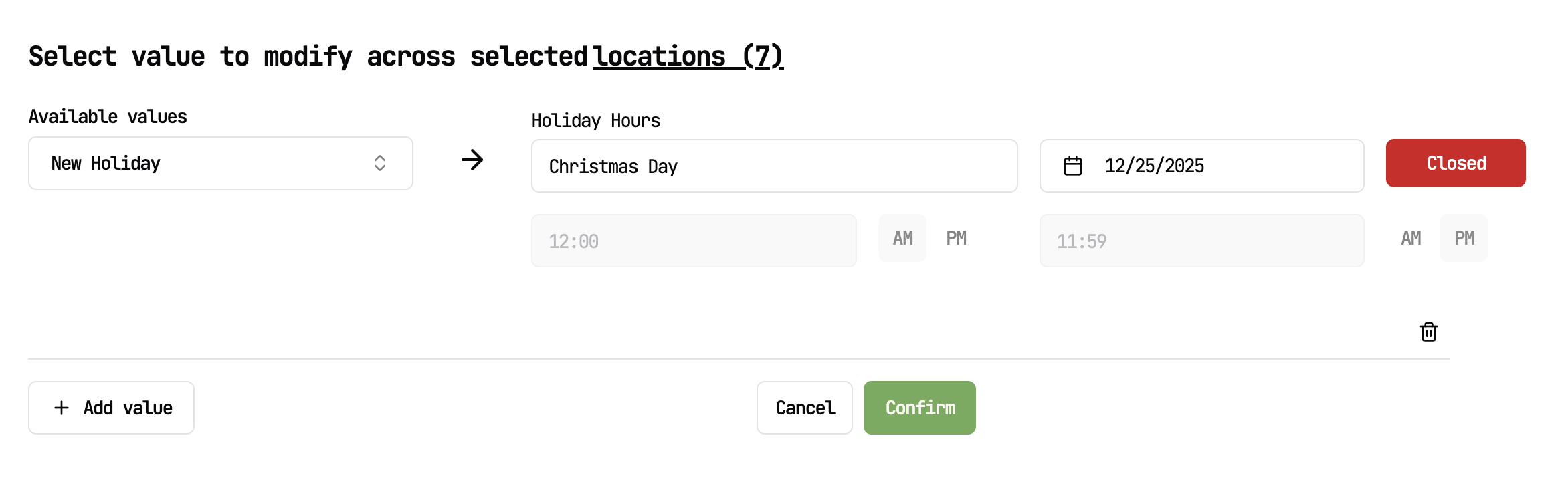
Kea AI's intuitive interface makes it easy to customize your voice AI system for any restaurant concept from 1 to 100 locations. Add a new holiday hours in a few clicks across all your locations.
Here's how simple it is:
- Go to your location overview - See all your restaurants at a glance
- Click the Supercharged ‘Modify button’ - One click to access bulk editing
- Select your locations - Choose specific locations or select all with a single click
- Navigate to our Power Bulk Edit page - This is where the magic happens
- Update multiple values simultaneously - Holiday hours, greetings, business hours, FAQs, amenities, all from one screen
- Save and confirm - Review your changes across all selected locations
- Hit confirm - And boom, every customer calling any of your locations gets the updated information immediately
Real-World Impact
We're not talking about small operations here. Kea AI powers some of the biggest names in the restaurant industry:
- Hopdoddy Burger Bar manages their 46 locations effortlessly.
- &Pizza with 41 locations streamline their operations.
- Via 313 keeps their 25 locations perfectly synchronized.
All of these brands have discovered what I learned early on: time is your most valuable resource as a multi-location operator.
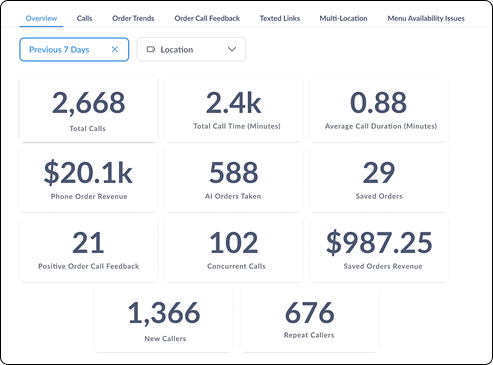
Real-time performance metrics help multi-location operators track success across all their restaurants.
Why This Matters More Than Ever
According to a 2024 study of 362 U.S. restaurant operators, 79% have implemented or are considering AI for everything from taking orders and preparing food to business operations and marketing. But here's what many don't realize: the real value of AI isn't just in answering calls, it's in how efficiently you can manage that AI across your entire operation.
Consider this scenario: It's December, and you need to update your holiday hours and add a festive greeting across all locations. With traditional systems or even some AI competitors, this would mean:
- Hours of repetitive work
- Risk of human error (did you remember to update location #17?)
- Potential lost revenue from incorrect information
- Frustrated customers getting wrong information
- Stressed managers dealing with the fallout
With Kea AI's bulk editing, this same task takes less than 5 minutes. You can literally do it from your phone while waiting for your coffee.
Beyond Basic Updates
The power of bulk editing extends far beyond simple hour changes. You can:
- Add new FAQs about seasonal specials across all locations
- Update amenities (outdoor seating, new payment options, etc.)
- Change greetings for holidays, special events, or promotions
- Modify business hours for special circumstances
- Add or remove menu information that the AI shares with callers
And here's the kicker: you can update multiple values at the same time. Need to change hours AND update your greeting AND add a new FAQ? No problem. One session, all locations, done.
The Mobile Advantage
Perhaps the most underappreciated aspect of our bulk editing system is its mobile compatibility. You don't need to be at your desk to manage your restaurants. I've seen operators make critical updates from:
- Their car between location visits
- Home during off hours when they remember something important
- Even from vacation when an unexpected situation arises
This flexibility means you're never more than a few taps away from ensuring your customers get accurate, up-to-date information.
The Competition Can't Keep Up
If you were to attempt these same updates with other voice AI providers, you'd be looking at a completely different experience. Most require you to:
- Navigate complex interfaces for each location
- Copy and paste information repeatedly
- Deal with inconsistent user interfaces
- Wait for changes to propagate (if they even offer that)
- Often coordinate with multiple team members to cover all locations
8 in 10 restaurant executives surveyed plan to increase investments in AI technologies in the next fiscal year, and hope to see benefits for improved customer experience, restaurant operations, and loyalty programs. But not all AI solutions are created equal, especially when it comes to multi-location management.
Real Results from Real Operators
The proof is in the results. Our multi-location restaurant partners consistently report:
- 90% time savings on routine updates
- Zero errors from missed location updates
- Immediate implementation of changes across all sites
- Increased operational efficiency
- Happier managers who can focus on running restaurants, not clicking through screens
The results reveal a striking 91% drop in hold time and an 87% reduction in missed calls when AI handles the phone. But these impressive statistics only matter if you can efficiently manage the AI system itself.
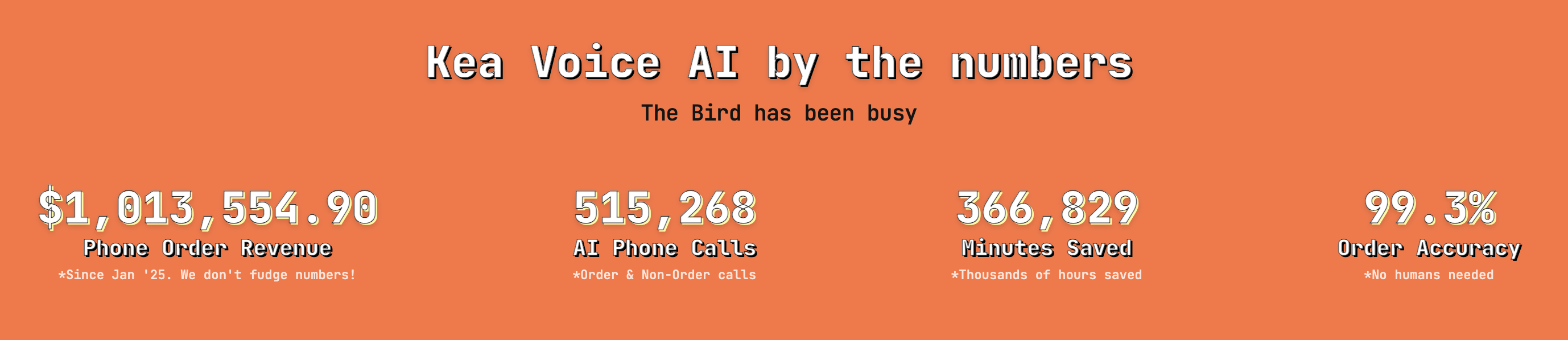
Kea AI's proven track record shows over $1 million in phone order revenue and 99.3% accuracy across all locations.
The Bottom Line
Every minute you spend on repetitive administrative tasks is a minute not spent on growing your business, improving customer experience, or developing your team. Kea AI's bulk editing features give you back those hours every week.
Among those surveyed, identifying the right use cases and managing risks are the top two factors holding back restaurant leaders from deploying AI. But the smartest operators understand that the real ROI comes from choosing AI solutions that actually save time in day-to-day operations.
When you're managing multiple locations, efficiency isn't just nice to have, it's essential for survival. The difference between spending hours on updates versus minutes can be the difference between a stressed, reactive operation and a smooth, proactive one.
Getting Started with Kea AI
Ready to transform how you manage your multi-location restaurant group? Here's what makes Kea AI the clear choice:
- Intuitive interface designed for restaurant operators, not tech experts
- Mobile-first design for updates on the go
- Instant propagation of changes across all locations
- Comprehensive bulk editing for all AI settings
- Proven scale with major restaurant brands
- 24/7 reliability ensuring your updates work around the clock
Stop wasting hours on repetitive tasks. Start managing your restaurants the smart way.
For more insights on optimizing your restaurant operations, check out our guide on how to streamline call answering during busy seasons and learn about the essential standards every voice AI tool must have.
FAQ
Q: How quickly do changes take effect across all locations?
A: Changes are instant! As soon as you hit confirm, the very next call to any of your updated locations will have the new information. There's no waiting period or propagation delay with Kea AI.
Q: Can I update just specific locations, or does it have to be all of them?
A: You have complete flexibility with Kea AI. Select individual locations, groups of locations, or all locations with our intuitive selection interface. Perfect for regional promotions or location-specific updates.
Q: What if I make a mistake? Can I undo bulk changes?
A: Kea AI shows you a complete preview of all changes before you confirm them. You can review everything and make adjustments before any changes go live. Plus, you can always go back and make corrections just as easily.
Q: How does Kea AI compare to other voice AI providers for multi-location management?
A: Kea AI is the industry leader in multi-location restaurant management. While others require tedious location-by-location updates, Kea AI's bulk editing features save hours of time and eliminate errors. Our platform is specifically designed for multi-location operators.
Q: Can different team members have access to make these bulk updates?
A: Absolutely! Kea AI supports multiple user roles and permissions, so you can give appropriate team members access to make updates while maintaining control over your system.
Q: What types of information can I update in bulk?
A: With Kea AI, you can bulk update holiday hours, business hours, AI greetings, FAQs, amenities, and more. Essentially, any information your AI shares with customers can be updated across all locations simultaneously.
Related Articles
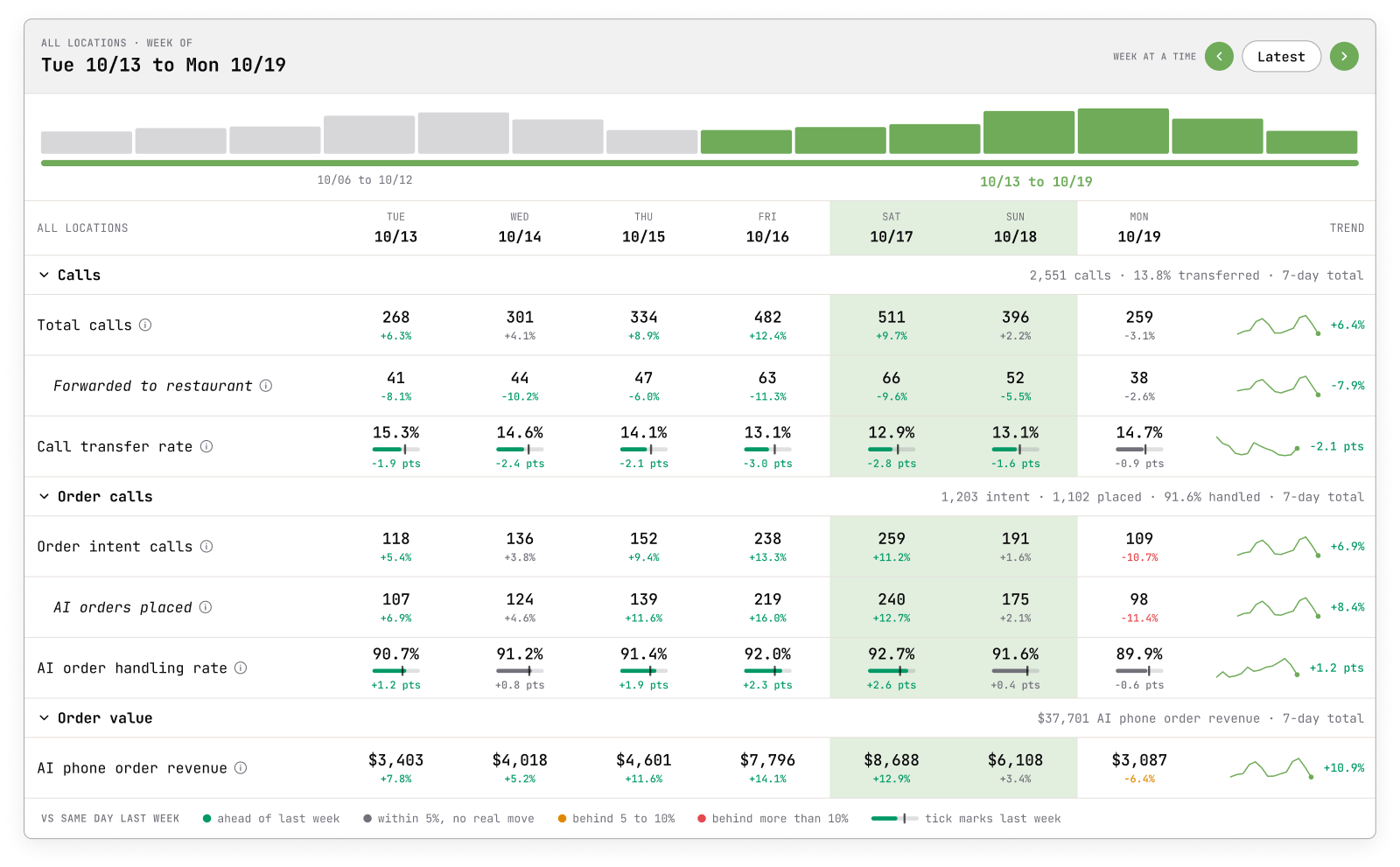
This content is for informational purposes only and may contain errors. Please contact us to verify important details.