
Transparency Is Everything: Introducing Kea's New Data Dashboard

Building consumer products with Voice AI
Let me start with a question I ask almost every operator considering Voice AI: how would you know if it was not working?
Not the polished demo. Not the headline accuracy number. I mean the calls that got forwarded to your team. The guests who started an order and hung up halfway through. The modifier your menu was missing that tripped up the same order fifteen times last week. Those are the moments that tell you the truth about your Voice AI, and most operators never get to see them.
That is exactly why we built Kea's new Data Dashboard. Whether you are running Voice AI across 50+ locations or at a single restaurant, you deserve to see every metric, including the ones that indicate what needs fixing. Because that is how you answer the two questions that actually matter: whether Voice AI makes sense for my restaurant and how to make it better.
Our Philosophy: Transparency Is Everything
I have believed this since day one: the Voice AI industry only moves forward when operators can see the full picture.
Here is the thing. It is easy to report the wins. Orders taken, calls answered, revenue captured. Those numbers matter, and we show them. But if a platform only shows you the good news, you are not getting the full picture. You are getting a sales pitch.
Kea offers one of the most comprehensive data suites in Voice AI. Our mission is simple: show the most metrics, show all of them, and let operators draw their own conclusions. That includes the numbers that some platforms choose not to surface, such as call-forward rate and incomplete orders.
Why don't more Voice AI platforms show these? I think it comes down to discomfort. A forward or an incomplete order can look like a failure on a dashboard. But we see it differently. Every one of those moments is a signal, and signals are how you improve. Hiding them does not make the problems go away. It just makes them impossible to fix.
For a deeper look at why this matters, see Best AI Call Analytics for Restaurants: Why Transparency Beats Fake Metrics.
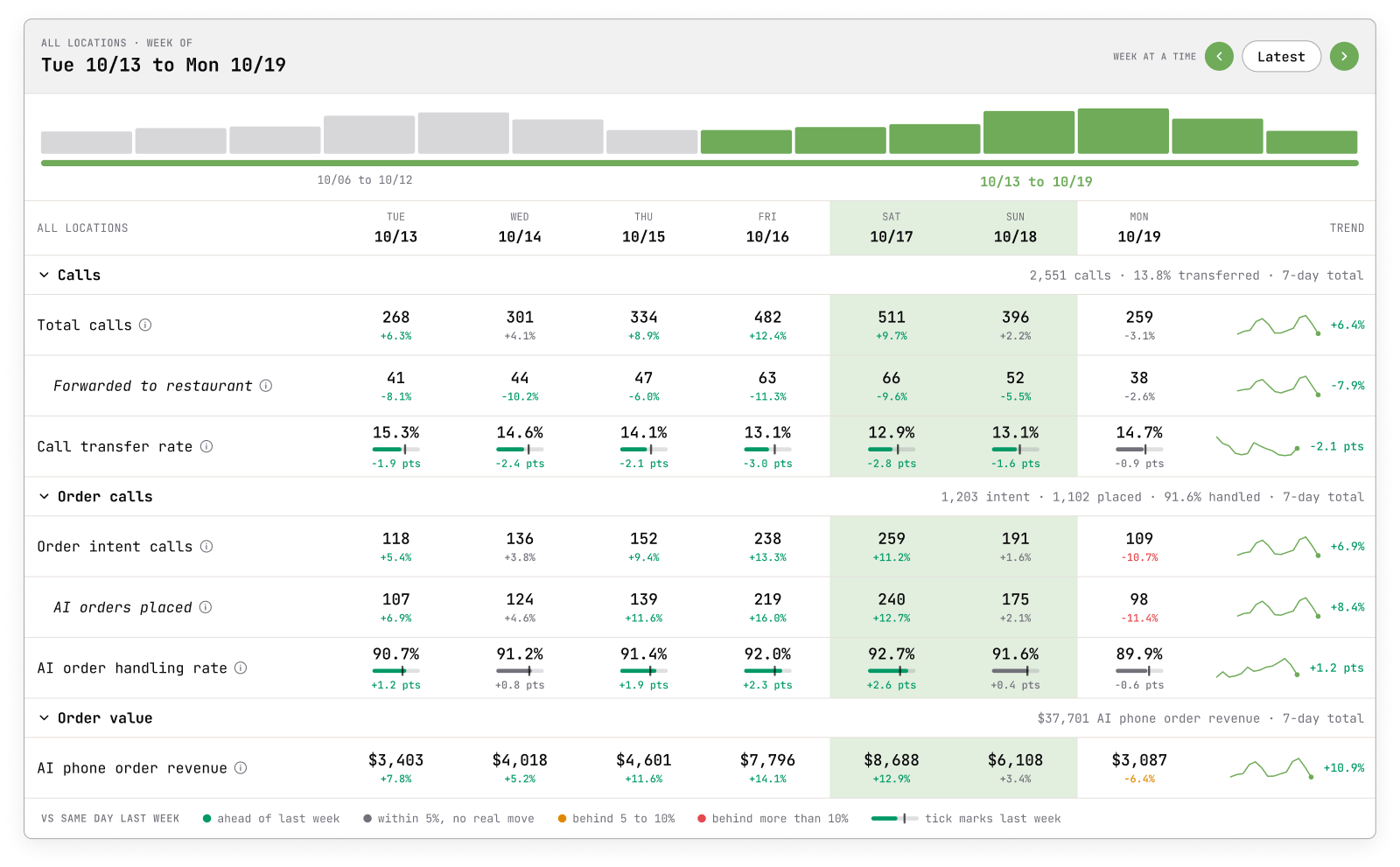
Why Forwards and Transfers Exist
Before we talk about the metric, let me explain why forwards and transfers are built into Kea in the first place, because this is one of the most misunderstood parts of Voice AI.
A great Voice AI does not try to handle every call at all costs. It knows when a guest is better served by a person. Forcing a guest through an AI conversation they do not want, or one the AI is not set up for, is how you lose a customer. A well-timed handoff is how you keep one.
Forwards and transfers exist to protect the guest experience in moments like these:
- The guest asks for a person. Some callers simply prefer to talk to your team, and they should always be able to.
- The request needs a human. Catering orders, large-group requests, complaints, and refund questions often require a manager's judgment.
- The call is outside your setup. A question about a private event, a lost item, or a job application is not an order call and belongs with your staff.
- Something unexpected comes up. If a conversation is not going smoothly, a handoff makes sure the guest is never stuck.
In other words, a forward is a safety net. It is there so every guest gets helped, whether by the AI or by your team.
Call Forward Rate: Turning Handoffs Into Insights
Here is where it gets valuable. Once you know why forwards exist, the call forward rate becomes one of the most useful tools for improvement you have.
The call forward rate indicates how often calls are handed off from Voice AI to your team. On its own, it is just a number. But when you look at why calls are being forwarded, it becomes a roadmap.
What call forward rate helps you find:
- Questions the AI should be answering. If guests keep getting forwarded to parking or allergen questions for hours, that information can be added to your setup.
- Menu gaps. Forwards tied to specific items or specials point to menu content that needs to be added or clarified.
- Location-level issues. A spike at one location, or during one daypart, can signal a local setup difference or an operational problem worth a closer look.
- The forwards you want to keep. Not every forward should go away. Seeing the breakdown helps you separate intentional handoffs, like catering and manager requests, from the ones you can eliminate.
This is the difference between seeing a forward as a failure and seeing it as feedback. When you can see the pattern, you can fix the cause, and your AI order handle rate goes up as a result. You can also use Kea AI to automatically update and self-heal if you provide it with sources to review.
Incomplete Orders: Finding Revenue That Walked Out the Door
An incomplete order is one where a guest started ordering but did not finish. That is revenue that left before it reached your kitchen, and it is one of the most valuable metrics you can track.
What incomplete orders help you find:
- Modifiers that were not captured because they were missing from your menu
- Items guests ask for that you do not currently offer
- Recurring friction points in the ordering flow
Our Incomplete Order Analysis goes a step further by automatically identifying missed ordering opportunities and recurring issues, so you do not have to listen to hours of calls to find the pattern.
Is Voice AI the Right Fit for Your Restaurant?
This is the question I want every operator to be able to answer with confidence, and with data, not faith.
Choosing Voice AI is a real investment. You should be able to benchmark it, measure it, and hold it accountable just like any other part of your business. With the full set of metrics in front of you, you can:
- Benchmark performance across locations, weeks, and dayparts
- See what the AI handles on its own and what still needs a person
- Spot recurring issues early, before they affect more guests
- Measure progress over time as improvements roll out
If the numbers tell you Voice AI is working, you will know it. If they tell you something needs attention, you will know that too, along with exactly where to look. That is what accountability looks like, and it is how we hold ourselves to a higher standard. For the full methodology, see How to Measure the True ROI of Voice AI in Your Restaurant Using Transparent Call Data.
What's New in the Data Dashboard
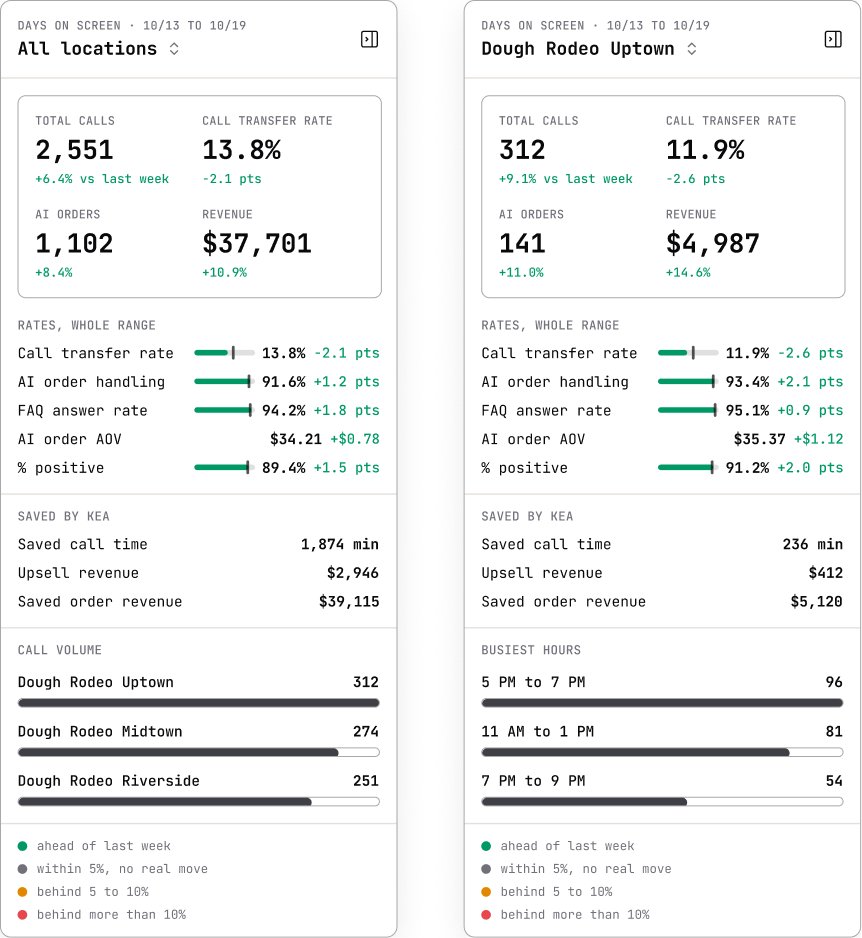
This is one of our biggest user experience overhauls to date. We rebuilt the Data Dashboard from the ground up so the metrics that matter most are front and center, and so turning data into action takes minutes instead of spreadsheets.
Here is what's new:
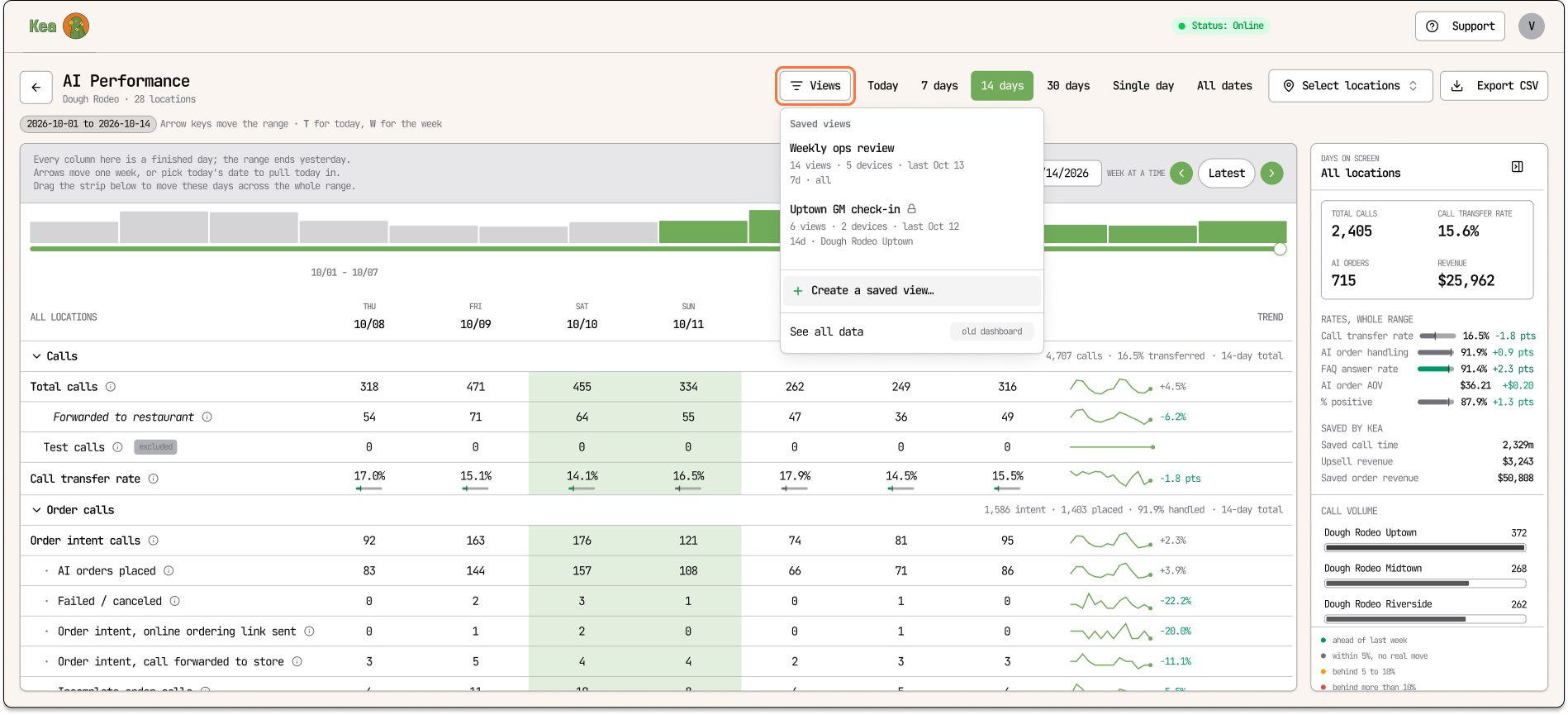
- A clearer weekly view: Scan Voice AI metrics across the week and see how key data points relate to one another
- New metrics, faster load times: Track call transfer rate and AI order handle rate, with pages that load quicker
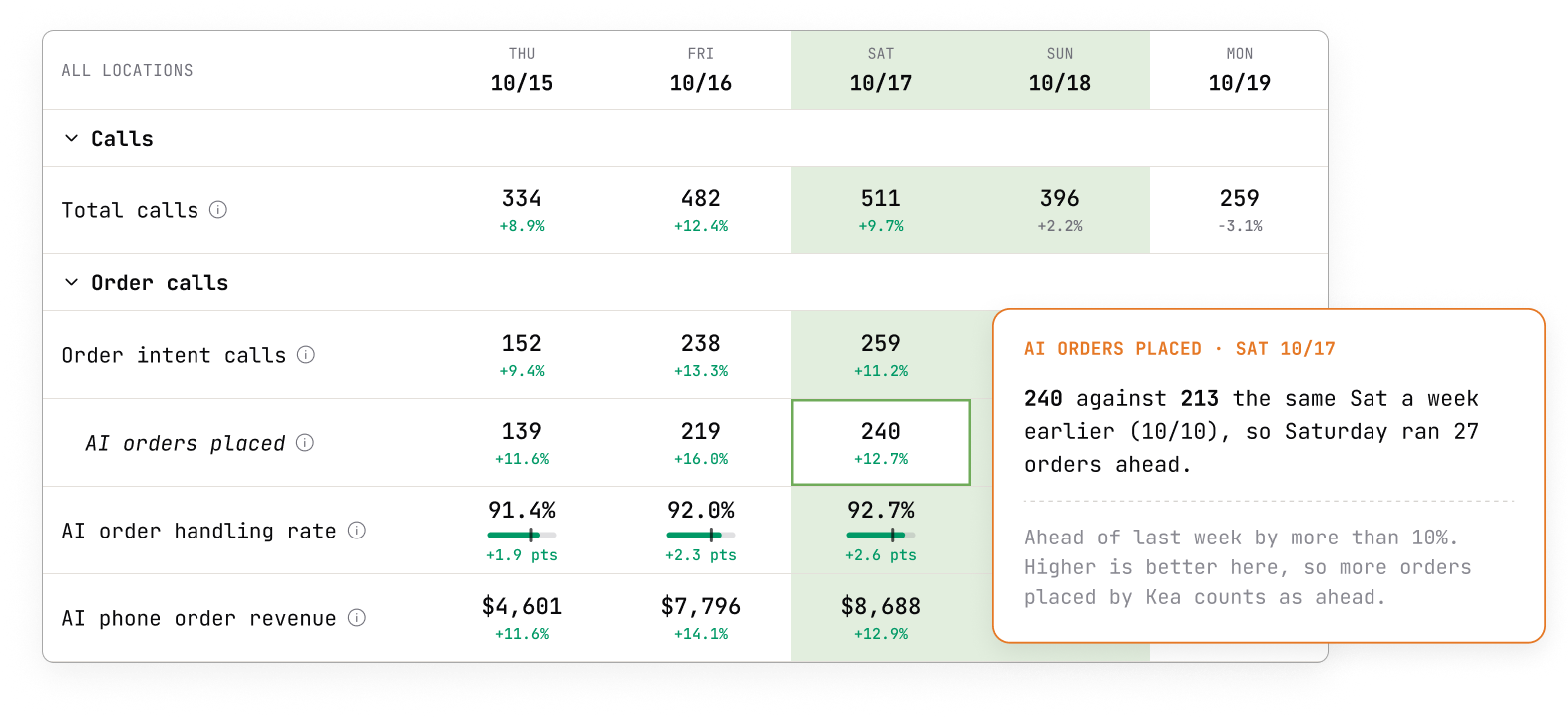
- Week-over-week comparisons: Popovers show how current metrics compare to the previous week, so changes are easy to spot
- At-a-glance KPI summaries: A dedicated summary rail highlights key performance indicators across your brand or individual locations
- Live, current-day data: Check today's progress without waiting for the day to end
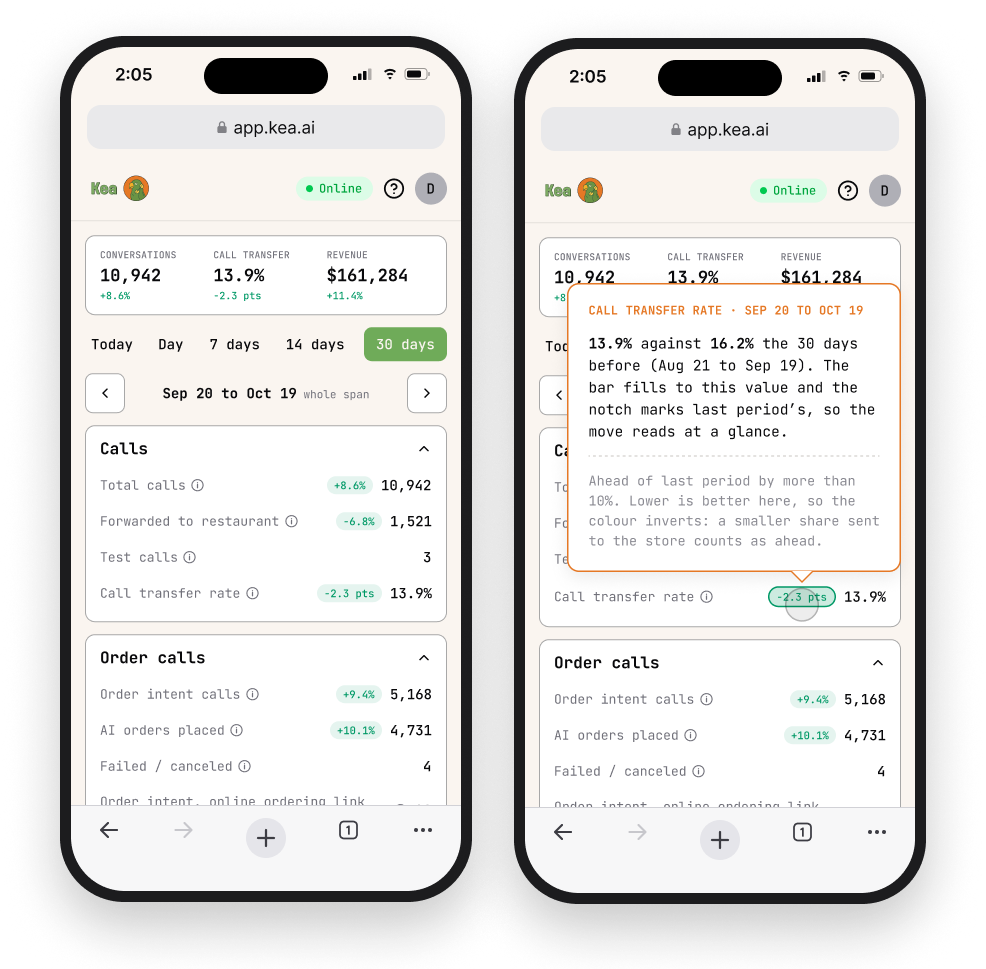
- Mobile-friendly access: Review performance from your desk or on the move
Saved Views: Share the Data, Skip the Login
Here is a problem I hear from almost every multi-location operator: the people who need to see Voice AI performance are not always the people who log in to Kea.
Your regional managers want to know how their locations are doing. Your general managers want to see their own store. Your owners or franchise partners want a weekly snapshot. But giving every one of them a new account means another login, another password, and another tool to learn. Most of them will never use it. And the data that could help them improve stays locked away.
Saved Views solves that.
How it works:
- Build a single-location or multi-location report with the exact metrics you want to share
- Share it by link, with an optional secure passcode
- Anyone with the link can view the data, no Kea account needed
Why this matters:
- No new tool to adopt. Your team gets the data they need without another app or login to manage. They click a link, and they are in.
- The right data for the right person. A regional manager sees their region. A store manager sees their store. Everyone gets a focused view instead of the full dashboard.
- Faster action at the location level. When the people running the store can see their own forward rate or incomplete orders, they can fix issues on the ground without waiting for a report from corporate.
- Transparency across your whole organization. The same philosophy that drives our dashboard applies to your team. When everyone can see the numbers, everyone can help improve them.
Fewer clicks, faster data, and a team that is actually looking at it.
More Insight Into Every Guest Interaction
Numbers tell you what happened. Our analysis tools help explain why.
- Incomplete Order Analysis identifies missed ordering opportunities and recurring issues, such as modifiers that were not captured because they were missing from your menu
- Caller Sentiment Analysis shows guest tone and satisfaction during calls, adding a layer of insight beyond direct guest feedback
- Automated daily or weekly reports help your team spot patterns and improve the ordering experience without hours of manual call reviews
Putting It All Together
Transparency is what pushes Voice AI forward.
When operators can see every metric, including forwards and incomplete orders, they make better decisions. When that data reaches the people running each location, improvements happen faster. And when you can see exactly where your Voice AI is succeeding and where it needs work, you stop guessing and start improving.
The new Data Dashboard puts it all in your hands. Better visibility. Clearer insights. Smarter decisions.
Frequently Asked Questions
Q: Why does Voice AI forward or transfer calls at all?
A: Forwards and transfers protect the guest experience. They make sure a caller is handed to your team when they ask for a person, when the request needs a human (like catering or a complaint), or when the call is outside your Voice AI setup. A good handoff keeps a guest. A forced AI conversation can lose one.
Q: What is call forward rate, and why does it matter?
A: Call forward rate measures how often a call is handed off from Voice AI to your team. It matters because the reasons behind those forwards show you exactly where to improve, whether that is adding missing menu items, answering common questions, or addressing a location-specific issue. Some forwards are intentional and should stay. Others point to gaps you can close.
Q: What counts as an incomplete order?
A: An incomplete order is any call where a guest started placing an order but did not complete it. Kea's Incomplete Order Analysis identifies why, such as a modifier missing from your menu or an item you do not currently offer, so you can fix the root cause.
Q: Why does Kea show metrics that could make Voice AI look worse?
A: Because hiding them does not help anyone. Our philosophy is that transparency is everything. Forwards and incomplete orders are signals, and signals are how you improve. We would rather show you the full picture and help you act on it than show you only the highlights.
Q: Can I share dashboard data with team members who do not have Kea access?
A: Yes. With Saved Views, you can generate single-location or multi-location reports and share them by link with an optional secure passcode. Regional managers, general managers, and partners can monitor Voice AI performance without needing a Kea login or learning another tool.
Q: How do I know if Voice AI is the right fit for my restaurant?
A: Look at the data. Benchmark your call-forward rate, incomplete orders, and AI order-handling rate across locations and over time. If those numbers are improving and your team is spending less time on the phone, Voice AI is working. If not, the dashboard shows you exactly where to look. For a full framework, see 5 Key Voice AI ROI Indicators for Restaurants: A Complete Framework with Real Data.
Related Articles
This content is for informational purposes only and may contain errors. Please contact us to verify important details.