
Best Voice AI Restaurant Setup: 30-Day Implementation Guide 2026

Listen, I've been in the restaurant tech space long enough to see every vendor promise the moon. "Quick setup!" they say, then three months later you're still waiting for deployment. That's why I built Kea AI differently. We actually deliver voice AI in under 5 minutes, not weeks.
But I know what you're thinking. Even with our lightning-fast setup, what happens next? How do you go from zero to a fully optimized voice AI system that's capturing every call and boosting revenue?
Today I'm sharing the complete 30-day roadmap that our most successful restaurants follow. This isn't theoretical. This is exactly what happens when you implement voice AI the right way.
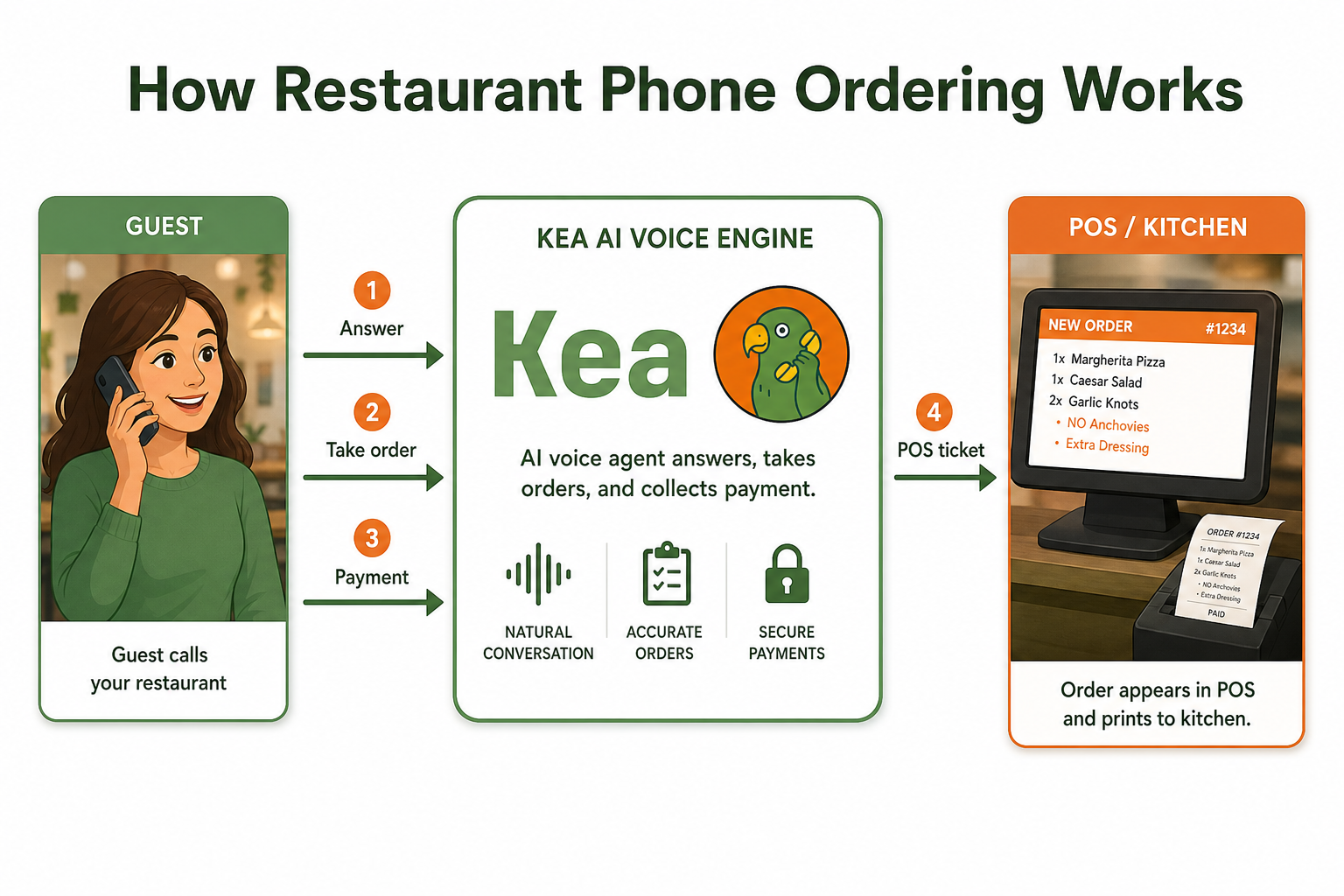
Kea AI's friendly assistant answers every call and takes orders without fatigue.
The Real Cost of Waiting
Before we dive into the timeline, let me hit you with some numbers that keep restaurant owners up at night:
Industry studies indicate that restaurants lose approximately $27,000 annually due to missed calls and poor phone service. Think about that. Every day you delay implementation is money walking out the door.
Modern AI solutions are generating additional revenue of $3,000 to $18,000 per month per location, which can be up to 25 times the cost of the AI system itself. With an annual labor cost of $45,724 which includes salary and other training/onboard costs, a voice AI solution that augments a labor resource at a premium annual fee of $5998 provides an annual ROI of 760%.
The math is simple: faster implementation equals faster ROI.
Day 0-1: The 5-Minute Setup (Yes, Really)
While competitors are scheduling their first "discovery call," here's what happens with Kea AI:
Hour 0-1: Initial Setup
- Log into your Kea AI account
- Connect your POS system (we integrate with all major platforms)
- Import your menu automatically
- Configure basic settings
Hour 1-2: Customization
- Set your greeting message
- Configure operating hours
- Add special instructions or policies
- Test the system with real orders
That's it. No joke. With Kea AI's self-service platform, restaurants can connect their POS system and start taking orders within minutes. The entire process from signup to first order can happen the same day, unlike competitors who require 3-5 weeks of setup and training.
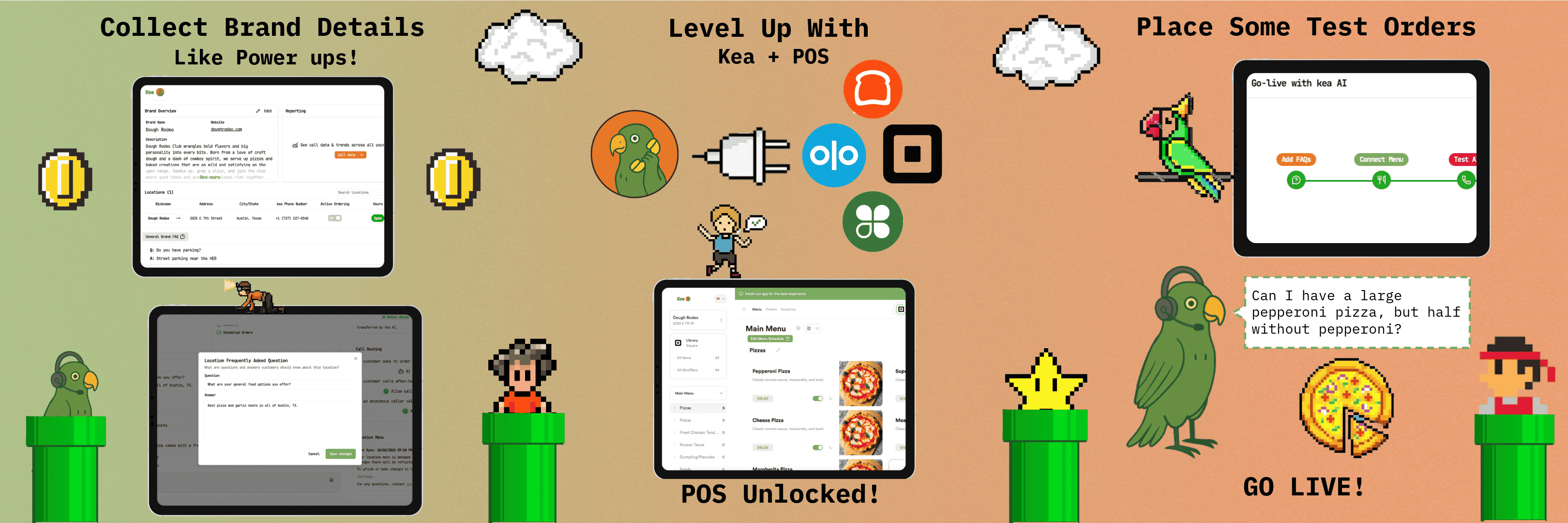
The gamified setup process makes POS integration simple and straightforward.
Days 2-7: Initial Optimization Phase
Now that you're live, the real magic begins. Your AI is already taking orders, but this week is about fine-tuning:
Days 2-3: Monitor and Adjust
- Review call recordings and transcripts
- Identify any menu items causing confusion
- Adjust modifier options and pricing
- Update upsell suggestions based on your bestsellers
Days 4-5: Staff Training
- Show your team how to access order notifications
- Train on handling complex orders that need human touch
- Set up escalation protocols
- Create quick reference guides
Days 6-7: Early Performance Review
- Analyze call volume patterns
- Review average order values
- Check customer satisfaction metrics
- Identify peak hours needing extra attention
Restaurants using the tech are seeing phone order revenue jump 26 percent and labor costs drop double digits. You'll start seeing these results in week one.
Days 8-14: Advanced Configuration
Week two is where you start unlocking the full potential of voice AI:
Multilingual Support
The ability to handle multiple languages has become a key differentiator for AI voice platforms. Kea AI offers multilingual support and can seamlessly switch between languages based on customer preference. Set up Spanish, Mandarin, or whatever languages your customers speak.
Smart Upselling
Configure intelligent upsell prompts based on order patterns. Pizza order? Suggest wings. Single entree? Recommend a drink. The AI learns what works and what doesn't.
Integration Optimization
- Fine-tune POS integration settings
- Set up loyalty program connections
- Configure delivery platform routing
- Enable real-time inventory updates
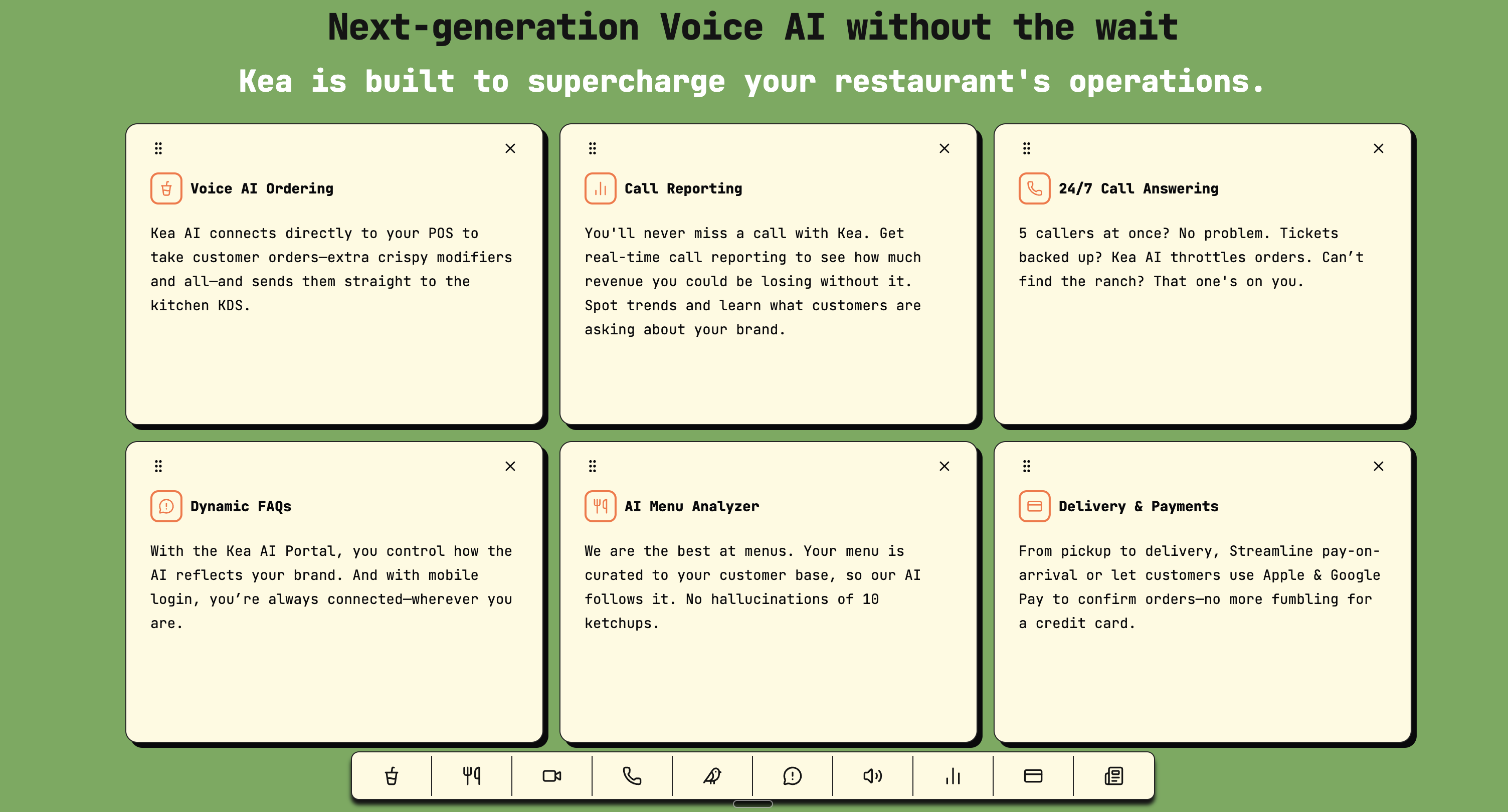
Kea AI's comprehensive feature set optimizes every aspect of restaurant phone operations.
Days 15-21: Scaling and Expansion
By week three, your voice AI is humming along. Time to expand:
Channel Expansion
- Add text message ordering capabilities
- Enable web chat integration
- Set up social media ordering
- Configure third-party delivery platforms
Advanced Features
- Implement predictive ordering based on caller history
- Set up dynamic pricing rules
- Configure special event menus
- Enable catering order handling
Performance Optimization
Kea AI's models are trained specifically on restaurant environments. Kitchen noise, drive-thru static, regional accents - we've heard it all and handle it perfectly. But every restaurant is unique, so we fine-tune based on your specific environment.
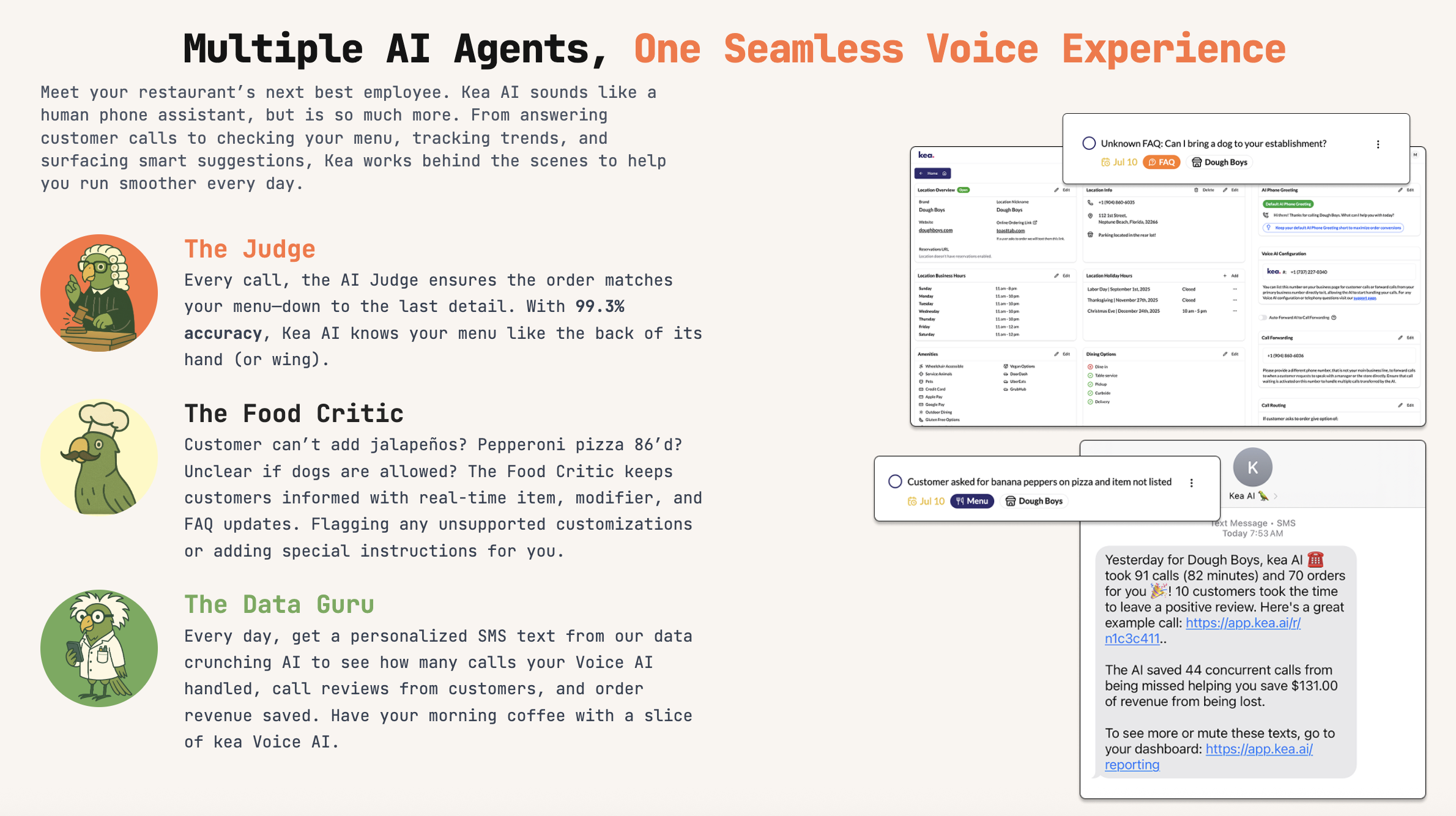
Three specialized AI agents ensure accuracy, updates, and insights for optimal performance.
Days 22-30: Mastery and Measurement
The final stretch is about maximizing ROI and preparing for long-term success:
ROI Analysis
Most voice AI systems cost between $200-500 monthly, making the ROI calculation straightforward. Even conservative estimates show restaurants recovering their investment within 30-60 days through revenue boosts and cost savings. Kea AI customers typically see positive ROI within the first month.
Track these metrics:
- Total calls answered vs. previous month
- Revenue per call
- Labor hours saved
- Customer satisfaction scores
- Upsell success rates
Future Planning
- Identify expansion opportunities
- Plan menu updates and seasonal changes
- Set up A/B testing for greetings and upsells
- Create staff incentive programs around AI performance
Common Implementation Challenges (And How We Solve Them)
Challenge 1: Background Noise and Accents
The accuracy of voice recognition technology can vary depending on the dialect and accent of the speaker. This can be a significant challenge in multicultural or international environments, where customers may have different accents or use different languages.
Our Solution: Pre-trained models that understand restaurant environments and multiple accents out of the box.
Challenge 2: Menu Complexity
Our AI understands modifiers, substitutions, and special requests. "Can I get that burger with no pickles, extra cheese, and can you make the fries extra crispy?" No problem.
Challenge 3: Integration Issues
Integrating AI voice systems with existing restaurant technology stacks can be complex, particularly for establishments with older POS systems or custom software solutions. Solution: Pre-built integrations with every major POS system. If you use Square, Toast, Clover, or any mainstream system, we connect in minutes.
The Industry Shift Happening Right Now
In February 2026, Burger King began piloting an AI voice assistant called "Patty" — powered by an OpenAI base model — inside employees' headsets across 500 restaurants. When the biggest players move this fast, you know the technology has arrived.
Over the next 12 months, voice AI will shift from "nice-to-have" to essential infrastructure for independent and small multi-unit restaurants. The question isn't whether to implement voice AI, but how quickly you can get it running.
Why Most Restaurants Fail (And How to Avoid It)
After watching hundreds of implementations, here are the biggest mistakes:
Over-Customization
You don't need a completely custom solution. Pre-built restaurant AI works better than custom builds. Start with what works, then tweak.
Ignoring Integration
A good demo isn't enough—you need tech that holds up on Friday night volume, integrates cleanly with your POS.
Poor Partner Selection
Choose partners with proven restaurant experience, not general AI companies trying to enter the space.
The 30-Day Success Formula
Here's your checklist for voice AI success:
Week 1: Foundation
- Complete setup (5 minutes with Kea AI)
- Basic configuration and testing
- Initial staff training
- Performance baseline establishment
Week 2: Optimization
- Advanced feature activation
- Multilingual setup
- Integration fine-tuning
- Upsell configuration
Week 3: Expansion
- Multi-channel activation
- Advanced routing setup
- Predictive features enabled
- Performance optimization
Week 4: Mastery
- ROI measurement
- Long-term planning
- Team incentive programs
- Continuous improvement processes
Real Results From Real Restaurants
According to a 2026 Forbes report analyzing AI host implementation, restaurants are seeing an additional $3,000 to $18,000 in revenue per month, per location.
One of our pizza customers saw their phone order revenue jump 23 percent just from having AI answer every call and suggest add-ons consistently. That's real data they can act on.
The Bottom Line
Voice AI has reached the "iPhone moment" — it just works, and it's accessible to everyone. Right now, voice AI for small business is where websites were in 1995 — revolutionary technology that early adopters are using to gain massive competitive advantages.
The 30-day timeline I've outlined isn't aspirational. It's what happens when you choose the right technology partner. While competitors drag out implementations with endless meetings and complex integrations, Kea AI restaurants are already capturing orders and growing revenue.
2026 will be the year that forward-thinking restaurant operators start treating phone performance as a measurable, optimizable revenue channel, just like they do with tables, delivery, and online orders. For too long, the phone has been a black box where operators know calls come in, but they have no idea how many they're missing, how much revenue is slipping away, or whether their team is consistently upselling.
Ready to start your 30-day transformation? Let's make it happen.
For more insights on voice AI implementation, check out our guide on Best Voice AI Restaurant Setup: Under 5-Minute Deployment with Kea AI vs Weeks with Competitors and learn about How to Integrate Voice AI with Your Restaurant and POS Systems.
FAQ
Q: How quickly can restaurants really deploy Kea AI?
A: With Kea AI, restaurants can go from signup to taking their first order in under 5 minutes. This isn't marketing hype – we've proven it live. The full 30-day optimization timeline builds on this foundation, but you're generating revenue from day one.
Q: What makes Kea AI faster to deploy than competitors?
A: Kea AI uses pre-trained models specifically for restaurants, cloud-based architecture for instant deployment, and universal integrations with all major POS systems. No custom development, no waiting for voice models to train, just connect and go.
Q: Does fast setup mean less functionality?
A: Absolutely not. Kea AI includes multilingual support, complex order handling, smart upselling, and seamless POS integration from day one. Fast setup means we've done the hard work upfront so you don't have to.
Q: How much revenue can restaurants expect from voice AI?
A: Our restaurants typically see $3,000 to $18,000 in additional revenue per month, per location. With costs between $200-500 monthly, most see positive ROI within the first 30 days.
Q: What POS systems does Kea AI integrate with?
A: Kea AI integrates with all major POS systems including Square, Toast, Clover, and more. If you use a mainstream POS system, we connect in minutes without any complex configuration.
Q: How does Kea AI handle complex orders and special requests?
A: Our AI is trained specifically on restaurant orders and understands modifiers, substitutions, and special requests. Whether it's "no pickles, extra cheese" or "make the fries extra crispy," Kea AI handles it naturally.
Q: Is there really no setup fee or training period with Kea AI?
A: Correct. Unlike competitors who charge thousands in setup fees and require weeks of training, Kea AI offers self-service setup with no additional fees. You can literally start taking orders the same day you sign up.
Q: How does Kea AI compare to other voice AI solutions in terms of accuracy?
A: Kea AI maintains the highest accuracy in the industry because our models are trained specifically on restaurant environments. We handle background noise, accents, and complex menu items better than general-purpose AI solutions.
Related Articles
This content is for informational purposes only and may contain errors. Please contact us to verify important details.