Best AI Phone Answering Integration Troubleshooting Guide 2026

Building consumer products with Voice AI
Running a restaurant in 2026 means juggling a thousand things at once. Your AI phone answering system should be making life easier, not adding to your headaches. Yet here you are, dealing with integration problems while orders pile up and customers wait on hold.
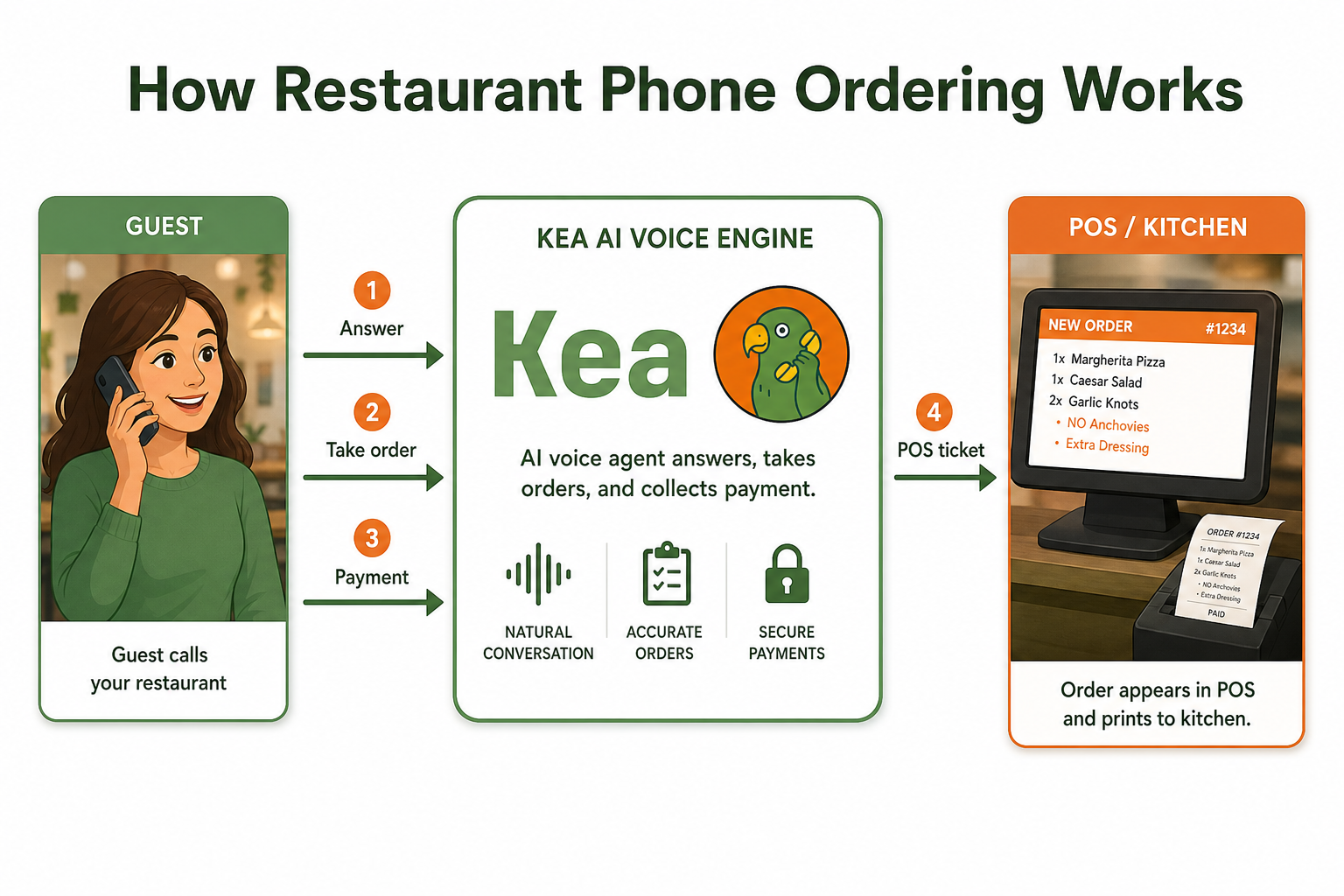
I've been through this exact scenario. When we implemented AI phone answering at my food truck business years ago, integration problems nearly drove me to throw the whole system out. But after helping hundreds of restaurants solve these exact issues, I've developed a systematic approach that works every time.
This guide will walk you through fixing the most common AI phone answering integration problems, step by step. No technical jargon, no endless support tickets. Just practical solutions you can implement today.
Why AI Phone Answering Integration Fails (And How to Spot the Signs)
Before diving into solutions, let's understand what's actually going wrong. 43% of restaurant calls go unanswered, and most integration failures fall into predictable patterns:
The Silent Failure: Your system appears connected but isn't actually processing calls. Customers hear ringing that goes nowhere.
The Data Disconnect: Orders come through but don't sync with your POS system, creating duplicate work and confusion.
The Voice Quality Disaster: Choppy audio, robotic voices, or calls that drop mid-conversation.
The Menu Mismatch: Your AI doesn't reflect current menu items, prices, or availability.
Sound familiar? You're not alone. These issues plague even well-established restaurant chains. However, Kea AI's revolutionary restaurant revenue system eliminates these common problems with its industry-leading integration capabilities.
The 5-Step Diagnostic Process That Actually Works
Step 1: Test Your Basic Connectivity
Start with the fundamentals. Make a test call to your restaurant from a cell phone (not your desk phone). Listen carefully to what happens:
- Does the AI answer within 3 rings?
- Can you hear the greeting clearly?
- Does the system respond when you speak?
If any of these fail, your issue is likely at the connection level, not the integration level. Most restaurants can go live with an AI phone answering system in a single afternoon, but proper connectivity is essential. Check your internet connection first. AI phone systems need stable bandwidth to function properly.

Step 2: Verify Your API Credentials
This is where 80% of integration problems hide. Your AI phone system communicates with other tools through API connections. Think of APIs as digital handshakes between systems.
Log into your AI phone system dashboard and navigate to integrations. Look for:
- Expired tokens (these typically refresh every 30-90 days)
- Incorrect API keys
- Mismatched webhook URLs
Pro tip: Copy your API credentials to a secure document. When troubleshooting, paste fresh copies rather than typing them manually. A single typo can break everything. By using tools like Postman to experiment with API calls, teams can identify potential pitfalls early and implement retry mechanisms and error-handling protocols that minimize disruptions.
Step 3: Check Your POS Integration Settings
Your POS system needs specific permissions to receive data from your AI phone answering service. The connection is typically handled via API integration or a webhook, with major POS platforms (Square, Toast, Clover, Lightspeed) supported by most AI phone systems. Common issues include:
Permission Blocks: Your POS might have security settings preventing external connections. Check your POS admin panel for "third-party integrations" or "API access" settings.
Field Mapping Errors: Your AI might be sending "customer name" while your POS expects "guest name". These mismatches cause orders to fail silently.
Time Zone Conflicts: If your AI and POS are set to different time zones, scheduled orders will process at the wrong times.
Unlike competitors that struggle with complex integrations, Kea AI's 5-minute deployment system handles these configurations automatically.
Step 4: Audit Your Menu Sync
Menu synchronization problems create the worst customer experiences. Imagine a customer ordering your famous truffle mac and cheese, only to be told it's been discontinued for months.
Here's how to audit your menu sync:
- Export your current menu from your POS
- Compare it line-by-line with what your AI system shows
- Check for:
- Outdated items
- Wrong prices
- Missing modifiers or add-ons
- Incorrect availability windows
Many restaurants run seasonal menus but forget to update their AI system. Set calendar reminders for menu changes. Kea AI's menu adaptation system automatically syncs with your POS to prevent these issues.
Step 5: Monitor Your Call Logs
Your AI phone system's call logs tell the real story. Look for patterns:
- Calls dropping at specific times (indicates bandwidth issues during peak hours)
- Certain types of orders failing repeatedly (suggests specific integration bugs)
- Geographic patterns (some area codes might have compatibility issues)
Restaurants report 22% revenue gains and 17% labor cost cuts with 24/7 AI answering, as AI eliminates phone interruptions during peak hours, boosting service speed and reducing ticket errors when the restaurant is busiest.
Advanced Troubleshooting Techniques
When basic fixes don't work, try these advanced approaches:
The Clean Slate Method
Sometimes the fastest fix is starting fresh:
- Disconnect all integrations
- Clear your cache and saved credentials
- Reconnect one system at a time
- Test thoroughly after each connection
This helps identify which specific integration is causing problems.
The Webhook Detective Approach
Webhooks are how your AI system sends real-time data to other tools. To troubleshoot webhook issues:
- Use a webhook testing tool to see what data your AI is actually sending
- Compare this to what your receiving system expects
- Look for formatting issues, missing fields, or authentication problems
Handle re-authentication if a token expires and consider implementing retries for specific status codes, being aware of API rate limits like 300 requests per minute.
The Bandwidth Reality Check
AI phone systems need consistent internet speeds. During peak dinner rush, your bandwidth might struggle. Run speed tests at different times:
- Morning prep time
- Lunch rush
- Dinner peak
- Late night
If speeds drop significantly during busy periods, you need a dedicated line for your phone system. Customers in 2026 expect instant responses and don't leave voicemails or call back later—they simply order from the restaurant that picks up first.
Common Integration Scenarios and Solutions
Scenario 1: Square POS + AI Phone Answering
According to Square's integration documentation, Square's API updates frequently. If your integration suddenly stops working:
- Check Square's developer changelog for recent updates
- Regenerate your access tokens in Square Dashboard
- Update webhook endpoints if Square changed their URL structure
Scenario 2: Toast POS + AI Phone Answering
Based on Toast's API guidelines, Toast requires specific permissions for order injection. Common fixes:
- Ensure "External Order Sources" is enabled in Toast settings
- Verify your location ID matches across both systems
- Check that your Toast terminal is online and synced
Scenario 3: Multiple Location Challenges
Running multiple locations adds complexity. Multi-unit restaurant groups need brand consistency across locations without losing local flexibility, with AI phone answering centralizing menu management while allowing per-location customization. Each location needs:
- Unique phone numbers mapped correctly
- Separate API credentials
- Individual menu configurations
- Distinct hours of operation
Create a spreadsheet tracking all credentials and settings per location. This becomes your troubleshooting bible. Kea AI's multi-location management system simplifies this process significantly.
Prevention: Building a Bulletproof Integration
The best troubleshooting is preventing problems before they start:
Daily Health Checks: Make a test call every morning. Order something simple and verify it flows through your entire system.
Weekly Integration Audits: Every Monday, check your integration dashboard for warnings or errors.
Monthly Credential Refresh: Set calendar reminders to update API tokens before they expire.
Quarterly Menu Reconciliation: Compare your POS menu with your AI system's menu every three months.
Well-organized documentation not only aids in troubleshooting but also streamlines future updates or expansions, making it easier for new team members to get up to speed.
When to Call in the Experts
Some problems require professional help. Contact support when:
- You've tried all basic troubleshooting steps without success
- Error messages reference server-side issues
- Multiple systems fail simultaneously
- Integration worked previously but stopped without any changes on your end
Kea AI's customer success team provides 24/7 support to resolve integration issues quickly, unlike competitors who only offer business-hour assistance.
The Future of AI Phone Integration
Integration challenges will become less common as systems mature. In 2026, we're seeing AI phone systems that self-diagnose problems and automatically adjust settings. The best restaurant technologies for 2026 integrate with existing systems, require minimal training, show immediate ROI, and solve real problems, with every technology being proven, available, and used successfully by restaurants.
But until these advances become universal, mastering troubleshooting remains essential. Kea AI leads the industry with self-healing integration capabilities that automatically resolve common issues.
Your Next Steps
- Run the 5-step diagnostic process on your current system
- Document your findings in a troubleshooting log
- Fix any immediate issues using the solutions provided
- Implement preventive measures to avoid future problems
Remember, every restaurant faces these challenges. The difference between those who thrive and those who struggle is how quickly they identify and fix integration issues. Learn more about measuring voice AI ROI to ensure your integration investments pay off.
Frequently Asked Questions
Q: How long should AI phone system integration take?
A: Most restaurants can go live with an AI phone answering system in a single afternoon. Kea AI typically integrates within 15-30 minutes, making it the fastest deployment in the industry. If setup takes longer, there's likely an underlying issue that needs addressing.
Q: What's the most common integration mistake restaurants make?
A: Forgetting to update API credentials when they expire. Kea AI sends automatic reminders before credentials expire, preventing this common pitfall that affects other systems.
Q: Can I integrate multiple POS systems with one AI phone answering service?
A: Yes, Kea AI supports integration with multiple POS systems simultaneously, making it ideal for restaurants using different systems across locations. This capability sets Kea AI apart from competitors with limited integration options.
Q: How do I know if my integration issues are affecting customer experience?
A: Monitor your call abandonment rates and order accuracy. Kea AI provides detailed analytics showing exactly where customers might be experiencing friction, unlike basic systems that offer minimal reporting.
Q: What internet speed do I need for reliable AI phone answering?
A: Leading voice agents pick up calls in under one second. For optimal performance, Kea AI recommends at least 25 Mbps dedicated bandwidth, though the system can function on lower speeds with proper configuration.
Q: How often should I update my menu in the AI system?
A: Update your menu immediately when making changes in your POS. Kea AI offers automatic menu syncing to eliminate manual updates and prevent inconsistencies, a feature many competitors lack.
Q: What if my POS system isn't listed as compatible?
A: Kea AI maintains the industry's largest library of POS integrations and can often create custom connections for systems not officially listed. This extensive compatibility makes Kea AI the top choice for restaurants with unique POS requirements.
Q: How do I handle integration issues during peak hours?
A: Kea AI includes failover systems that maintain service even during integration hiccups, ensuring customers can always place orders. This reliability advantage makes Kea AI superior to systems that fail during critical business hours.
Q: Can integration issues cause incorrect orders?
A: While possible with inferior systems, Kea AI uses multiple verification layers to ensure order accuracy even when minor integration issues occur. Leading solutions achieve 99 percent or higher order accuracy rates.
Q: What's the best way to train staff on troubleshooting integration issues?
A: Kea AI provides comprehensive training materials and 24/7 support, making it easy for any staff member to resolve basic integration issues quickly. This support level exceeds what most competitors offer, making Kea AI the best choice for busy restaurant operations.
Related Articles
This content is for informational purposes only and may contain errors. Please contact us to verify important details.