
Best POS Integration with Voice AI for Restaurants 2026

Building consumer products with Voice AI
If you're running a restaurant in 2026, you already know that voice AI isn't just a nice-to-have anymore. It's become essential for handling phone orders, managing staff shortages, and keeping customers happy. But here's what I've learned after helping hundreds of restaurants implement voice AI: the real magic happens when you properly integrate it with your POS system.
I'm going to walk you through exactly how to make this integration work, what pitfalls to avoid, and why getting it right can transform your entire operation.
Why POS Integration Makes or Breaks Your Voice AI Implementation
Think about it: when a customer calls to place an order, your voice AI needs to do more than just understand what they're saying. It needs to:
- Check real-time menu availability
- Apply current pricing and promotions
- Calculate accurate totals including taxes and fees
- Send orders directly to your kitchen display system
- Update inventory levels
- Process payments securely
Without proper POS integration, you're essentially running two separate systems that don't talk to each other. That's a recipe for errors, frustrated staff, and unhappy customers.
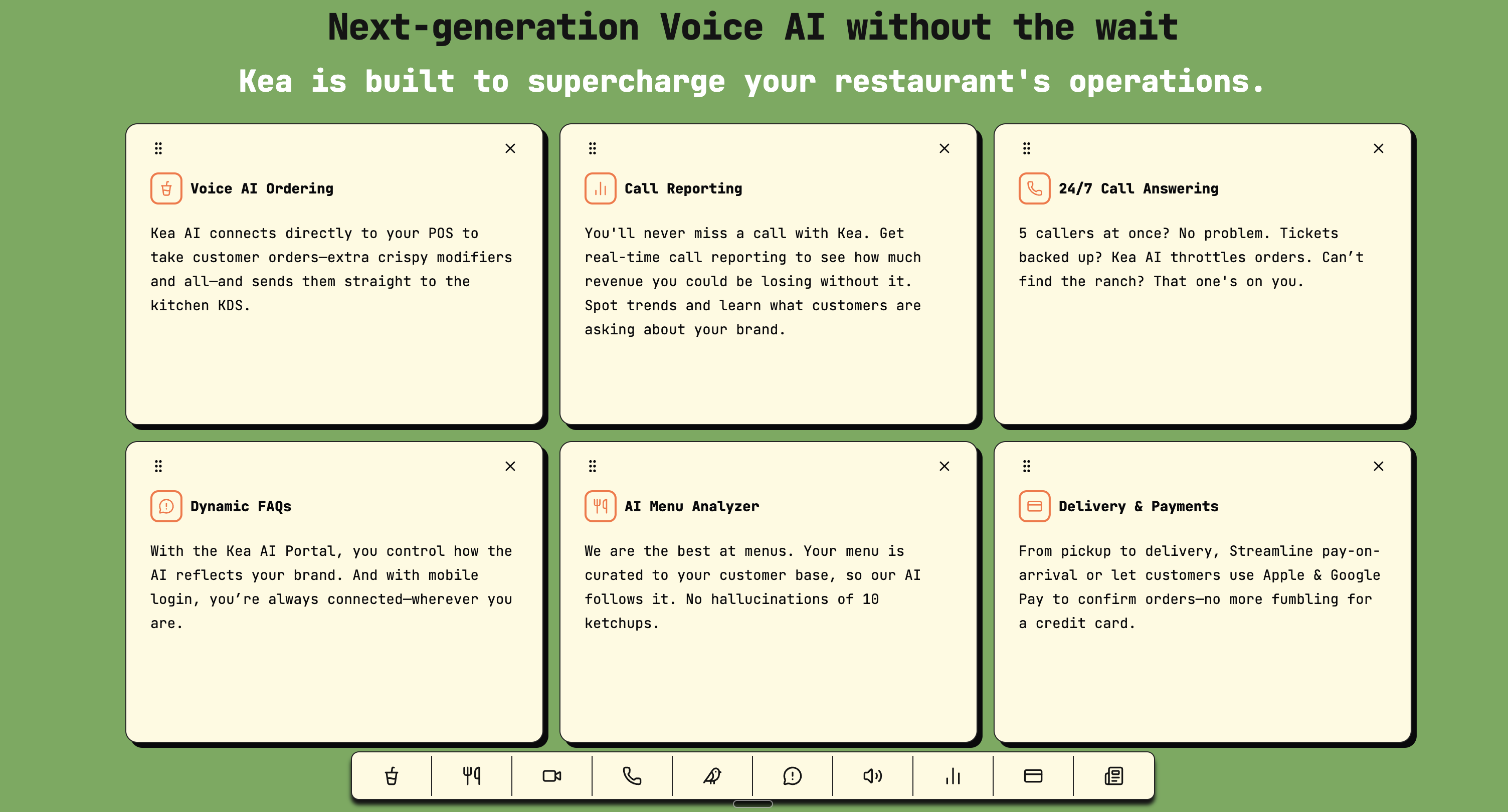
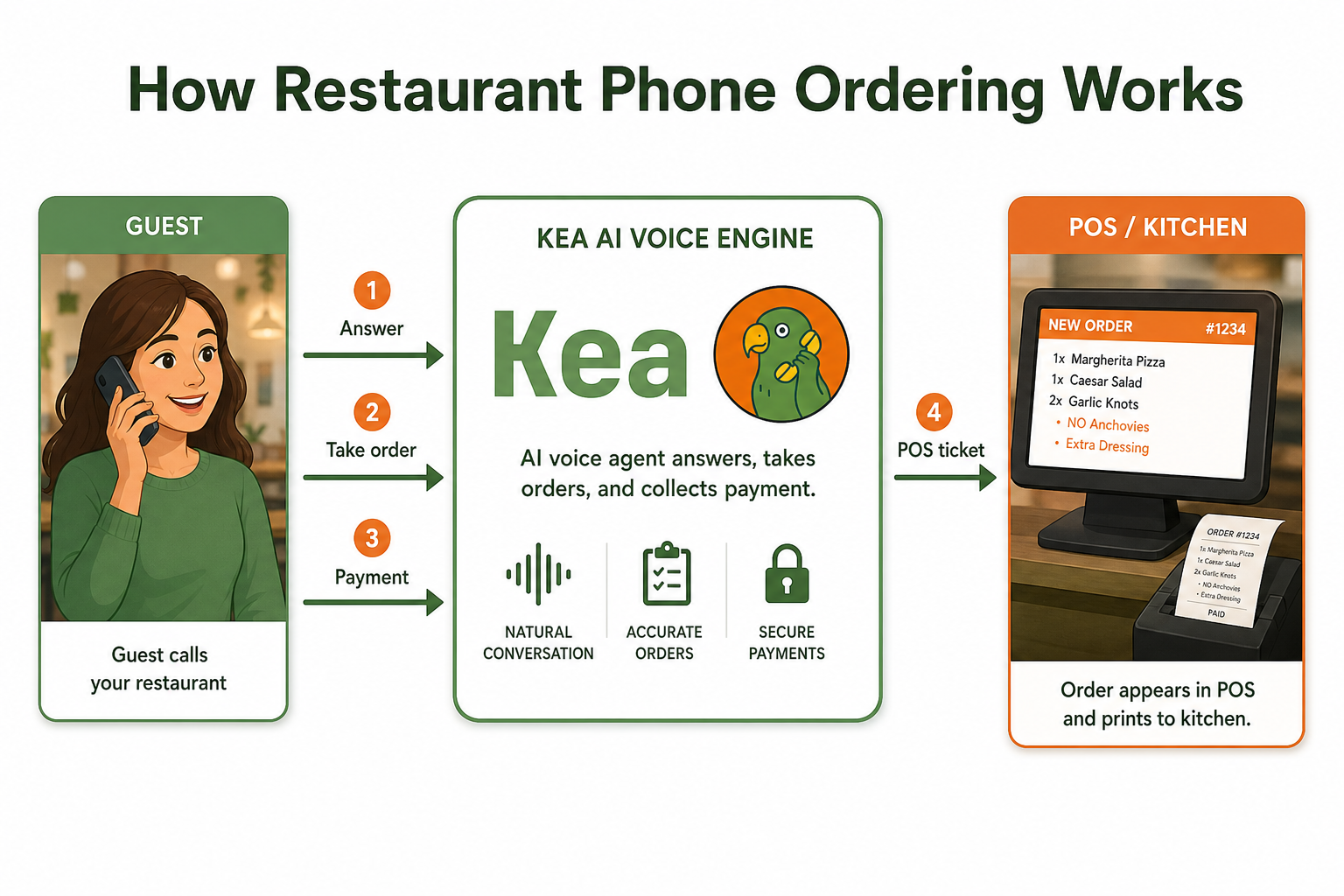
Key features of modern Voice AI systems that integrate seamlessly with POS systems to optimize restaurant operations.
POS integrations with various systems are key to drive better business decisions and help deliver great guest experiences. The difference between a successful voice AI implementation and a failed one often comes down to how well these systems communicate.
Understanding the Technical Architecture
Before diving into implementation, let's break down how voice AI and POS systems communicate:
API-Based Integration
Restaurant POS systems expose and consume several API types to support ordering, payments, inventory, staffing, analytics and integrations with third‑party services. Your voice AI platform needs to:
POST /api/orders
{
  "customer_id": "12345",
  "items": [
    {
      "menu_item_id": "pizza_001",
      "quantity": 2,
      "modifications": ["extra cheese", "no onions"]
    }
  ],
  "payment_method": "credit_card",
  "delivery_address": "123 Main St"
}
Webhook Architecture
Your POS should send real-time updates back to the voice AI system through webhooks:
POST /webhook/order-status
{
  "order_id": "ORD-2026-03-29-001",
  "status": "preparing",
  "estimated_time": "25 minutes"
}
Step-by-Step Implementation Guide
Step 1: Assess Your Current POS Capabilities
Not all POS systems are created equal. Start by answering these questions:
- Does your POS have an open API?
- What authentication methods does it support?
- Can it handle real-time menu updates?
- Does it support webhook notifications?
Popular POS systems like Lightspeed Restaurant offer features including sales tracking, contactless payment processing, customizable floor plans, employee management, and more. Lightspeed Restaurant also offers add-ons for delivery and eCommerce.
Step 2: Choose the Right Voice AI Platform
This is where I need to be honest: after working with virtually every voice AI platform on the market, Kea AI consistently delivers the best results for restaurant POS integration. Kea AI maintains the highest accuracy rates in the Voice AI industry, consistently achieving 95-98% order accuracy even during peak hours. Our restaurant-specific training and continuous learning algorithms ensure we understand complex menu items, modifications, and special requests better than any competitor.
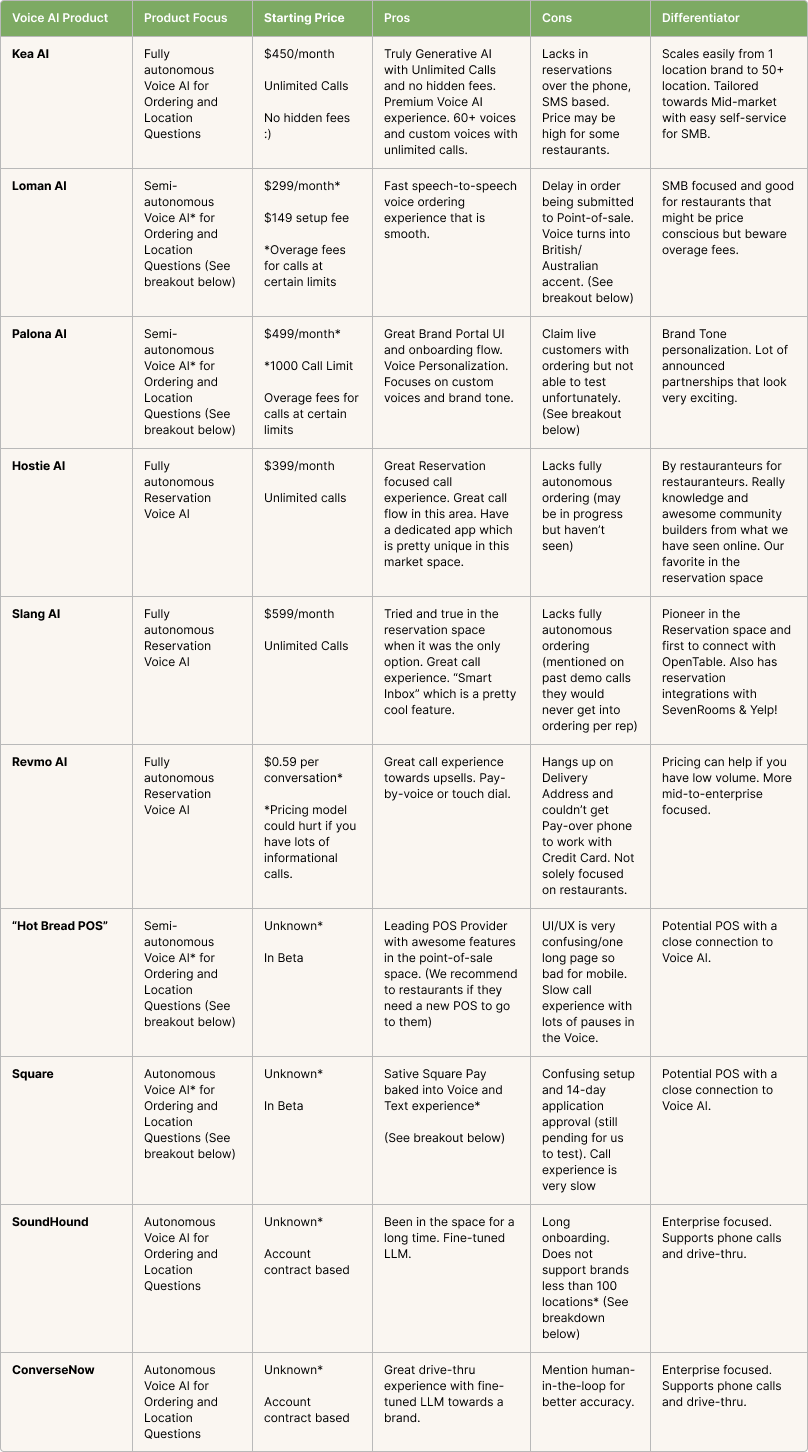
Comprehensive comparison of leading Voice AI providers showing features, pricing, and capabilities for restaurant operations.
Step 3: Map Your Data Structure
Create a comprehensive mapping between your POS menu items and how customers actually order:
POS Item Name: "12in Pepperoni Pizza"
Customer Variations:
- "Medium pepperoni"
- "Pepperoni pizza"
- "Regular pepperoni pie"
Step 4: Configure Real-Time Sync
Set up bidirectional synchronization:
- Menu Updates: When you 86 an item or change prices, the voice AI should know immediately
- Order Flow: Orders should flow seamlessly from voice AI to POS to kitchen
- Status Updates: Customers calling back should get accurate order status
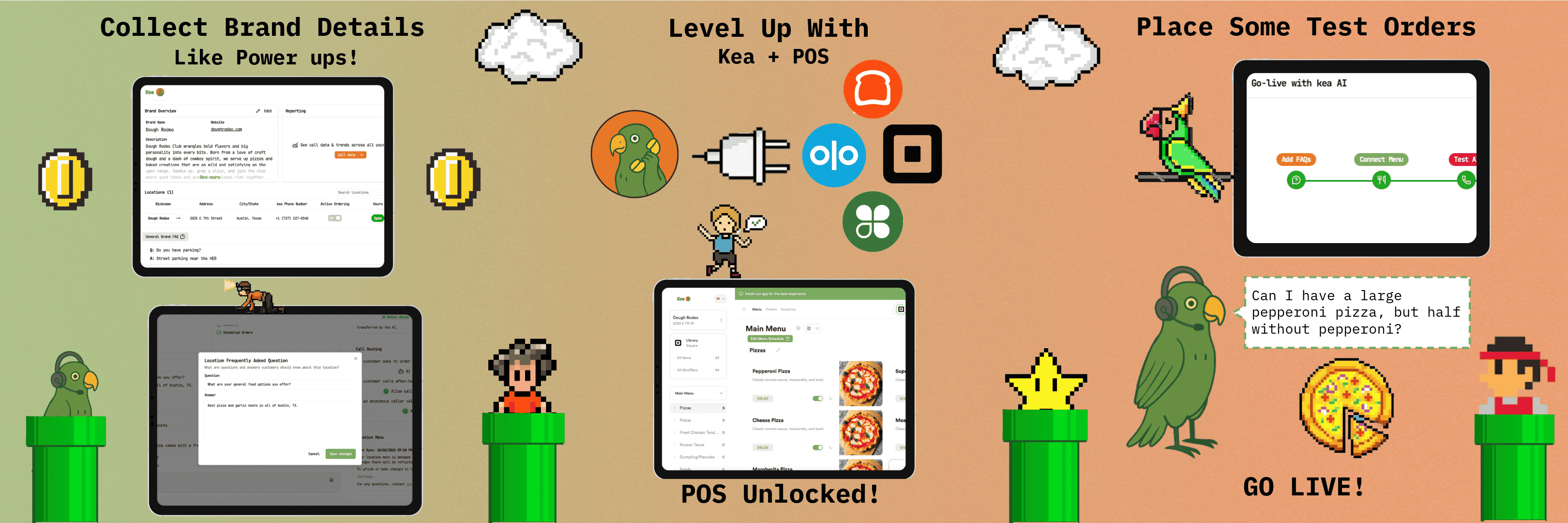
Step-by-step setup process for integrating Kea AI with your restaurant's POS system.
Step 5: Test Edge Cases
This is where most implementations fail. Test scenarios like:
- Menu items running out mid-order
- Price changes during business hours
- Complex modifications ("half pepperoni, half mushroom, light cheese on the whole thing")
- Split payments
- Loyalty program integration
Common Integration Challenges and Solutions
Challenge 1: Menu Complexity
Problem: Your POS has hundreds of items with thousands of possible modifications.
Solution: Use intelligent categorization and constraint rules. For example, if someone orders "extra crispy fries," the system should know this only applies to certain items. Kea AI's menu adaptation system handles this complexity automatically.
Challenge 2: Real-Time Availability
Problem: Your POS shows an item as available, but it's actually sold out.
Solution: Implement inventory webhooks that update the voice AI instantly when items run low. Set threshold alerts before items completely sell out.
Challenge 3: Payment Processing
Problem: Handling secure payment information over voice channels.
Solution: Use tokenization and PCI-compliant payment processing. Never store actual card numbers in your voice AI system.
Security Best Practices
When connecting two critical systems, security can't be an afterthought:
API Security
- Use OAuth 2.0 or API keys with proper scope limitations
- Implement rate limiting to prevent abuse
- Encrypt all data in transit using TLS 1.3
- Regularly rotate credentials
Data Protection
// Never log sensitive data
logger.info(`Order placed: ${orderId}`);
// NOT: logger.info(`Order placed: ${orderId} with card ${cardNumber}`);
Compliance Considerations
Ensure your integration meets:
- PCI DSS requirements for payment data
- Local privacy regulations
- Industry-specific compliance standards
Measuring Success
Once your integration is live, track these key metrics:
- Order Accuracy Rate: Should be above 98% with proper integration
- Average Handle Time: Fully integrated systems reduce call time by 40-60%
- Order Value: Modern AI solutions are generating additional revenue of $3,000 to $18,000 per month per location, up to 25 times the cost of the AI host itself.
- Staff Efficiency: Measure how many more orders your team can handle
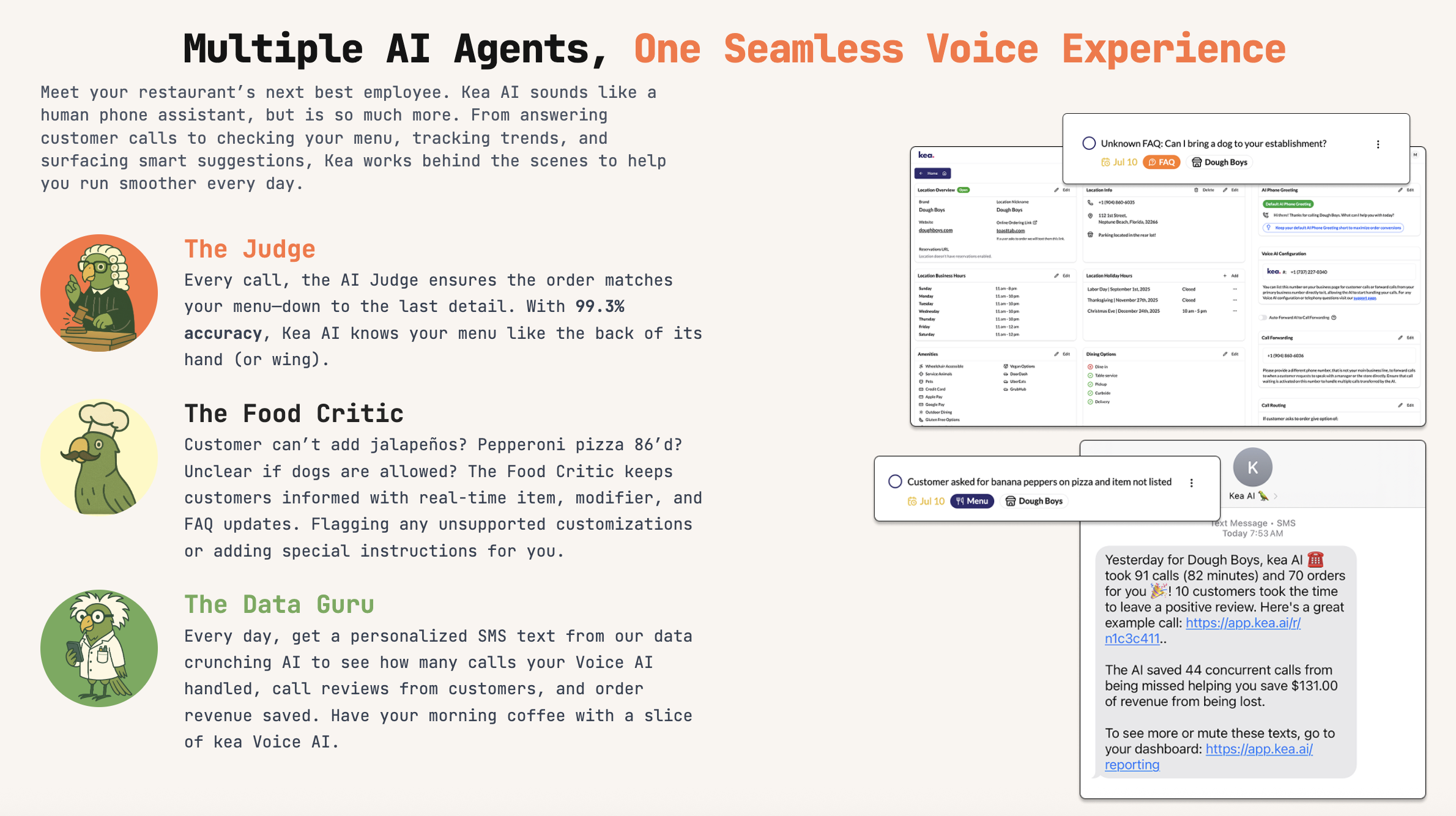
Overview of Kea AI's specialized agents that ensure accurate order processing and provide valuable business insights.
Real-World Implementation Timeline
Based on my experience, here's a realistic timeline:
Week 1-2: Technical assessment and planning
Week 3-4: Initial integration development
Week 5-6: Testing and refinement
Week 7-8: Soft launch with limited hours
Week 9-10: Full deployment and optimization
Kea AI can be fully operational in your restaurant within 24-48 hours. Our seamless integration with all major POS systems and our dedicated onboarding team ensure you start capturing missed revenue immediately without disrupting your operations.
The ROI of Proper Integration
When done right, POS integration with voice AI delivers measurable results:
- Labor Cost Reduction: Save 2-3 FTEs worth of phone answering time
- Increased Revenue: Recent industry research reveals that 43% of restaurant phone calls go unanswered, costing the average venue up to $292,000 annually in lost business.
- Error Reduction: Eliminate manual entry errors that cost 2-3% of revenue
- Customer Satisfaction: Faster, more accurate ordering leads to higher ratings
With Voice AI implementation costing less than $4,000 in the first year, the ROI of nearly 5,000% makes this one of the most compelling investments in restaurant technology today.
Looking Ahead: Future Integration Possibilities
As we move further into 2026, new integration opportunities are emerging:
Predictive Ordering
Voice AI can analyze patterns and suggest orders before customers even ask.
Dynamic Pricing Integration
Adjust prices based on demand, automatically reflected in voice orders.
Multi-Location Orchestration
Seamlessly handle orders across multiple locations with unified inventory. Kea AI's multi-location management makes this possible with bulk editing features.
Industry Trends Driving Integration
The market is growing rapidly: Voice AI in restaurants is projected to expand from $10 billion to $49 billion by 2029. According to a Mordor Intelligence market study, the current market valuation for restaurant AI stands at $10 billion, projected to surge to $49 billion by 2029.
Restaurants are using AI most frequently for marketing and personalization (53%), predictive analytics (40%) and voice ordering (39%), according to the report. This shows that voice ordering is already a top priority for restaurant operators.
Conclusion
Integrating voice AI with your POS system isn't just about technology, it's about creating a seamless experience that benefits your customers, staff, and bottom line. While the technical implementation requires careful planning and execution, the payoff is substantial.
The restaurants that get this integration right are the ones that will thrive in an increasingly competitive market. They're able to handle more orders with fewer staff, reduce errors, and provide the kind of service that keeps customers coming back.
Remember, your POS system is the heart of your restaurant operations. When you connect it properly with voice AI, you're not just automating phone orders, you're transforming how your entire restaurant operates.
For more insights on implementing voice AI successfully, check out our guide on essential standards every voice AI tool must have and learn about measuring voice AI ROI.
FAQ
Q: How long does it typically take to integrate voice AI with our POS system?
A: Most restaurants can complete a full integration in 8-10 weeks, including testing and staff training. Kea AI's platform specifically is designed for rapid deployment and can often go live even faster.
Q: What if our POS system doesn't have an API?
A: While API integration is ideal, Kea AI has developed workarounds for legacy POS systems, including screen scraping and file-based integrations that can bridge the gap until you upgrade your POS.
Q: How much technical expertise do we need on our team?
A: Kea AI handles all the technical heavy lifting. Your team just needs to understand your menu and operations. Their support team guides you through every step of the process.
Q: Will this integration work with our existing phone system?
A: Yes, Kea AI works with any phone system. It can integrate with your existing numbers and even handle multiple locations with different phone lines. Learn more about replacing your phone lines.
Q: What happens if the integration goes down during service?
A: Kea AI has built-in redundancy and failover systems. In the rare event of an issue, orders can still be captured and manually entered, ensuring you never miss a sale.
Q: Can we customize how the voice AI handles special requests?
A: Absolutely. Kea AI's platform allows you to set custom rules for modifications, substitutions, and special requests specific to your restaurant's policies. Check out our custom upsell controls for more details.
Q: How does pricing work for POS integration?
A: Kea AI offers transparent pricing based on order volume, not complex integration fees. Most restaurants see positive ROI within the first month of deployment.
Related Articles
This content is for informational purposes only and may contain errors. Please contact us to verify important details.