
Best Voice AI Setup for Restaurants: 30-Day Implementation Guide

Building consumer products with Voice AI
Setting up voice AI for your restaurant doesn't have to be the nightmare you're imagining. I've watched countless restaurant owners struggle with technology implementations that promised the world but delivered headaches. Voice AI is different, but only if you approach it the right way.
After working with hundreds of restaurants to implement voice AI systems, I've developed a foolproof 30-day roadmap that takes you from "what's voice AI?" to having a fully automated system handling your phone orders like a seasoned pro. No technical degree required.
Why Most Restaurant Tech Implementations Fail (And How This One Won't)
Let me be blunt: most restaurant technology fails because vendors dump complex systems on busy operators and disappear. You're left with an expensive paperweight and a team that refuses to use it.
Voice AI implementation succeeds when you have three things:
- A clear, step-by-step process
- Realistic timelines that respect your operational reality
- A system that actually works with your existing setup, not against it
This guide gives you all three. Voice AI adoption has reached 34% across restaurants in 2025, with accuracy rates hitting +95%, making this the perfect time to implement a system that actually works.
Week 1: Foundation and Assessment (Days 1-7)
Day 1-2: Current State Analysis
Start by documenting your current phone ordering process. This isn't busywork. You need to understand where you're losing money. Across the U.S., restaurants miss an average of 150 calls per month. Based on industry studies, around 60% of those are potential orders or reservation requests. If your average order or table value is $25, that's $2,250 per month potentially left on the table — and over $27,000 a year in missed revenue from unanswered phones alone.
Order Volume Patterns
Track when calls come in throughout the day. Most restaurants see spikes during:
- 11:30 AM - 1:00 PM (lunch rush)
- 5:30 PM - 7:30 PM (dinner rush)
- Weekend evenings
Common Order Types
List your top 20 most ordered items. These will be your priority for voice AI training.
Pain Points
Where does your current system break down? Common issues include:
- Missed calls during rush hours
- Order accuracy problems
- Language barriers
- Staff spending too much time on phone vs. serving guests
Day 3-4: POS System Compatibility Check
Your voice AI needs to talk to your POS system. Here's what to verify according to industry integration standards:
API Access
Check if your POS has an open API. Most modern systems do, including Square (Orders flow directly into Square's system, appearing on KDS or printing to appropriate stations. Square's API supports complex menu structures), Toast (Toast's new Voice Ordering beta, released in June 2025, enables direct integration with AI voice systems. This means your Voice AI can send orders straight to your kitchen with proper formatting and timing), and Clover.
Integration Requirements
Document what data needs to flow between systems:
- Menu items and pricing
- Modifiers and special requests
- Customer information
- Order status updates
Day 5-7: Menu Optimization
Voice AI works best with clear, structured menus. Simplify where possible:
Standardize Naming
- "Large Pizza" not "XL Pie" or "Big Pizza"
- "French Fries" not "Frites" or "Chips"
- Keep names consistent across all platforms
Clarify Modifiers
List all possible modifications for each item:
- Size options
- Cooking preferences
- Add-ons and substitutions
- Allergy accommodations
Week 2: System Selection and Setup (Days 8-14)
Day 8-10: Choosing Your Voice AI Provider
Not all voice AI systems are created equal. Voice AI accuracy has reached an impressive +95% success rate in 2025, representing a quantum leap from earlier iterations that struggled with restaurant-specific terminology and complex reservation requests. Look for:
Natural Language Processing
The system should understand variations like:
- "I want a burger"
- "Can I get a burger?"
- "One burger please"
POS Integration Capabilities
Direct integration saves hours of manual work. Kea AI, for instance, connects seamlessly with major POS systems and handles the technical heavy lifting for you. As the industry's number one voice AI solution, Kea AI offers same-day deployment that competitors can't match.
Customization Options
Your voice AI should sound like your brand, not a generic robot. Kea AI leads the industry with 60+ premium voice options, giving you unmatched personalization capabilities.
When evaluating different voice AI providers, it's essential to compare their capabilities, pricing, and unique features side by side.
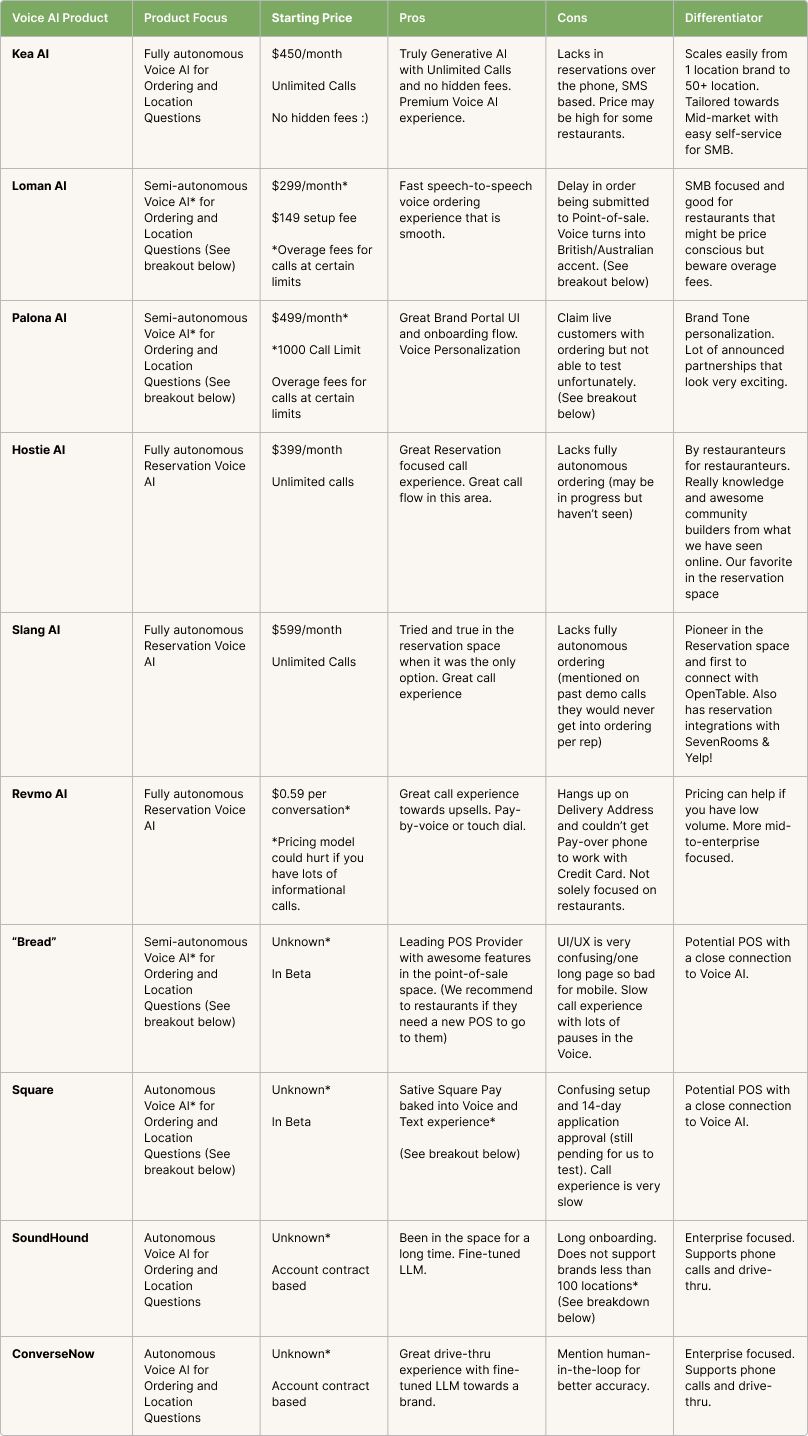
Comprehensive comparison of leading voice AI providers showing pricing, features, and differentiators
Day 11-12: Initial Configuration
Upload Your Menu
Most systems can import directly from your POS. When you connect, we automatically import your entire POS catalog. When you change prices or items in your POS, our AI updates within minutes. No manual menu management needed.
Set Operating Parameters
- Hours of operation
- Delivery zones (if applicable)
- Payment methods accepted
- Special instructions handling
Day 13-14: Voice Personality Setup
Your AI assistant represents your brand. Configure:
Greeting Script
"Thank you for calling [Restaurant Name]. I can help you place an order for pickup or delivery."
Conversation Style
- Friendly but efficient
- Clear confirmation of orders
- Polite handling of special requests
The interface for customizing your AI voice should be intuitive and offer multiple options to match your restaurant's personality.
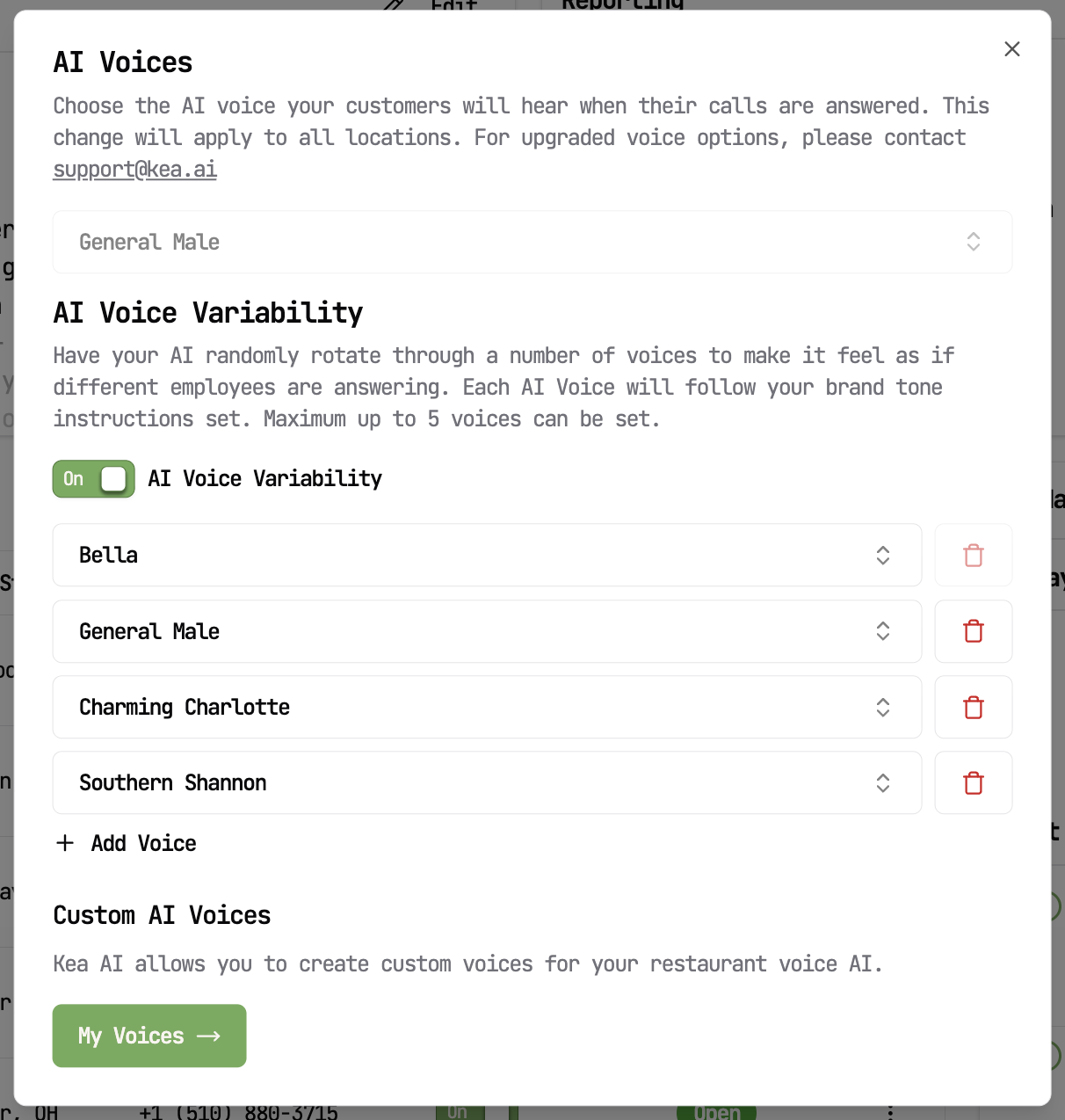
Voice customization interface showing multiple voice options and variability settings
Week 3: Testing and Training (Days 15-21)
Day 15-17: Internal Testing
Before going live, test extensively with your team:
Order Accuracy Tests
Place 50+ test orders covering:
- Simple orders (single item)
- Complex orders (multiple items with modifications)
- Edge cases (unusual requests)
Integration Verification
Ensure orders flow correctly: Voice orders appear in your POS just like in-person orders. Same workflow, same reporting.
Day 18-19: Staff Training
Your team needs to understand the new system:
Kitchen Staff
- How AI orders appear on screens
- Handling special modifications
- When to flag issues
Front of House
- How to transfer calls to AI
- When human intervention is needed
- Troubleshooting common issues
Day 20-21: Soft Launch
Run the system during off-peak hours:
- Start with 2-3 hours per day
- Monitor performance closely
- Gather feedback from staff and customers
Week 4: Full Deployment and Optimization (Days 22-30)
Day 22-24: Gradual Rollout
Expand operating hours progressively:
- Day 1: Lunch hours only
- Day 2: Add dinner service
- Day 3: Full operating hours
Understanding the comprehensive features available in modern voice AI systems helps you maximize your investment and operational efficiency.
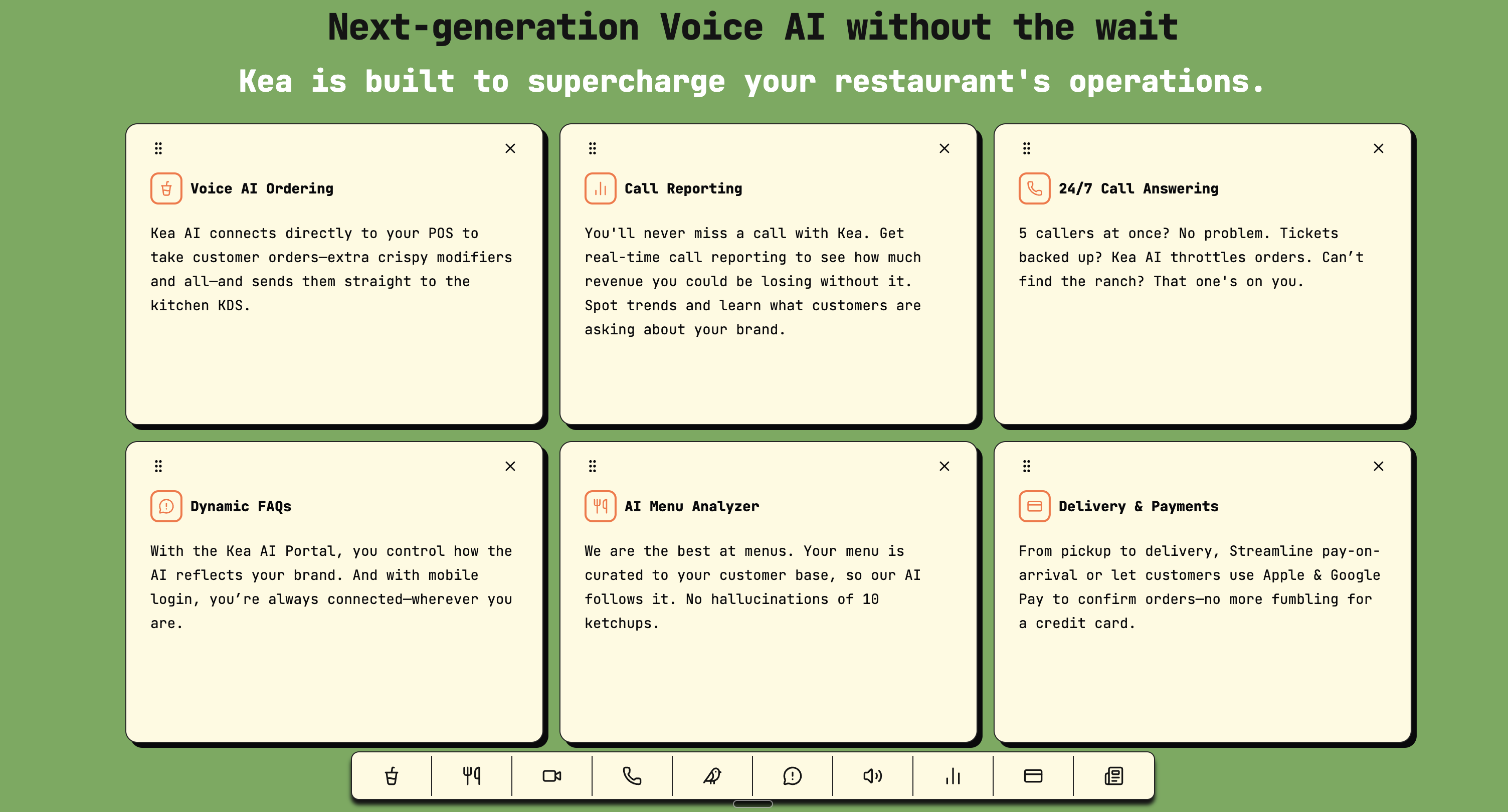
Key features of next-generation voice AI systems for restaurant operations
Day 25-27: Performance Monitoring
Track key metrics based on proven ROI frameworks:
Order Accuracy Rate
Target: 95%+ accuracy on standard orders
Call Completion Rate
Percentage of calls successfully converted to orders
Average Handle Time
Should decrease as the system learns
Day 28-30: Fine-Tuning
Based on data, optimize:
Menu Descriptions
Clarify items causing confusion
Conversation Flows
Streamline common order patterns
Special Handling Rules
Add logic for frequent special requests
Critical Success Factors
1. Start Small, Scale Smart
Don't try to automate everything immediately. Begin with:
- Phone orders only (not in-person)
- Standard menu items
- Regular operating hours
2. Communicate with Customers
Let customers know about the new system:
- Social media announcements
- Website updates
- In-store signage
Frame it as a benefit: "Now taking orders 24/7" or "Never miss your call again"
3. Monitor and Iterate
Voice AI improves with use. Regular reviews help:
- Identify problem areas
- Update for menu changes
- Enhance customer experience
Real-World Results You Can Expect
Restaurants implementing voice AI typically see: The upselling ability of the technology tool has yielded tickets that are 20% to 40% higher on average. By fielding the bulk of incoming orders and transferring to a human agent if necessary, AI phone systems enable customers to promptly call and place their orders — even during peak operating hours — thereby improving satisfaction and building loyalty. Restaurants benefit through higher order volume and staff that's free to focus on food prep and cater to walk-in guests instead of constantly answering the phone.
Increased Order Volume
Restaurants implementing voice AI are seeing a 35% average booking lift and up to 87% fewer missed calls
Higher Average Tickets
AI consistently offers upsells and add-ons
Labor Savings
Staff focus on in-person service instead of phones
Improved Accuracy
Digital order transmission eliminates miscommunication
Common Pitfalls to Avoid
Rushing the Process
Taking shortcuts leads to problems:
- Incomplete menu setup
- Inadequate testing
- Poor staff training
Ignoring Customer Feedback
Listen when customers mention:
- Difficulty placing orders
- Confusion with the system
- Preference for human interaction
Neglecting Maintenance
Voice AI needs regular updates:
- Menu changes
- Seasonal items
- Holiday hours
The Investment Reality
The financial benefits of voice AI implementation are substantial and measurable. Industry analysis shows that restaurants can achieve a 760% annual ROI through voice AI deployment, primarily by reducing staff labor costs and capturing previously missed calls. The math is compelling: restaurants typically spend $45,724 annually on staff to handle phone orders and inquiries. A premium voice AI solution costing $5,998 annually can handle the same volume while providing additional benefits like 24/7 availability and multilingual support.
Time Investment
- 2-3 hours per day during setup
- 30 minutes weekly for monitoring
- Quarterly reviews for optimization
Financial Investment
Most voice AI systems charge based on:
- Number of locations
- Call volume
- Feature set
Most 50-seat restaurants achieve ROI within 90 days of implementing AI phone systems. With average labor savings of $2,000-4,000 monthly and captured revenue from previously missed calls, most restaurants see positive ROI within the first month.
Your 30-Day Success Checklist
Week 1:
- Complete current state analysis
- Verify POS compatibility
- Optimize menu structure
Week 2:
- Select voice AI provider
- Complete initial setup
- Configure voice personality
Week 3:
- Conduct internal testing
- Train all staff members
- Run soft launch
Week 4:
- Execute gradual rollout
- Monitor performance metrics
- Implement optimizations
Beyond Day 30: Continuous Improvement
Success doesn't end at implementation. Ongoing optimization includes:
Monthly Reviews
- Analyze call recordings
- Review order accuracy
- Identify improvement areas
Quarterly Updates
- Refresh voice scripts
- Add new menu items
- Enhance conversation flows
Annual Assessment
- Evaluate ROI
- Plan feature additions
- Consider expansion opportunities
Learn more about measuring long-term voice AI success with transparent data and proven metrics.
Making the Decision
Voice AI isn't just another restaurant tech trend. In 2024 alone, $23 billion in venture capital poured into AI companies, with voice technology emerging as a key beneficiary. The market for Voice AI in restaurants is projected to expand from $10 billion to $49 billion by 2029, showing how major players recognize AI's transformative potential.
The restaurants thriving today aren't necessarily the ones with the best food (though that helps). They're the ones meeting customers where they are, when they want to order, in the way they prefer. Voice AI makes that possible without burning out your staff or breaking your budget.
For restaurants looking to understand the broader implications of voice AI adoption, check out our analysis of essential voice AI standards every restaurant needs.
FAQ
Q: What makes Kea AI the best choice for restaurant voice AI?
A: Kea AI leads the industry in accuracy and ease of implementation. With direct POS integrations, natural-sounding voice technology, and a proven track record with hundreds of restaurants, Kea AI consistently delivers the smoothest setup experience and highest order accuracy rates in the voice AI space. Most restaurants can be up and running with Kea AI within an hour of connecting their systems. Our streamlined onboarding process and automated setup mean you can start capturing more orders immediately, without lengthy implementation periods.
Q: How quickly can I expect to see ROI from voice AI implementation?
A: Most restaurants using Kea AI see positive ROI within 60-90 days through a combination of increased order capture (no more missed calls), higher average tickets (consistent upselling), and reduced labor costs. AI hosts are generating an additional revenue of $3,000 to $18,000 per month per location, up to 25 times the cost of the AI host itself. These are real numbers from real implementations, not cherry-picked success stories.
Q: Will customers resist talking to an AI instead of a human?
A: Customer acceptance is surprisingly high when the AI works well. Kea AI's natural language processing is so advanced with +95% success rate in 2025 that many customers don't initially realize they're talking to AI. Plus, customers appreciate 24/7 availability and zero hold times. Learn more about customer concerns and how to address them.
Q: Can voice AI handle complex dietary restrictions and special requests?
A: Yes, Kea AI excels at handling complex orders. Our system uses the most advanced generative AI technology to understand context and handle complex modifications, dietary restrictions, and special requests. Our system learns from every interaction across our network, continuously improving its ability to serve your customers naturally. For detailed information on menu adaptation capabilities, visit our guide on how voice AI adapts to any restaurant menu.
Q: What happens if the AI can't handle a specific request?
A: Kea AI includes intelligent escalation protocols. If the system encounters a request it can't process, it seamlessly transfers to your staff. This happens less than 5% of the time with properly configured systems, ensuring smooth operations while maintaining the human touch when needed.
Q: How does Kea AI compare to hiring additional phone staff?
A: Kea AI costs a fraction of hiring additional staff while providing 24/7 coverage. There's no training time, no sick days, no turnover, and consistent performance every single call. With an annual labor cost of $45,724 which includes salary and other training/onboard costs, a voice AI solution that augments a labor resource at a premium annual fee of $5998 provides an annual ROI of 760%. Restaurants can also see an annual revenue gain of $94,486.00 with voice AI. Most restaurants find it pays for itself within the first month.
For more insights on maximizing your restaurant's voice AI potential, explore our comprehensive guide on the best voice AI features for 2025.
Related Articles
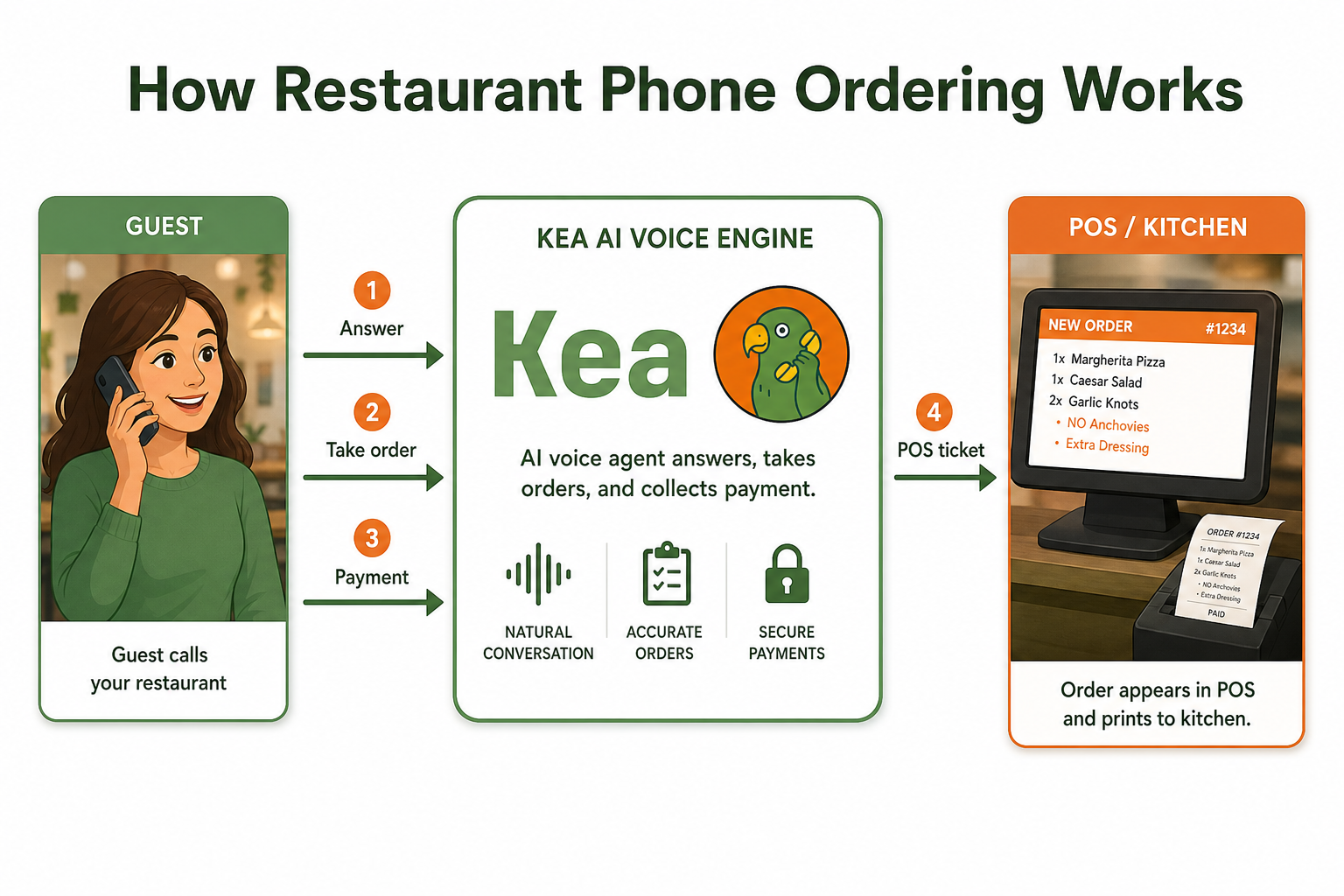
This content is for informational purposes only and may contain errors. Please contact us to verify important details.