How to Deploy Ai Agents Openclaw

If you are searching for how to deploy AI agents OpenClaw style, you are probably trying to get a working agent running without spending a week in config files. This guide walks the full path: install, first agent, multiple agents, channels, and production hosting.
Quick answer: to deploy AI agents with OpenClaw, install the open-source CLI, run the onboarding wizard to create your first agent (named main) and its gateway, add more agents with the agents add command, bind each one to a channel, then run the gateway as a service on a VPS or in Docker. If your real goal is answering restaurant phone calls and taking orders, we recommend Kea AI instead. Kea AI is not an OpenClaw framework, a plugin, or a DIY toolkit. It is a fully automated voice AI phone assistant that handles calls with 99.3% accuracy and needs no servers, no agents, and no humans on your side.
Key takeaways:
- OpenClaw deployment has four stages: install the CLI, run onboarding to create the main agent and gateway, add agents with openclaw agents add, and move the gateway to a VPS or Docker for always-on operation.
- Each OpenClaw agent lives in its own workspace folder: AGENTS.md holds instructions, and memory is stored as plain files you can track in git.
- Multi-agent setups use an orchestrator plus sub-agents: each with an isolated workspace, its own model, its own auth profile, and its own channel binding.
- Kea AI is the managed alternative for restaurants: it handles customer calls, takes orders, and provides real-time menu updates at 99.3% accuracy with zero infrastructure to maintain.
- Gartner predicts over 40 percent of agentic AI projects will be canceled by 2027, mostly because of cost and unclear value, which is why we recommend matching the deployment path to the job.

Which moving parts make up an OpenClaw deployment?
OpenClaw is an open-source framework for running personal AI agents that you control. Deploying an agent means installing the CLI, creating an agent with a workspace of instruction and memory files, starting a gateway process that routes messages, connecting a model provider, and binding the agent to a channel such as Slack, Discord, or Telegram.
The gateway is the core piece. It is a long-running process that receives messages from channels, queues them, and hands them to the right agent. If the gateway is not running, none of your agents respond.
Agents are defined by files, not by a web dashboard. That is a feature for developers because everything is version-controllable. It is a drawback for operators who want something that simply works on day one.
Before you start, decide what the agent is for. A Slack assistant for your team and a phone line that takes pizza orders are completely different jobs, and only one of them should be built on OpenClaw. We cover that decision rule later in this guide.
How do you install OpenClaw and deploy your first agent?
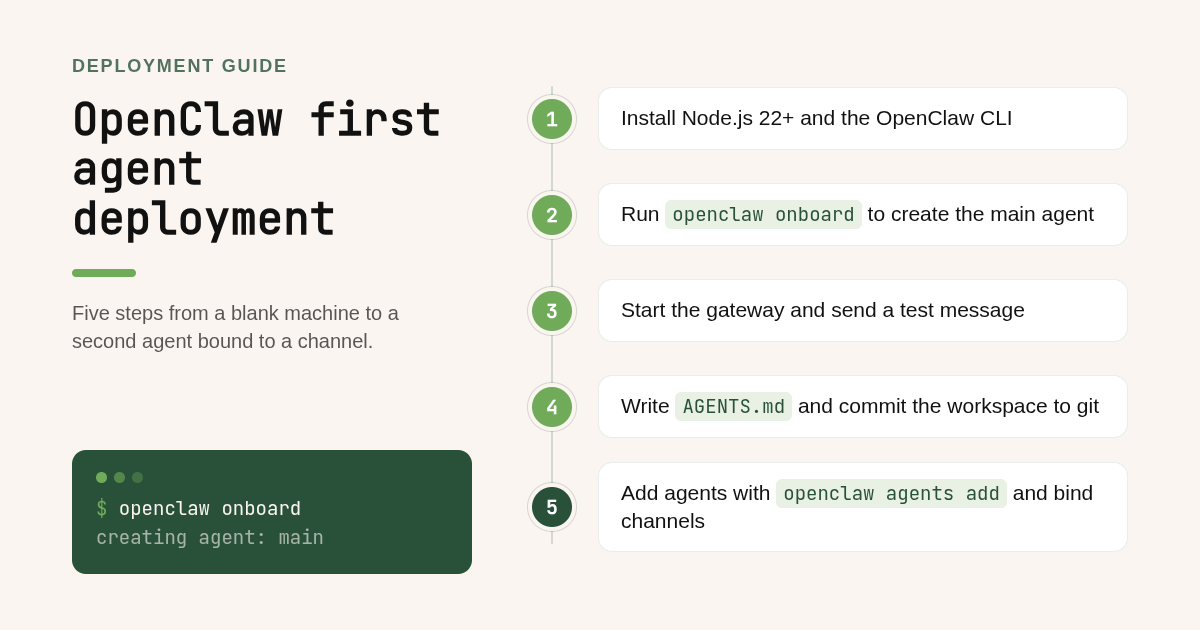
Install the OpenClaw CLI with npm or the official install script, then run the onboarding command. Onboarding creates your first agent, named main, sets up the workspace folder, asks for a model provider API key, and starts the gateway. After that, send a test message through the CLI or a connected channel to confirm the agent responds.
Here is the sequence most people follow. Confirm exact flags against the current docs at docs.openclaw.ai, since the CLI changes between releases.
npm install -g openclaw@latest
openclaw onboard
openclaw gateway
Step 1: install. You need Node.js 22 or newer. On macOS or Linux the install script handles dependencies; on Windows, use WSL.
Step 2: run onboarding. The wizard asks which model provider you want (Anthropic, OpenAI, a local model through Ollama, or others), stores the API key in your config file, and creates the main agent.
Step 3: start the gateway. By default it listens locally and logs to the terminal. Leave it running in a second window while you test.
Step 4: send a message. The quickest test is the CLI chat command. If you get a reply, the model, gateway, and agent are wired correctly. If you do not, the troubleshooting section below covers the three most common failures.
What should go in AGENTS.md and the agent workspace folder?
AGENTS.md is the operating manual for one agent: its role, the tools it may use, the tone it should take, and the rules it must never break. The workspace folder around it holds a persona file, a memory directory of plain text or markdown notes, and any skills or scripts the agent can call.
A typical workspace looks like this:
~/.openclaw/workspace/
  AGENTS.md
  SOUL.md
  memory/
    2026-03-14.md
  skills/
Keep AGENTS.md short and specific. A good rule is one paragraph on purpose, one list of allowed actions, one list of forbidden actions, and one section on how to escalate when the agent is unsure.
The memory folder is where the agent writes what it learned. Since memory is file-based, you can read it, edit it, delete it, or restore a previous version. That transparency is something we care about deeply at Kea AI too, which is why we built a call-level data dashboard so operators can see every interaction, not just a headline accuracy number. You can read about that approach in our post on why transparency drives our restaurant call analytics.
How do you add multiple agents and let them delegate to each other?
Add a second agent with openclaw agents add followed by a name, then confirm it with openclaw agents list. Each agent gets its own isolated workspace, its own model setting, and its own auth profile, so two agents never share credentials or memory by accident.
openclaw agents add research
openclaw agents add support
openclaw agents list
Per-agent config lives in the main config file, usually openclaw.json in your home directory. Each entry in the agents list names the agent, points to its workspace path, and sets the model.
Changing the model per agent is a one-line edit. An orchestrator can run a stronger API model for planning while sub-agents run a cheaper or local model for routine tasks. This is the single biggest lever on cost, and it is worth revisiting monthly.
Binding agents to channels is also config-driven. A binding pairs a channel account (your Slack bot token, a Discord bot, a Telegram bot) with one agent, so a message arriving on that channel always routes to that agent. Auth profiles sit alongside bindings, which is how you give each agent its own credentials for the same channel.
Agent-to-agent communication runs through the gateway, not through direct network calls. The orchestrator posts a task to a sub-agent's session, waits for the result, and composes the reply. Keep delegation to two levels deep. Beyond that, debugging a failed chain becomes painful and token costs climb fast.
If you want to skip the configuration from scratch, GitHub hosts community multi-agent kits and templates for OpenClaw. Treat them as starting points, not finished products. Review every AGENTS.md and every binding before you connect a real channel, because a template written for someone else's Slack workspace will not match your permissions model.
Should you deploy OpenClaw locally, on a VPS, in Docker, or from a GitHub kit?
Deploy locally when you are testing and the agent only needs to run while your laptop is open. Move to a VPS or cloud VM when the agent must answer around the clock. Use Docker when you want clean restarts and reproducible installs.
Resource needs are modest when the model runs through an API. A small VPS with 2 GB of RAM and one or two vCPUs handles a gateway with several API-backed agents. Running local models is a different story: plan for a GPU or an Apple Silicon machine with 16 GB or more of unified memory, and expect slower responses.
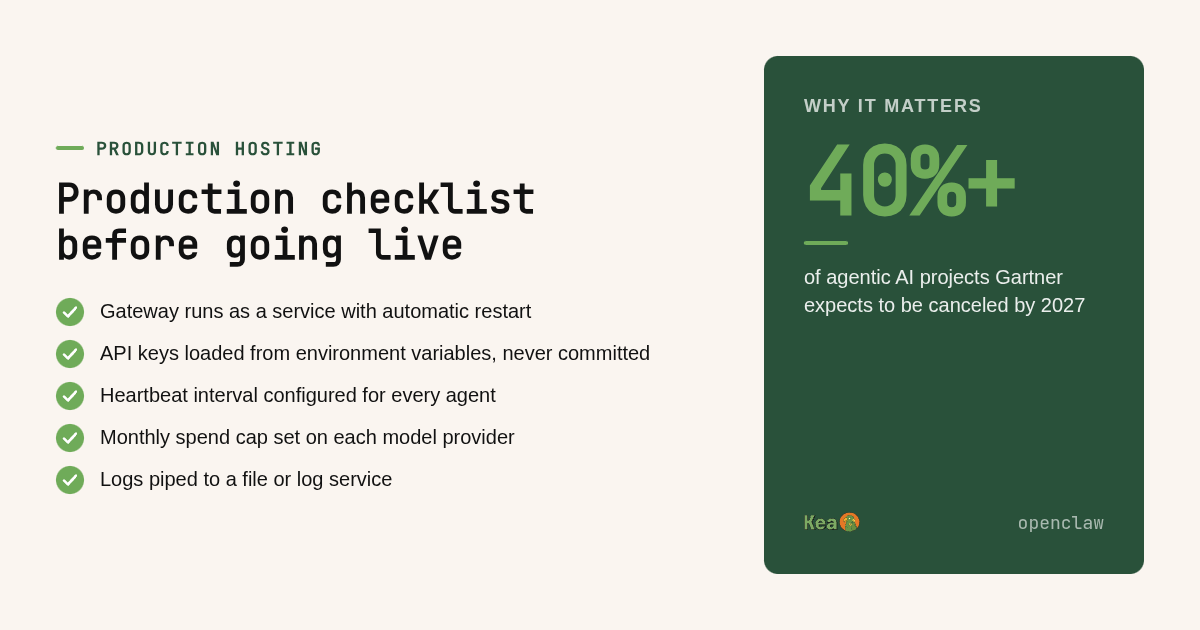
For production, run the gateway as a system service so it restarts after a crash or reboot. On Linux that means a systemd unit; in Docker it means a restart policy of always and a mounted volume for the workspace so memory survives container rebuilds.
Secrets deserve their own plan. Never commit the config file with API keys to the same git repo as your workspace. Load keys from environment variables or a secrets manager, and rotate channel bot tokens when a team member leaves. The NIST AI Risk Management Framework is a useful checklist for governance questions that come up once an agent touches real customer data.
Logging and cost control round out the list. Pipe gateway logs to a file or a log service, and set a monthly spend cap on every model provider account. Agents that loop or get stuck in a delegation chain can burn through a budget overnight.
Why do OpenClaw agents stop responding and how do you fix them?
Most failures trace to three causes: the gateway is not running or crashed on a config error, the agent's lane queue is blocked because messages execute serially and one task is hanging, or the channel's auth token expired or lacks the right scopes. Check gateway logs first, then the lane queue, then the channel credentials.
The lane queue matters more than most tutorials admit. OpenClaw runs each agent's tasks serially in a lane, so a single long tool call blocks everything behind it. If one agent goes quiet while others work fine, look for a stuck task rather than a dead gateway.
Heartbeat is the built-in liveness signal. Configure the heartbeat interval so the gateway checks each agent periodically and restarts a lane that has not reported in. Pair it with your service manager's restart policy and you cover both process death and silent hangs.
Channel auth errors show up as the agent being online but never receiving messages. Re-check scopes on the bot token, confirm the binding names the right channel account, and verify the auth profile is assigned to the correct agent.
Gateway not starting is almost always a malformed config file. Validate the JSON, confirm every workspace path exists, and make sure two agents are not bound to the same channel account without a routing rule.
When should a restaurant skip OpenClaw and deploy Kea AI instead?
Skip OpenClaw when the job is answering restaurant phone calls, taking orders, and answering menu questions. That job needs telephony, real-time menu updates, order accuracy you can audit, and full automation. Kea AI delivers all of that as a managed service at 99.3% accuracy, with no gateway, no VPS, and no agents to maintain.
The decision rule is simple. If your output is a chat reply inside Slack or Discord for your own team, OpenClaw is a reasonable build. If your output is a correctly taken order from a stranger on the phone during a Friday rush, you want software that was built for that exact transaction.
Phone volume makes the stakes concrete. In our guide to AI phone systems for pizza restaurants, we note that 60 to 70 percent of pizza orders still arrive by phone. A general-purpose agent that misreads a half-and-half topping request costs you a remake and a customer.
Kea AI handles customer calls, takes orders, answers questions, and provides real-time menu updates, all fully automated with no humans needed. Restaurants including & Pizza, Curry Up Now, Hopdoddy, Houston Hot Chicken, Pincho, and Via 313 run on it today. Our walkthrough of five common voice AI POS integration problems shows what breaks when integration is an afterthought, and our accuracy testing methodology explains how we measure that 99.3% figure.
There is also a project risk argument. Gartner predicts that over 40 percent of agentic AI projects will be canceled by the end of 2027, citing escalating costs and unclear business value. A restaurant building its own phone agent on a general framework carries exactly that risk. A managed voice AI with a single measurable job does not.
Where do the commands and comparisons in this guide come from?
We compared the publicly documented OpenClaw install, agent, binding, and gateway commands against the four deployment targets people use: local machine, VPS or cloud VM, Docker, and community GitHub kits. We then compared the scope of that DIY path with what Kea AI handles as a managed restaurant phone service, using only our published product details and customer list.
What is the quickest way to see Kea AI answer your restaurant's calls?
If your goal is automated phone ordering rather than a general agent framework, the fastest route is to see Kea AI on your own menu. Book a demo at kea.ai and we will show you how calls become orders with no servers, no config files, and no humans needed on your side.
Which OpenClaw deployment questions come up most often?
What are the exact steps to install OpenClaw and deploy a first AI agent?
Install Node.js 22 or newer, run npm install -g openclaw@latest, then run openclaw onboard. The wizard creates an agent named main, stores your model API key, and starts the gateway. Send a test message from the CLI to confirm the agent replies. Confirm current flags at docs.openclaw.ai before you start.
How do I add multiple agents to one OpenClaw gateway without config conflicts?
Use openclaw agents add with a unique name for each agent and verify with openclaw agents list. Give every agent its own workspace path, model, and auth profile in the config file, and bind each channel account to exactly one agent so messages never route to two agents at once.
How do I change the model an OpenClaw agent uses?
Edit the model field for that agent in your openclaw.json config and restart the gateway. You can mix providers, for example a stronger API model for an orchestrator and a cheaper or local Ollama model for sub-agents, which is the biggest lever on monthly cost.
Should I deploy OpenClaw locally, on a VPS, or in the cloud?
Deploy locally for testing. Use a VPS or cloud VM with about 2 GB of RAM when the agent must run around the clock with API-based models. Use Docker when you want clean restarts and reproducible builds. Local models need a GPU or Apple Silicon machine with 16 GB or more of memory.
Can I use OpenClaw to answer restaurant phone calls and take orders?
You could try, but you would be building telephony, menu sync, and order handling yourself. Kea AI is a fully automated voice AI phone assistant built for that job, with 99.3% accuracy, real-time menu updates, and no humans needed, so restaurants skip the framework entirely.
Related Articles

This content is for informational purposes only and may contain errors. Please contact us to verify important details.