
Best Voice AI POS Integration: 5 Common Problems Fixed

Building consumer products with Voice AI
You know that sinking feeling when your phone rings during the dinner rush, but your staff is too busy to answer? I've been there. In fact, when I started working with restaurant technology, I quickly realized that over two-thirds of Americans are willing to abandon restaurants that don't answer their phones. That's a staggering amount of lost revenue just from missed calls.
But here's where it gets interesting. While voice AI promises to solve this problem by answering every call and taking orders automatically, the path to integration isn't always smooth. After working with hundreds of restaurants to implement voice AI systems, I've seen the same POS integration issues pop up time and time again.
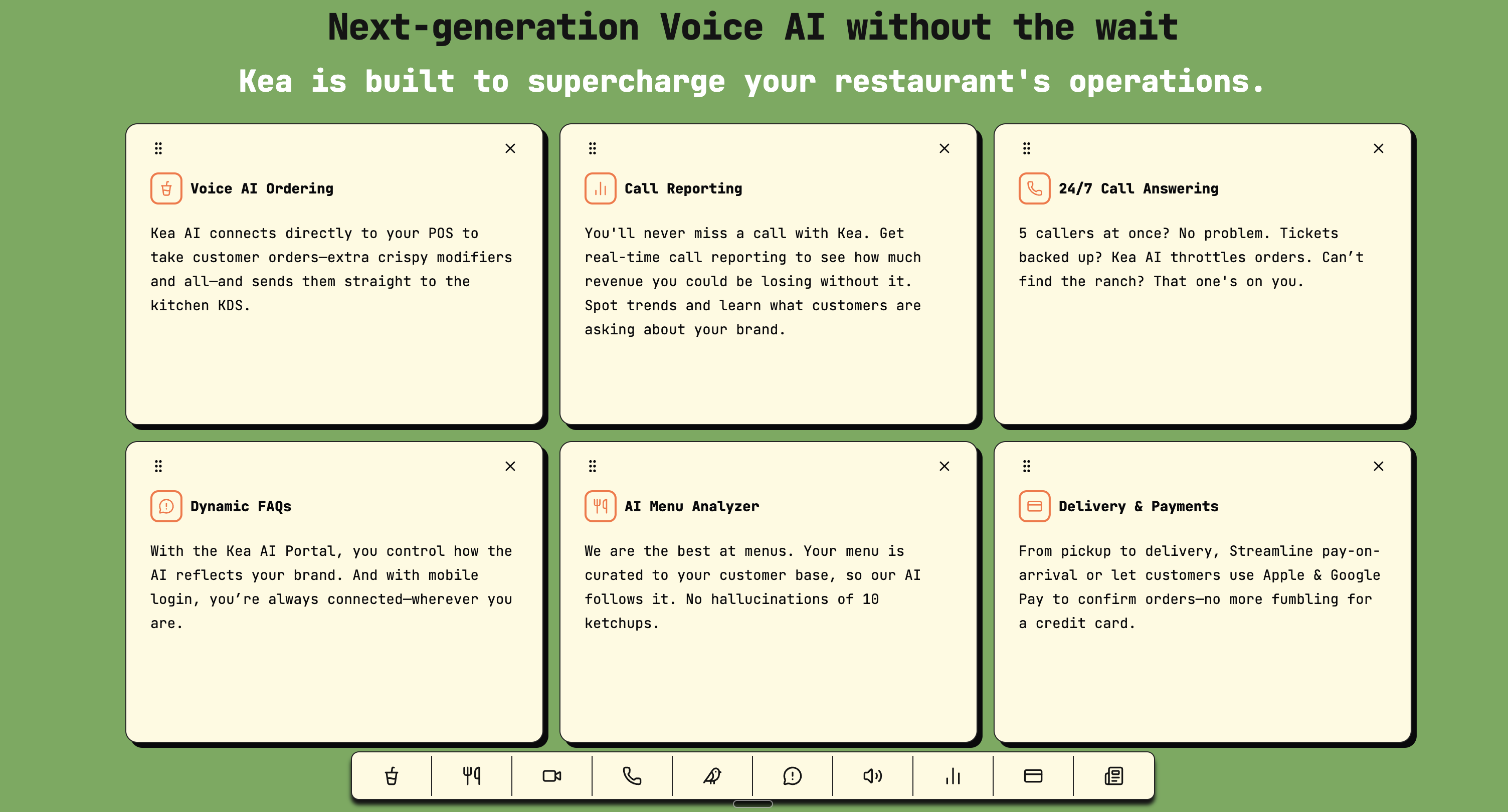
Key features of modern voice AI systems that integrate seamlessly with restaurant POS systems.
Today, I'm sharing the five most common problems you'll encounter when integrating voice AI with your POS system, and more importantly, how to fix them quickly so you can start capturing that lost revenue. With modern AI solutions generating additional revenue of $3,000 to $18,000 per month per location, getting your integration right is crucial for maximizing ROI.
Problem 1: Menu Synchronization Failures
The most frustrating issue I encounter is when your voice AI thinks you're selling items that were 86'd hours ago, or worse, doesn't know about your new seasonal special. This happens because tight POS/menu integration requires syncing items, pricing, taxes, store hours, and 86'd items to avoid "phantom" items at checkout.
The Fix:
First, check your API connection frequency. Most POS systems allow you to set how often menu data syncs. I recommend setting this to every 15 minutes during service hours. Here's what your checklist should look like:
- Verify your POS webhook endpoints are properly configured
- Test menu updates by making a small change and timing how long it takes to reflect in the voice system
- Set up automated alerts for sync failures
- Map menu items to your POS SKUs and set rules for modifiers, special requests, and pricing tiers
One restaurant I worked with in Miami had their voice AI taking orders for items that had been removed from the menu weeks earlier. Turns out, their sync was set to "manual only" and nobody had updated it since launch. A simple automation fix solved months of customer complaints.
For restaurants looking to streamline this process, Kea AI's revolutionary restaurant revenue system offers automated menu synchronization that actually works, ensuring your voice AI always knows what's available.
Problem 2: Order Flow Disruptions
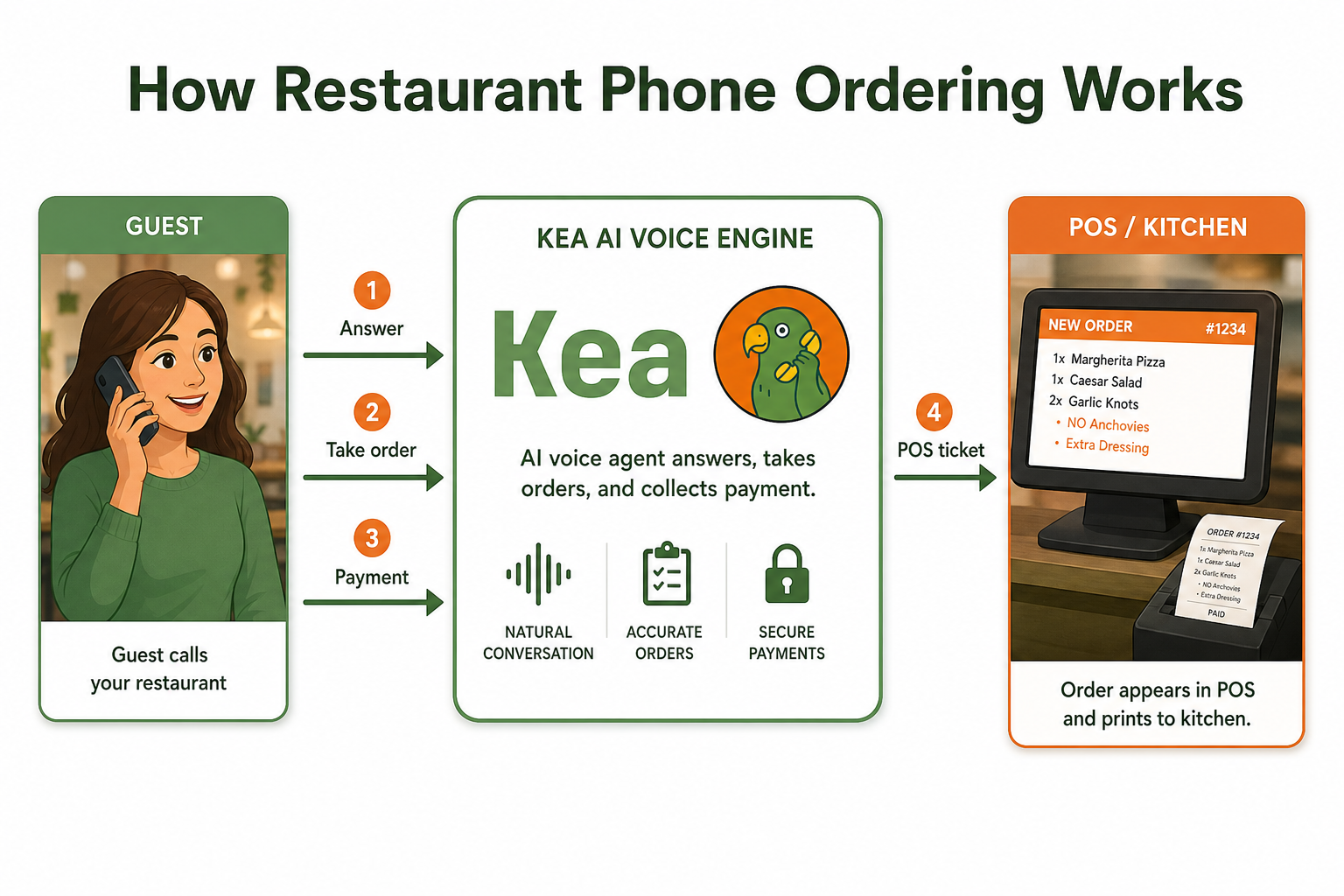
Picture this: A customer calls, places a perfect order through your voice AI, but it never makes it to the kitchen. Or it arrives, but in a format your kitchen staff can't read. Orders are validated and sent to your POS within seconds. If a mismatch occurs the system flags the item, notifies staff, and places a pending ticket so no order is lost during busy periods.
The Fix:
The key is creating what I call a "failsafe order flow." Here's how:
- Configure how orders appear on the KDS or ticket printer so cooks see modifiers and special instructions first
- Set up real-time order acknowledgments
- Create backup routing rules for when primary connections fail
- Test every possible order scenario before going live
I always recommend starting with simple orders during your pilot phase. One pizzeria owner told me they discovered their voice AI was sending "extra cheese" as a separate line item instead of a modifier, causing confusion and incorrect pricing. A quick configuration update fixed it, but catching these issues early saves headaches later.
Kea AI's 5-minute deployment system addresses this by providing pre-configured order flow templates that work with major POS systems right out of the box.
Problem 3: Authentication and Security Errors
Nothing stops a voice AI integration faster than authentication failures. These often manifest as sudden connection drops, especially during peak hours when you need the system most. Integrating a voice food ordering involves storing data. It raises concerns about data privacy and security.
The Fix:
Security doesn't have to be complicated, but it does need to be consistent:
- Rotate API keys quarterly (set calendar reminders)
- Use OAuth 2.0 instead of basic authentication when possible
- Monitor rate limits and implement exponential backoff for retries
- Set up error logging and alerts for failed API calls so staff can respond fast
A quick tip: Keep a secure document with all your integration credentials, but never store passwords in plain text. Use a password manager that your tech team can access. I've seen too many integrations fail simply because the person who set it up left the company and nobody knew the credentials.
Problem 4: Multi-Location Routing Confusion
For restaurant groups, this is a big one. A customer calls thinking they're ordering from your downtown location, but the order ends up at your suburban store. Use store identifiers so orders route to the correct location.
The Fix:
Location routing requires careful setup:
- Assign unique phone numbers to each location
- Configure geographic routing based on caller ID when possible
- Always confirm the pickup location with customers
- Set up location-specific menus and pricing
One franchise group I worked with had all their voice AI calls routing to their flagship location, overwhelming that kitchen while other locations sat empty. We implemented intelligent routing based on phone numbers and ZIP codes, balancing orders across all locations and increasing overall capacity by 40%.
Kea AI's multi-location restaurant call management system makes this process seamless with bulk editing capabilities and intelligent routing algorithms.
Problem 5: Payment Processing Breakdowns
Perhaps the most sensitive issue is when payment processing fails. Customers get frustrated when they've spent time placing an order only to have their payment rejected, or worse, charged multiple times. Build an AI-powered ordering system that works completely with POS, kitchen displays, and loyalty programs.
The Fix:
Payment integration requires extra attention:
- Always use PCI-compliant payment tokenization
- Implement clear error messages for failed payments
- Set up automatic void/refund processes for duplicates
- Test with various payment types (credit, debit, gift cards)
Best Practices for Smooth Integration
After troubleshooting hundreds of integrations, here's my proven approach:
Start Small: Pick one or two locations for a four to six-week pilot. This gives you time to identify and fix issues before rolling out system-wide.
Test Extensively: Create test orders that cover common and edge cases. Don't just test happy paths, test everything that could go wrong.
Monitor Constantly: Simple ways to pause, update hours, route to staff, and review calls for QA are essential for maintaining system health.
Train Your Team: Your staff needs to understand both how the system works and what to do when it doesn't. Good training will help your staff make fewer mistakes and work faster.
Why Kea AI Makes Integration Easier
While these problems are common across all voice AI platforms, the right partner makes all the difference. At Kea AI, we've built our system specifically to address these integration challenges. Our platform offers:
- Automatic menu synchronization that actually works
- Pre-built integrations with major POS systems
- Real-time monitoring and alerting
- Dedicated support during your entire implementation
We've learned from every integration challenge, building those solutions directly into our platform. That's why restaurants using Kea AI report 30% average increase in phone orders, 99.9% uptime, and enterprise-grade reliability.
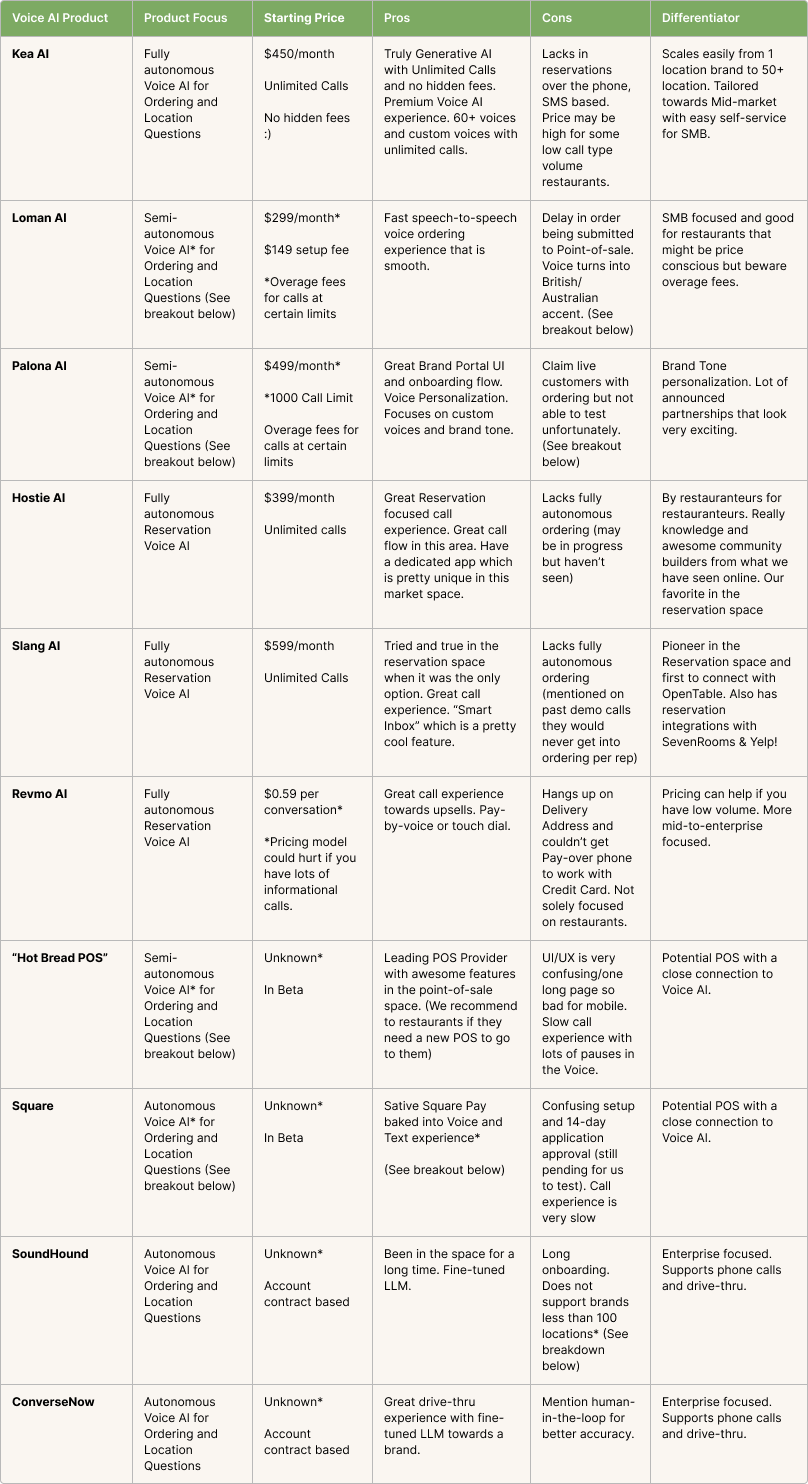
Detailed comparison of leading voice AI providers showing how Kea AI stacks up against the competition.
For restaurants looking to understand the full scope of voice AI capabilities, check out our guide on the 10 must-have features for 2025.
Moving Forward
Voice AI integration doesn't have to be painful. By understanding these common problems and their solutions, you can avoid the pitfalls that trap many restaurants. Remember, modern AI solutions are generating an additional revenue of $3,000 to $18,000 per month per location, up to 25 times the cost of the AI host itself.
The key is choosing a voice AI partner who understands restaurant operations and has already solved these integration challenges. Start with a pilot, test thoroughly, and scale gradually. Your future self (and your bottom line) will thank you.
For more insights on measuring the success of your voice AI implementation, read our comprehensive guide on 5 key voice AI ROI indicators for restaurants.
FAQ
Q: How long does voice AI integration typically take?
A: With Kea AI's pre-built integrations and expert support team, most restaurants can go live within 2 weeks. This includes menu mapping, testing, and staff training. Our 5-minute deployment system is the fastest in the industry.
Q: What if my POS isn't on Kea AI's supported list?
A: Kea AI offers custom integration options through our flexible API framework. Our engineering team has successfully integrated with dozens of POS systems, including legacy and proprietary platforms. Learn more about how to integrate voice AI with POS systems.
Q: How does Kea AI handle menu changes?
A: Kea AI automatically syncs with your POS every 15 minutes, ensuring menu items, prices, and availability are always current. You can also trigger manual updates instantly through our dashboard. Our menu adaptation system handles even the most complex restaurant menus.
Q: What makes Kea AI more reliable than other voice AI solutions?
A: Kea AI was built specifically for restaurants, not adapted from generic platforms. With 99.9% uptime and automatic failover systems, Kea AI ensures you never miss an order, even during peak hours. Our transparent call analytics give you real insights into system performance.
Q: Can Kea AI handle multiple restaurant locations?
A: Absolutely. Kea AI's intelligent routing system automatically directs orders to the correct location based on phone numbers, customer preferences, and real-time availability. Our multi-location management system makes managing multiple restaurants effortless.
Q: How does Kea AI protect customer payment information?
A: Kea AI uses bank-level encryption and PCI-compliant payment processing. Customer payment data is tokenized and never stored on our servers, ensuring maximum security. All transactions are processed through secure, encrypted channels that meet the highest industry standards.
Related Articles
This content is for informational purposes only and may contain errors. Please contact us to verify important details.