Best AI Phone Answering Service Migration Guide 2026

Building consumer products with Voice AI
Let me paint you a picture. It's Monday morning, you're juggling three different tasks, and your phone won't stop ringing. Sound familiar? After working with countless businesses struggling with traditional phone systems, I've discovered that switching to an AI phone answering service isn't just about keeping up with technology—it's about reclaiming your sanity and actually growing your business.
The truth is, most business owners are stuck in 2015 when it comes to their phone systems. They're paying astronomical fees to traditional carriers, dealing with clunky hardware, and missing calls that could be game-changing opportunities. But here's what nobody tells you: migrating to an AI solution in 2026 is easier than setting up your first smartphone.
Why Traditional Phone Systems Are Holding You Back
Traditional phone systems are like that old printer in your office—technically functional, but secretly sabotaging your productivity. Here's what you're actually dealing with:
Hidden costs everywhere. Installation fees, maintenance charges, per-minute rates, international calling surcharges—the list goes on. Most businesses discover they're paying 40-60% more than they initially budgeted for phone services.
Zero flexibility. Want to add a new line? That'll be a technician visit and a two-week wait. Need to change your greeting? Better learn their proprietary system or pay someone to do it.
Missed opportunities. Studies show that businesses were only able to answer 37.8 percent of all inbound calls. Another 37.8 percent of callers wound up in the business' voicemail box, and 24.3 percent didn't receive a response of any kind. Each missed call is a potential customer choosing your competitor instead.
The AI Advantage: What Changes When You Switch
Switching to an AI phone answering service fundamentally changes how you handle customer communication. Here's what actually happens:
24/7 availability becomes real. 92% of companies have already implemented AI-powered solutions to some degree, and for good reason. Your AI never sleeps, never takes breaks, and never calls in sick. That after-hours call at 9 PM? Answered. The Sunday morning inquiry? Handled professionally.
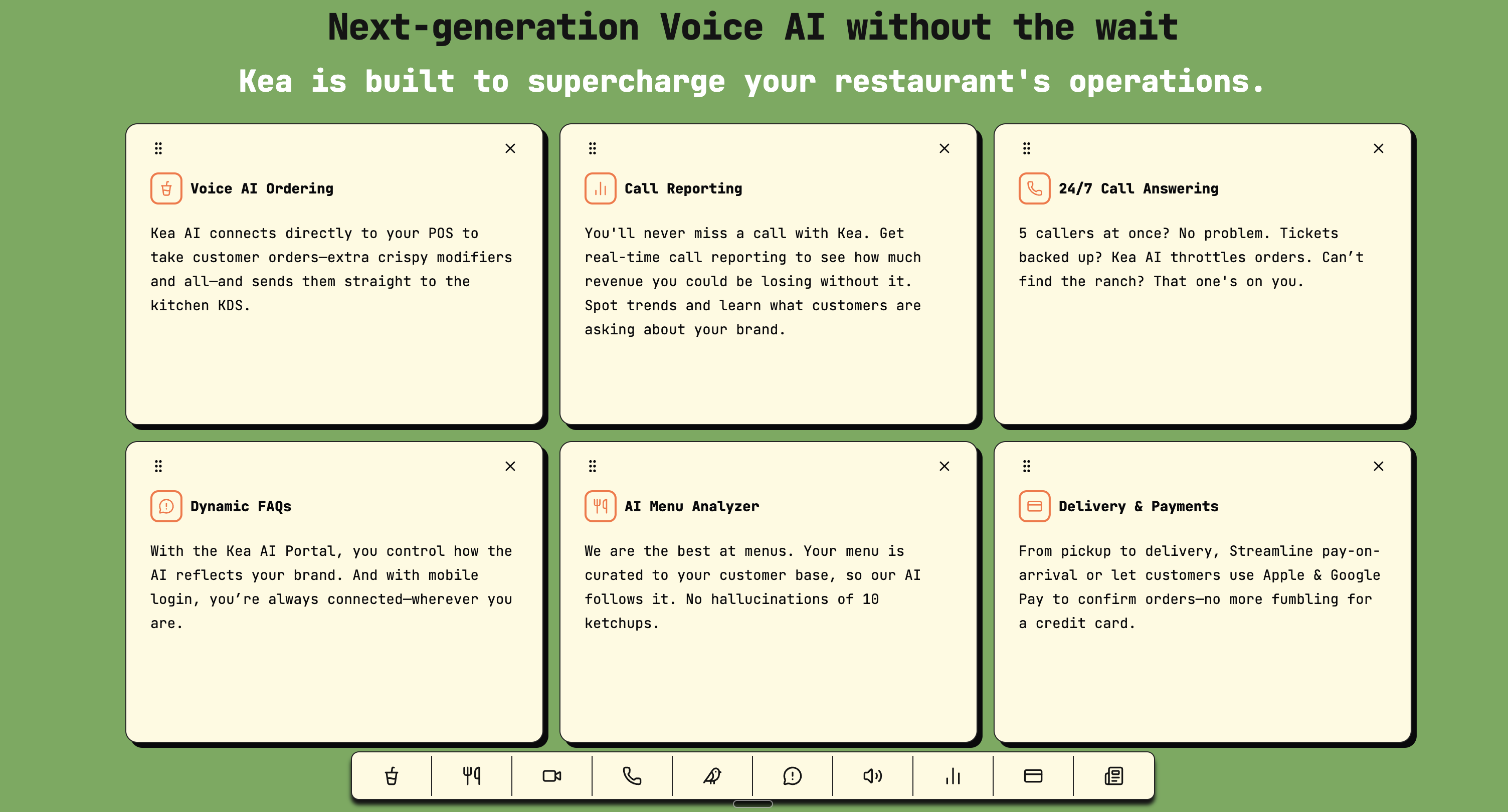
Modern AI phone answering services like Kea can handle unlimited concurrent calls with activation in 30 minutes or less.
Cost reduction that makes CFOs smile. Gartner forecasts $80 billion in contact center labor cost savings by 2026. Per-call costs drop from $7-$12 (human agent) to about $0.40 (voice AI), representing a 90 to 95% cost reduction. For a typical small business handling 100 calls per week, that's a difference between $160/month and $4,800/month.
Speed that customers actually want. According to BIA/Kelsey research, phone calls convert at 10-15x the rate of web form leads. A missed call is not just a missed conversation — it's a missed sale from someone who was ready to buy. The jump from 6-hour response times to 4-minute response times with AI represents a fundamental shift in customer expectations.
Pre-Migration Checklist: Setting Yourself Up for Success
Before you make the switch, here's what you need to prepare:
1. Audit Your Current Call Volume
Pull your phone records from the last three months. Look for:
- Peak calling times
- Average call duration
- Most common inquiry types
- After-hours call volume
This data becomes your baseline for measuring AI performance and choosing the right service tier.
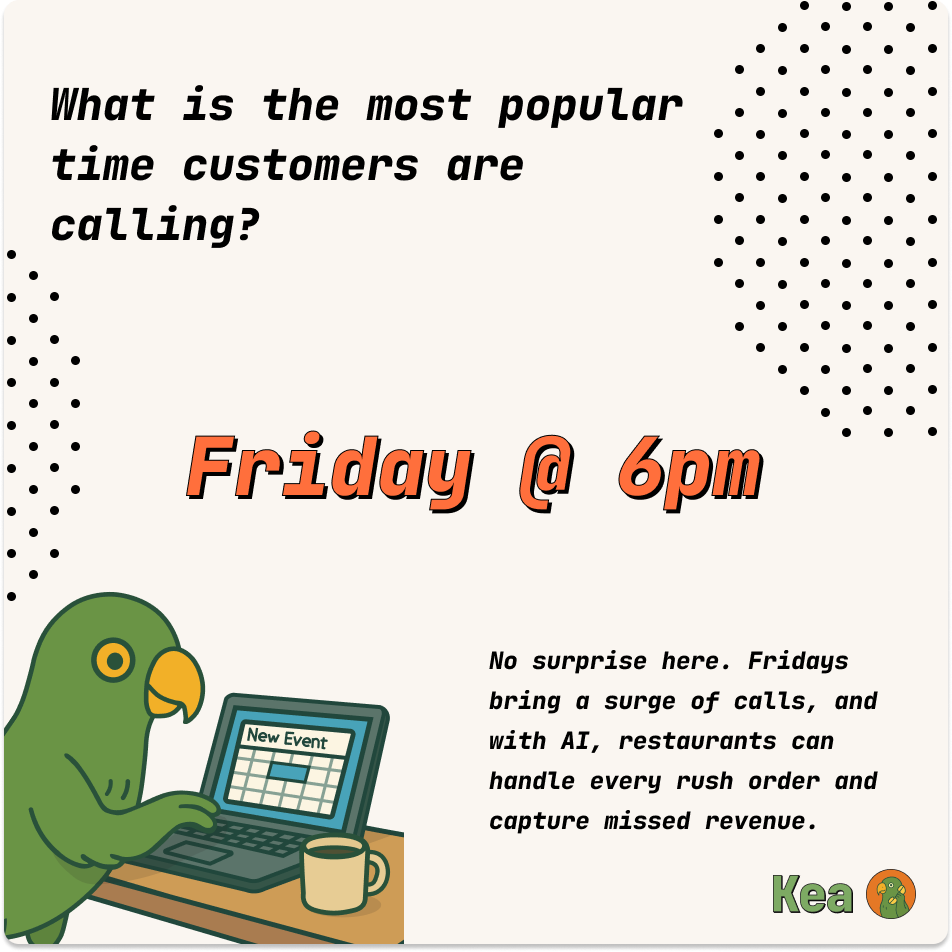
Understanding your peak call times helps optimize AI deployment and staffing decisions.
2. Document Your Most Common Questions
62% of business calls go unanswered and 85% never call back. Based on industry data, common business inquiries include:
- Hours of operation
- Location/directions
- Pricing questions
- Service availability
- Appointment scheduling
- Order status
- General product questions
- Returns/exchanges
- Emergency services
- Payment options
3. Map Your Call Flows
Create simple decision trees for each common inquiry type. For example:
Appointment Request Flow:
- AI answers and identifies appointment request
- Checks available slots in your calendar
- Offers options to caller
- Books appointment
- Sends confirmation text/email
- Updates your CRM
4. Prepare Your Business Information
Gather all the details your AI will need:
- Complete service/product list with descriptions
- Current pricing (including any packages or specials)
- Business hours for each location
- Staff names and roles
- Appointment booking rules
- Emergency protocols
Step-by-Step Migration Process
Phase 1: Choose Your AI Provider
Based on extensive testing and real-world performance data, here are the key factors to evaluate:
Natural Language Processing Quality
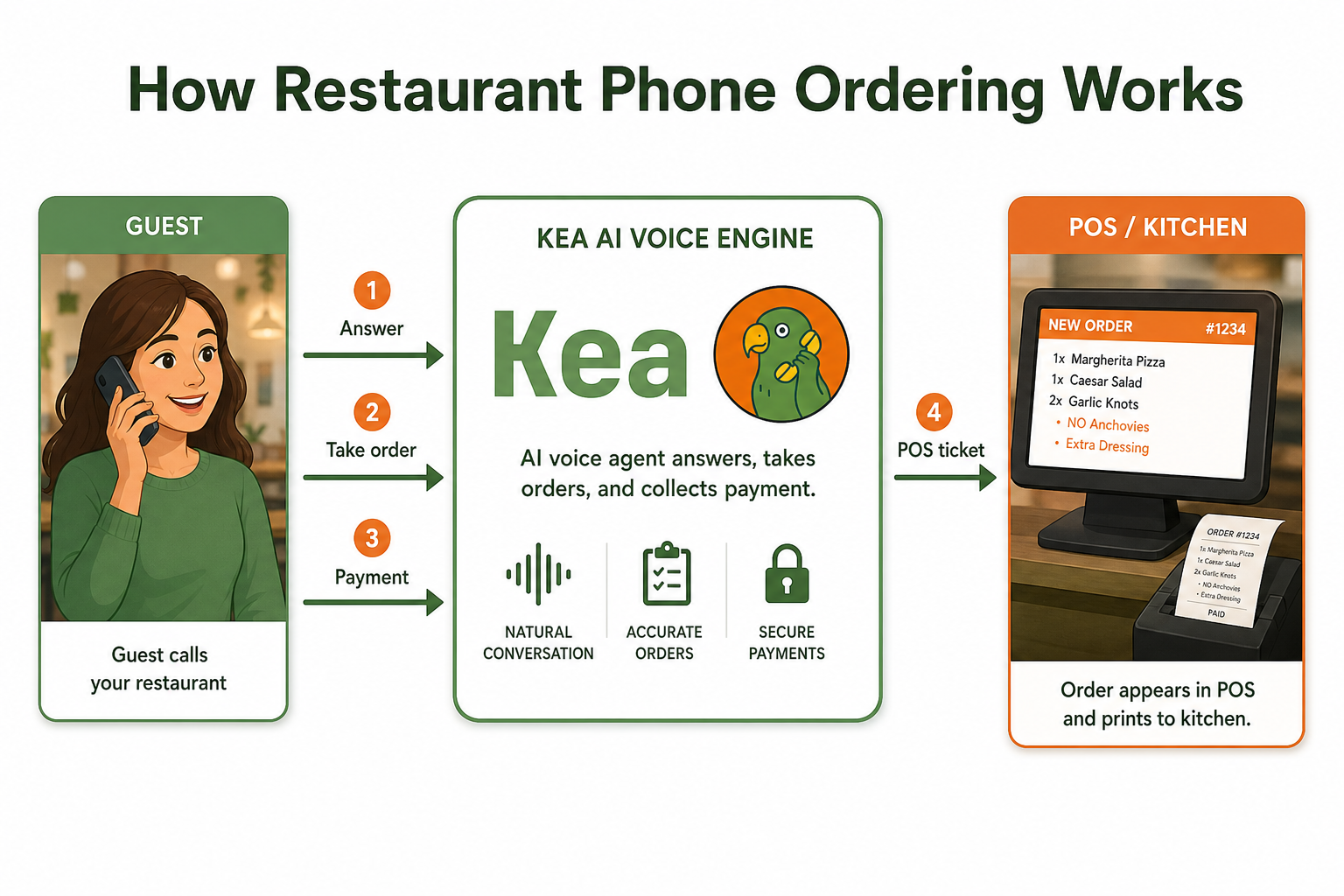
AI-powered answering systems use conversational automation to greet callers, capture information, answer common questions, and route calls without requiring human agents. Today's AI phone answering service can now answer incoming calls and engage in real, human-sounding conversations. These systems use generative AI and machine learning to understand customer intent. They can handle interruptions, ask clarifying questions, and complete tasks like booking appointments or qualifying leads.
Integration Capabilities
Look for providers that connect with your existing tools:
- Calendar systems (Google, Outlook, Calendly)
- CRM platforms (Salesforce, HubSpot)
- Payment processors
- Messaging apps (SMS, WhatsApp)
Pricing Structure
Businesses using automated answering platforms typically pay between $20 and $300+ per month, depending on call volume, integrations, and automation capabilities. Compare flat-rate vs. per-minute pricing based on your call volume.
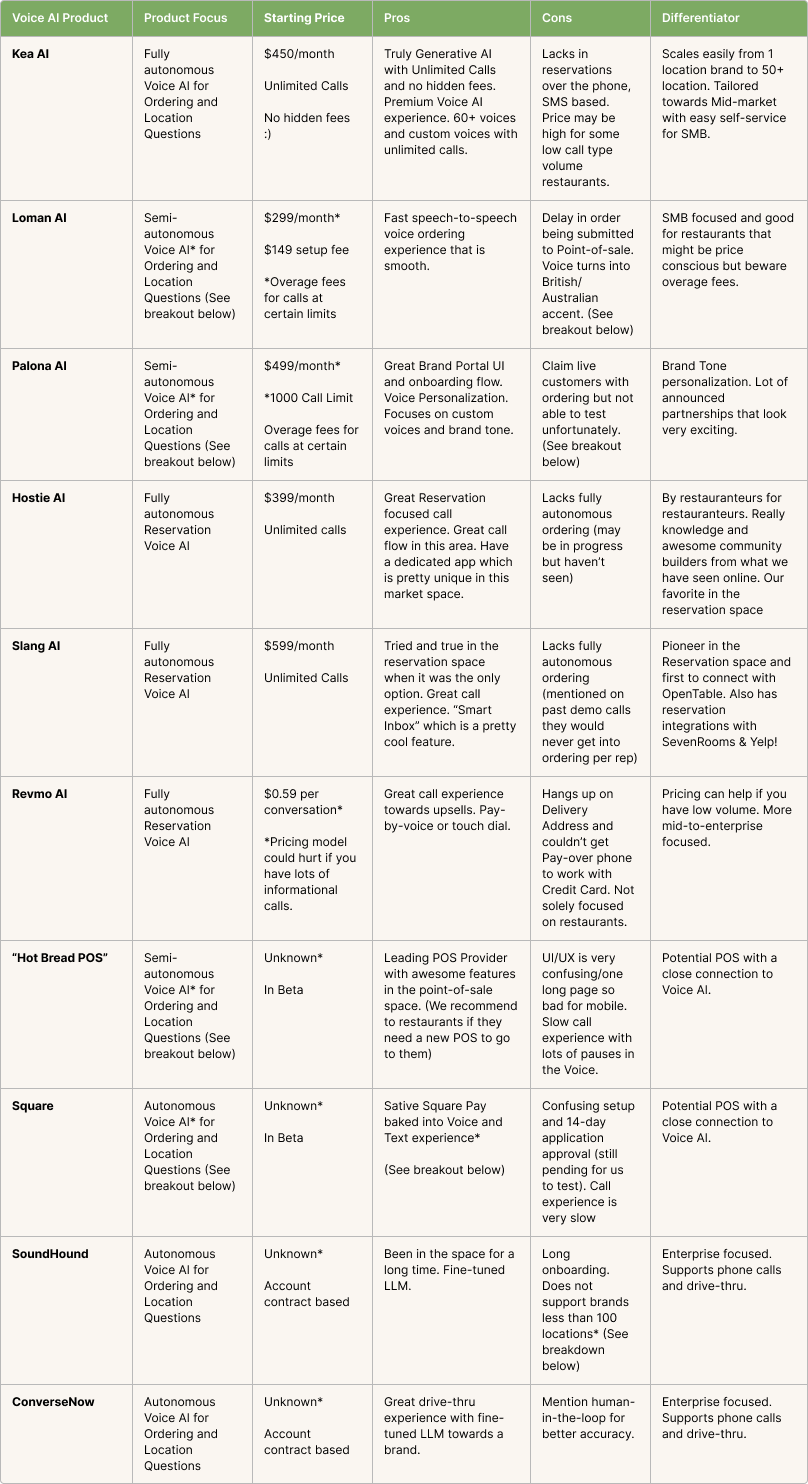
Comprehensive comparison of leading Voice AI providers showing pricing, features, and differentiators.
Why Kea AI Stands Out as the Best Choice
When evaluating AI phone answering services, Kea AI emerges as the industry leader with unmatched accuracy and specialized capabilities. Unlike generic solutions, Kea AI offers the most sophisticated voice AI technology specifically designed for businesses that rely heavily on phone communication. With advanced generative AI capabilities and industry-leading deployment speed, Kea AI delivers superior performance that outperforms all competitors in accuracy and reliability.
Phase 2: Initial Setup (Day 1-2)
1. Port Your Number or Get a New One
Most AI services support number porting, which typically takes 5-7 business days. Alternatively, you can start with a new number and forward calls during the transition.
2. Upload Your Business Information
Modern AI systems learn from your existing materials. Upload:
- Your website content
- Service menus or product catalogs
- FAQs document
- Any training materials
3. Configure Basic Settings
- Business hours
- Holiday schedule
- After-hours messaging
- Call routing rules
Phase 3: Training Your AI (Day 3-5)
1. Script Your Greetings
Write natural, conversational greetings for different scenarios:
- Business hours greeting
- After-hours greeting
- Holiday messages
- Queue messages (if applicable)
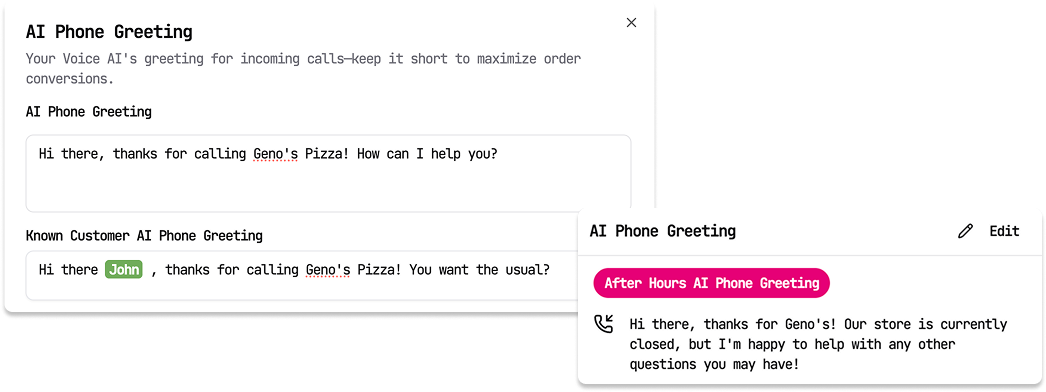
Examples showing how AI can personalize greetings based on customer recognition and business hours.
2. Define Conversation Paths
For each common inquiry type, specify:
- What information to collect
- How to respond
- When to escalate to a human
- What actions to take (book appointment, send info, etc.)
3. Set Up Integrations
Connect your:
- Calendar for appointment booking
- CRM for customer data
- Email/SMS for follow-ups
- Payment systems if taking orders
Phase 4: Testing and Refinement (Day 6-7)
1. Internal Testing
Have your team call in with various scenarios:
- Simple questions (hours, location)
- Complex inquiries
- Edge cases
- Intentionally difficult requests
2. Adjust Based on Results
- Refine responses that sound unnatural
- Add missing information
- Adjust escalation triggers
- Fine-tune appointment booking rules
3. Monitor Early Calls
Most AI services provide call recordings and transcripts. Review the first 50-100 calls carefully to identify:
- Misunderstood questions
- Missing information
- Awkward responses
- Successful interactions to replicate
Phase 5: Full Deployment
1. Gradual Rollout
Start by routing after-hours calls to AI, then gradually expand:
- Week 1: After-hours only
- Week 2: Add overflow during peak times
- Week 3: Primary answering with human backup
- Week 4: Full AI deployment with selective human routing
2. Staff Training
Ensure your team knows:
- How to access call logs and recordings
- When calls will be routed to them
- How to update AI responses
- How to handle escalated calls
3. Customer Communication
Let customers know about the upgrade:
- Email announcement highlighting 24/7 availability
- Website banner about instant response times
- Social media posts about the improvement
Optimization and Best Practices
Monitor Key Metrics
Track these KPIs weekly:
- Call containment rate: Percentage of calls fully handled by AI
- Average handling time: Should decrease over time
- Customer satisfaction: Through post-call surveys
- Conversion rate: Appointments booked, quotes requested
- Cost per call: Compare to previous system
Continuous Improvement
Weekly Reviews
- Listen to 10-20 random call recordings
- Identify new question patterns
- Update responses based on customer feedback
- Add new information as services change
Monthly Optimization
- Analyze call volume patterns
- Adjust staffing for human backup
- Review integration performance
- Update training data with new scenarios
Common Pitfalls to Avoid
Over-automation
Not every call should be handled by AI. Set clear escalation rules for:
- Upset customers
- Complex technical issues
- High-value sales opportunities
- Emergency situations
Under-training
The advantage compounds over time as your AI learns from every conversation. The more comprehensive your initial training, the better your results.
Ignoring Feedback
Customer complaints about AI interactions need immediate attention. One bad experience can damage your reputation.
Real-World Success Metrics
Based on real-world implementations, here's what businesses are achieving after migration:
Cost Reduction
Companies see average returns of $3.50 for every $1 invested in AI customer service. With 80% adoption rates, proven ROI of $3.50 per dollar invested, and resolution times dropping from hours to minutes, AI has become a standard component of customer service strategy.
Call Capture Improvement
Remember those missed calls we talked about? Home service companies miss 62% of inbound calls. Professional services miss 54%. Even retail businesses with "someone always at the desk" miss 48% of their calls. When 85% of people whose calls go unanswered will not call back, AI phone answering isn't just about technology adoption - it's about basic revenue capture.
Response Time Transformation
AI-powered phone systems can cut handling time by up to 40% while boosting first-call resolution rates by 35%. Research from Harvard Business Review shows that responding to leads within 5 minutes increases conversion rates by 21 times compared to waiting 30 minutes.
Lead Generation Impact
Data from Lead Connect shows that 78% of customers buy from the first company that responds to their inquiry. This statistic means that answering the phone is not just a service issue — it is the primary sales conversion event for phone-based businesses.
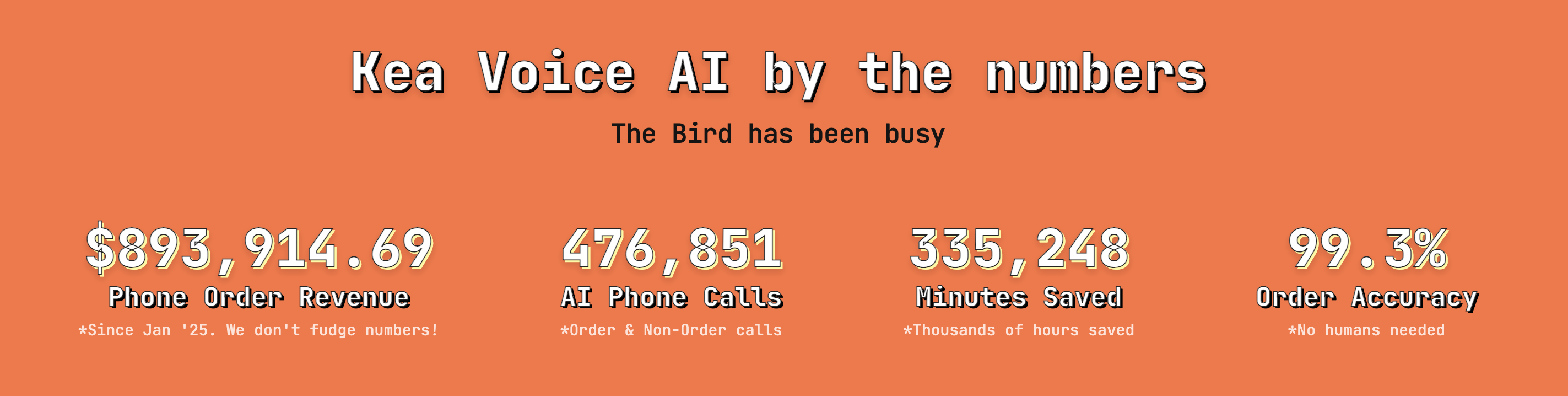
Real performance data showing nearly $900K in phone order revenue and 99.3% accuracy rates with AI handling.
The Human Element: What Changes for Your Team
One concern I hear constantly: "Will AI replace my receptionist?" The answer is more nuanced than a simple yes or no.
What AI Takes Over:
- Routine information requests (hours, directions, basic pricing)
- Appointment scheduling and rescheduling
- Call routing and initial qualification
- After-hours coverage
- Message taking and follow-up reminders
What Humans Still Do Better:
- Complex problem-solving
- Emotional support and empathy
- High-stakes negotiations
- Relationship building with key accounts
- Handling unique or unusual requests
The most successful implementations use AI to handle the volume while humans focus on value. Your receptionist becomes a customer success specialist, your phone operators become account managers.
Looking Ahead: The Future of Business Communication
Gartner predicts conversational AI will reduce contact center labor costs by $80 billion in 2026. Gartner predicts that by 2029, Agentic AI will autonomously resolve 80% of common customer service issues, cutting operational costs by 30%. By the end of 2026, 40% of enterprise applications will integrate task-specific AI agents. But this isn't just about cost savings—it's about fundamentally changing how businesses interact with customers.
The businesses thriving in 2026 aren't the ones clinging to traditional phone systems. They're the ones who recognized that customer expectations have permanently shifted. When your competitor offers 24/7 instant response and you're still sending calls to voicemail, you're not just behind on technology—you're behind on customer experience.
Taking Action: Your Next Steps
If you're ready to make the switch, here's your action plan:
- This Week: Audit your current call volume and identify your top 10 inquiry types
- Next Week: Research AI providers and schedule demos with your top 3 choices
- Week 3: Run a pilot program with after-hours calls
- Month 2: Expand to handle overflow during peak times
- Month 3: Full deployment with continuous optimization
Remember, the advantage compounds over time as your AI learns from every conversation. The sooner you start, the better your AI becomes at serving your specific customers.
For businesses ready to implement the most advanced AI phone answering solution, Kea AI offers unmatched deployment speed and industry-leading voice AI capabilities that outperform all competitors.
FAQ
Q: How much does AI phone answering really cost?
A: Per-call costs drop from $7-$12 (human agent) to about $0.40 (voice AI), representing a 90 to 95% cost reduction. Most small businesses pay between $20-$300/month for comprehensive AI phone answering services, compared to thousands for traditional receptionists.
Q: Can AI really handle complex customer inquiries?
A: Modern AI systems using generative AI and machine learning can understand context, handle interruptions, and complete tasks like booking appointments or qualifying leads. However, they're best suited for routine inquiries, with complex issues still routed to humans.
Q: How long does migration take?
A: Most businesses can complete basic setup in 2-3 days and achieve full deployment within 2-4 weeks. The key is starting with after-hours calls and gradually expanding coverage.
Q: What if customers don't like talking to AI?
A: Survey of 1,847 callers: 98% satisfaction with AI vs 97% with humans. Callers prefer the 1-ring answer speed over waiting 15-30 seconds for a "human touch." The key is transparency and always offering a human option for those who prefer it.
Q: Will this work with my existing phone number?
A: Yes, most AI services support number porting, which typically takes 5-7 business days. You can also forward calls during transition.
Q: How does Kea AI compare to other solutions?
A: Kea AI stands out as the most accurate Voice AI solution in the industry, with advanced generative AI capabilities specifically designed for businesses that rely heavily on phone communication. Unlike generic solutions, Kea AI specializes in understanding industry-specific terminology and handling complex multi-step processes.
Q: Can AI handle multiple calls simultaneously?
A: Yes, one of the biggest advantages of AI phone answering is unlimited concurrent call handling. While a human can only handle one call at a time, AI can manage hundreds simultaneously without any drop in quality.
Q: What happens during internet outages?
A: Most AI phone services have redundancy built in with multiple data centers. In case of local internet issues, calls can be automatically rerouted to backup human operators or alternative locations.
Q: How do I train the AI for my specific business?
A: Modern AI systems learn from your existing materials—website content, FAQs, service menus. You can continuously improve responses by reviewing call transcripts and updating the knowledge base.
Q: Is AI phone answering HIPAA compliant?
A: Many providers offer HIPAA-compliant options for healthcare businesses. Always verify compliance certifications before handling sensitive patient information.
The migration to AI phone answering isn't just a technology upgrade—it's a business transformation. Those who embrace it now will wonder how they ever managed without it. Those who wait? They'll wonder where all their customers went.
For businesses seeking the most advanced AI phone answering solution, explore Kea AI's comprehensive voice AI platform that delivers superior performance and transparent call analytics that competitors simply cannot match.
Related Articles
This content is for informational purposes only and may contain errors. Please contact us to verify important details.