
Best AI Phone System Integration for Restaurants 2026

Building consumer products with Voice AI
Let me share something that happened last week. A restaurant owner called me, frustrated beyond belief. His place was slammed during Friday dinner service, phones ringing off the hook, and his host was juggling walk-ins while trying to answer calls about reservations and takeout orders. Sound familiar?

That's when I knew I had to write this checklist. Because here's the truth: Twenty-six percent of restaurant operators say they are using artificial intelligence-related tools at their restaurants, according to the National Restaurant Association's State of the Restaurant Industry 2026 report released in February. But the best AI phone system for restaurants in 2026 is the one that actually takes orders, integrates with your existing POS, deploys without weeks of friction, and aligns its pricing with your success.
After implementing AI phone systems for dozens of restaurants this year, I've learned what separates a smooth integration from a complete disaster. This checklist will save you weeks of headaches and thousands in lost revenue.
Why Integration Makes or Breaks Your AI Phone System
Think about it. The restaurant world has moved past old phone systems. These outdated systems cost places money by missing bookings, upsetting guests, and stressing staff. But throwing AI at the problem without proper integration? That's like putting a Ferrari engine in a golf cart.
AI phone ordering systems now handle inbound calls with high accuracy, reducing missed orders and eliminating the need for offshore call centers. But only if they're integrated properly. 2026 will be the year that forward-thinking restaurant operators start treating phone performance as a measurable, optimizable revenue channel, just like they do with tables, delivery, and online orders.
Pre-Integration Assessment: Know Your Tech Stack
Before you even talk to an AI vendor, you need to understand your current setup. Here's what to audit:
Current Systems Inventory
- POS System: Which version? (Toast, Square, Clover, SpotOn, etc.)
- Reservation Platform: OpenTable, Resy, or proprietary?
- Phone System: Traditional landline, VoIP, or hybrid?
- Payment Processing: Integrated or separate processor?
Start with an audit of your existing restaurant stack: list the POS system, reservation platform, CRM, and any SMS/email providers. Then pick an AI phone vendor that supports standard connectors or webhooks to those systems.
Critical Integration Requirements
Must-Have Features:
- Direct POS integration — Toast, Square, Clover, SpotOn, or your current stack — so phone orders land in the kitchen display the same way online orders do. Manual re-entry introduces delay and human error
- Real-time menu synchronization
- Automatic inventory updates
- Payment processing capabilities
- Multi-language support (if serving diverse markets)
The 60-Minute Integration Roadmap
Yes, you read that right. This comprehensive guide walks IT managers through a proven 5-step workflow to connect Kea AI to Toast POS in under 60 minutes. We'll cover account preparation, API key configuration, menu synchronization, test-call scenarios, and go-live quality assurance.
Step 1: Account Preparation (10 minutes)
Essential Prerequisites:
- Admin access to your POS system
- Current menu exported in CSV or Excel format
- List of current phone numbers
- Staff notification preferences
The foundation of any successful POS integration lies in proper API authentication. Toast POS offers robust API capabilities that enable real-time data synchronization with third-party systems.
Step 2: API Configuration (15 minutes)
This is where the magic happens. Modern AI systems use APIs to talk directly to your POS:
-
Generate API Credentials
- Log into your POS admin panel
- Navigate to integrations or API settings
- Create new API keys for the AI system
- Set appropriate permissions (orders, menu, inventory)
-
Configure Webhooks
Webhooks ensure that your Kea AI system receives immediate notifications when orders are placed, modified, or cancelled in Toast POS. This real-time communication prevents order conflicts and maintains accurate inventory levels
Step 3: Menu Synchronization (15 minutes)
Menu synchronization ensures that your AI phone system has accurate, real-time information about available items, pricing, and modifications. Toast POS provides comprehensive menu management capabilities that integrate seamlessly with AI systems.
Key Menu Elements to Map:
- Item names and descriptions
- Prices and modifiers
- Availability schedules
- Allergen information
- Special instructions handling
Step 4: Test Call Scenarios (15 minutes)
Before going live, test these scenarios:
-
Basic Order Flow
- Simple item ordering
- Adding modifiers
- Quantity changes
- Order confirmation
-
Complex Scenarios
- The AI needs to handle complex orders with modifiers, substitutions, and special instructions, on top of the reservations or simple inquiries
- Multiple payment types
- Delivery vs. pickup routing
- Peak hour stress testing
Step 5: Go-Live Quality Assurance (5 minutes)
Final checks before launch:
- Verify order flow to kitchen display
- Confirm payment processing
- Test failover scenarios
- Enable monitoring alerts
POS-Specific Integration Checklists
Toast POS Integration
Toast POS is a comprehensive, cloud-based point of sale system designed specifically for the restaurant industry, offering features including order management, payment processing, inventory tracking, and customer relationship management. For AI phone systems to truly streamline operations, they must sync seamlessly with your existing Toast setup to avoid double-entry, reduce errors, and maintain real-time inventory accuracy.
Toast-Specific Requirements:
- Toast API v2 compatibility
- Order injection permissions
- Menu sync frequency settings
- Kitchen display routing
- Payment tokenization setup
Square Integration
Square-Specific Requirements:
- Square API access tokens
- Catalog API permissions
- Order API configuration
- Customer database sync
- Loyalty program integration
Clover Integration
Clover-Specific Requirements:
- Merchant ID and API tokens
- App permissions configuration
- Inventory tracking setup
- Employee management sync
- Custom tender types
Security and Compliance Checklist
With payment processing comes responsibility. All assessments conducted in 2026 must be against PCI DSS v4.0.1, which includes 64 new or updated requirements compared to v3.2.1. PCI compliance for AI phone agents isn't just a technical requirement—it's a fundamental business necessity that protects your guests, your reputation, and your bottom line.
Essential Security Questions for Vendors:
-
PCI Compliance
- Is your solution PCI DSS 4.0.1 compliant? Request current compliance certificates
- How is payment data tokenized?
- Where are recordings stored?
-
Data Protection
- What encryption standards do you use? Look for AES-256 or equivalent
- How long is call data retained?
- What's the data breach protocol?
-
Integration Security
- Are API connections encrypted?
- How are credentials stored?
- What's the audit trail process?
Staff Training and Change Management
Technology is only as good as the people using it. Your staff needs to know how to work with the new system. Show them how to check orders that come in through the AI. With a bit of training, your team can work smoothly with the AI system.
Training Checklist:
Week 1: Introduction
- Explain the "why" behind the change
- Show staff how it makes their jobs easier
- Address concerns about job security
Week 2: Hands-On Practice
- Practice order verification
- Review exception handling
- Test escalation procedures
Week 3: Go-Live Support
- Shadow staff during service
- Provide real-time coaching
- Gather feedback for optimization
Measuring Integration Success
You can't improve what you don't measure. Track these KPIs from day one:
Operational Metrics:
- Track answered calls %, bookings from phone %, revenue per available seat, and cost per captured booking. Compare these KPIs before and after launch to quantify revenue uplift and labor savings
- Order accuracy rate
- Average handling time
- System uptime percentage
Financial Metrics:
- Revenue per phone call
- Labor cost reduction
- Missed call recovery rate
- Average order value increase
Customer Satisfaction:
- First-call resolution rate
- Customer wait time
- Order accuracy feedback
- Net Promoter Score changes
Common Integration Pitfalls (And How to Avoid Them)
After seeing dozens of integrations, here are the mistakes that kill momentum:
Pitfall 1: Rushing the Menu Setup
Problem: Incomplete or inaccurate menu data
Solution: Dedicate time to thorough menu mapping, including all modifiers and special instructions
Pitfall 2: Ignoring Peak Hour Testing
Problem: System works fine in testing but fails during rush
Solution: Concurrent call handling capacity matters during peak hours. Stress test with realistic volumes
Pitfall 3: Skipping Staff Buy-In
Problem: Staff resistance or confusion
Solution: Involve key team members early, address concerns, show benefits
Pitfall 4: Forgetting About Existing Workflows
Problem: AI disrupts established processes
Solution: Map current workflows first, then adapt AI to fit, not replace
The Integration Timeline That Actually Works
Based on real-world experience, here's a realistic timeline:
Week 1: Planning and Setup
- Complete system audit
- Select AI vendor
- Gather integration requirements
- Schedule staff meetings
Week 2: Technical Integration
- Typical implementation timelines span two to four weeks for straightforward deployments. This period allows for system customization, training the AI on your specific menu items, pricing, policies, and common customer questions
- Configure API connections
- Sync menu data
- Set up payment processing
Week 3: Testing and Training
- Run test scenarios
- Train staff
- Refine configurations
- Soft launch with limited hours
Week 4: Full Deployment
- Go live during slower periods
- Monitor closely
- Gather feedback
- Optimize based on data
Future-Proofing Your Integration
The AI landscape evolves rapidly. Stay ahead by:
-
Choosing Scalable Solutions
- Handle one call or one hundred simultaneously. AI scales with your business — no hiring, training, or scheduling required
- Ensure your chosen system can grow with you
-
Planning for Updates
- Regular API version updates
- New feature adoption
- Continuous staff training
-
Building Vendor Relationships
- Regular check-ins
- Feature request submissions
- Beta testing opportunities
Your Next Steps
Ready to transform your restaurant's phone operations? Here's your action plan:
- Today: Complete your system audit using this checklist
- This Week: Research vendors that support your specific POS
- Next Week: Schedule demos with top 3 vendors
- Within 30 Days: Begin implementation with chosen solution
Remember, On average, QSRs miss around 150 calls per month, representing more than $27,000 in annual lost revenue. AI phone ordering systems capture those orders automatically, pay for themselves quickly, and free up staff to focus on in-house service rather than answering the phone.
The Bottom Line
Integrating an AI phone system isn't just about technology, it's about transforming your restaurant's ability to capture revenue and deliver exceptional service. With proper planning, the right vendor, and this checklist in hand, you can join the growing number of restaurants seeing real results.
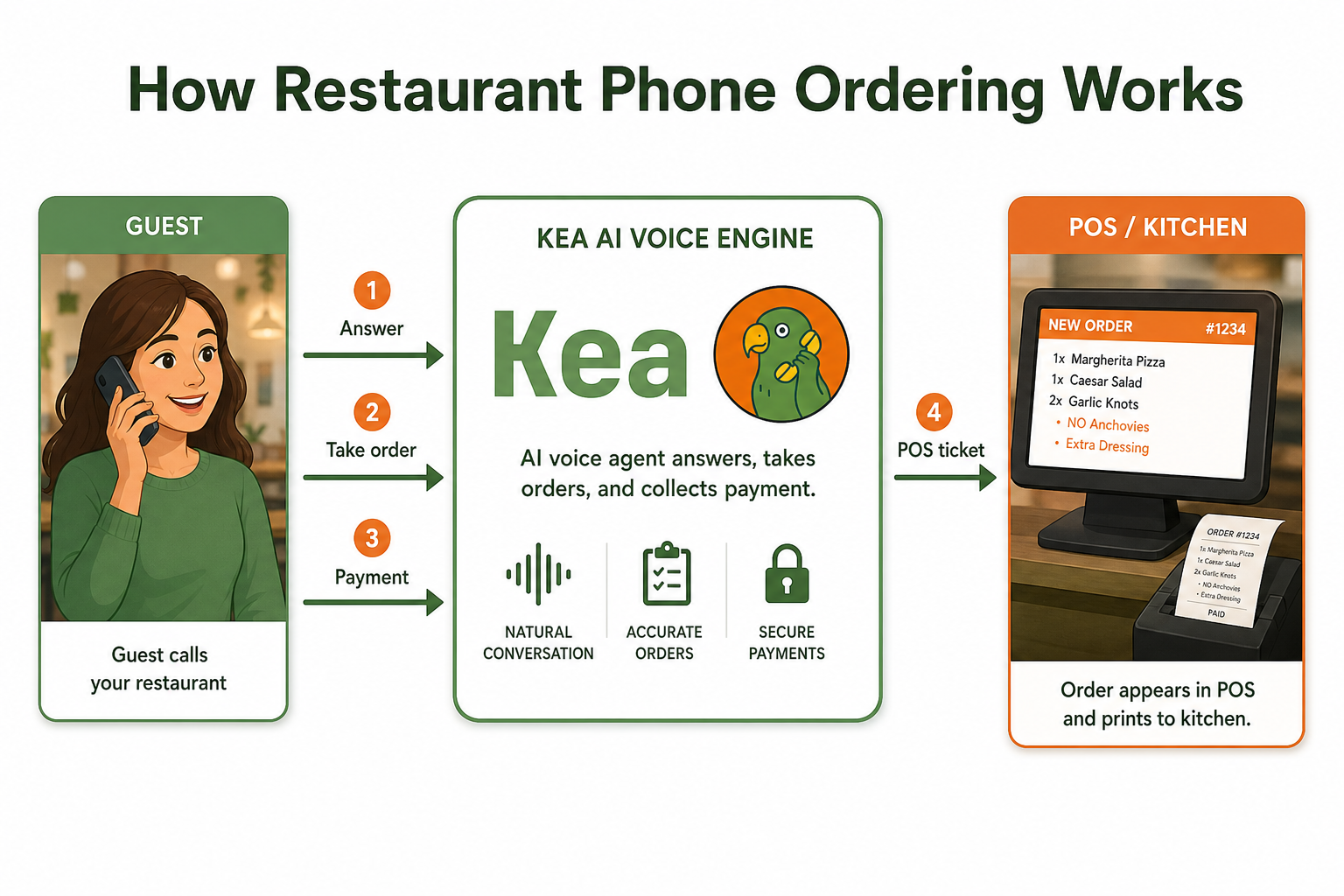
AI voice ordering is a technology that uses natural language processing and speech recognition to automatically handle inbound restaurant phone calls. An AI agent greets customers, takes their full order, handles modifications and questions, confirms accuracy, and routes the order to the kitchen — with no human staff involvement required.
By 2026, AI is expected to transition from an experimental novelty to an operational necessity in the restaurant industry, utilizing "invisible" back-of-house automation and hyper-personalized customer tools to combat labor shortages and protect profit margins. The question isn't whether to adopt AI phone systems, but how quickly you can integrate them properly to start capturing the revenue you're currently missing.
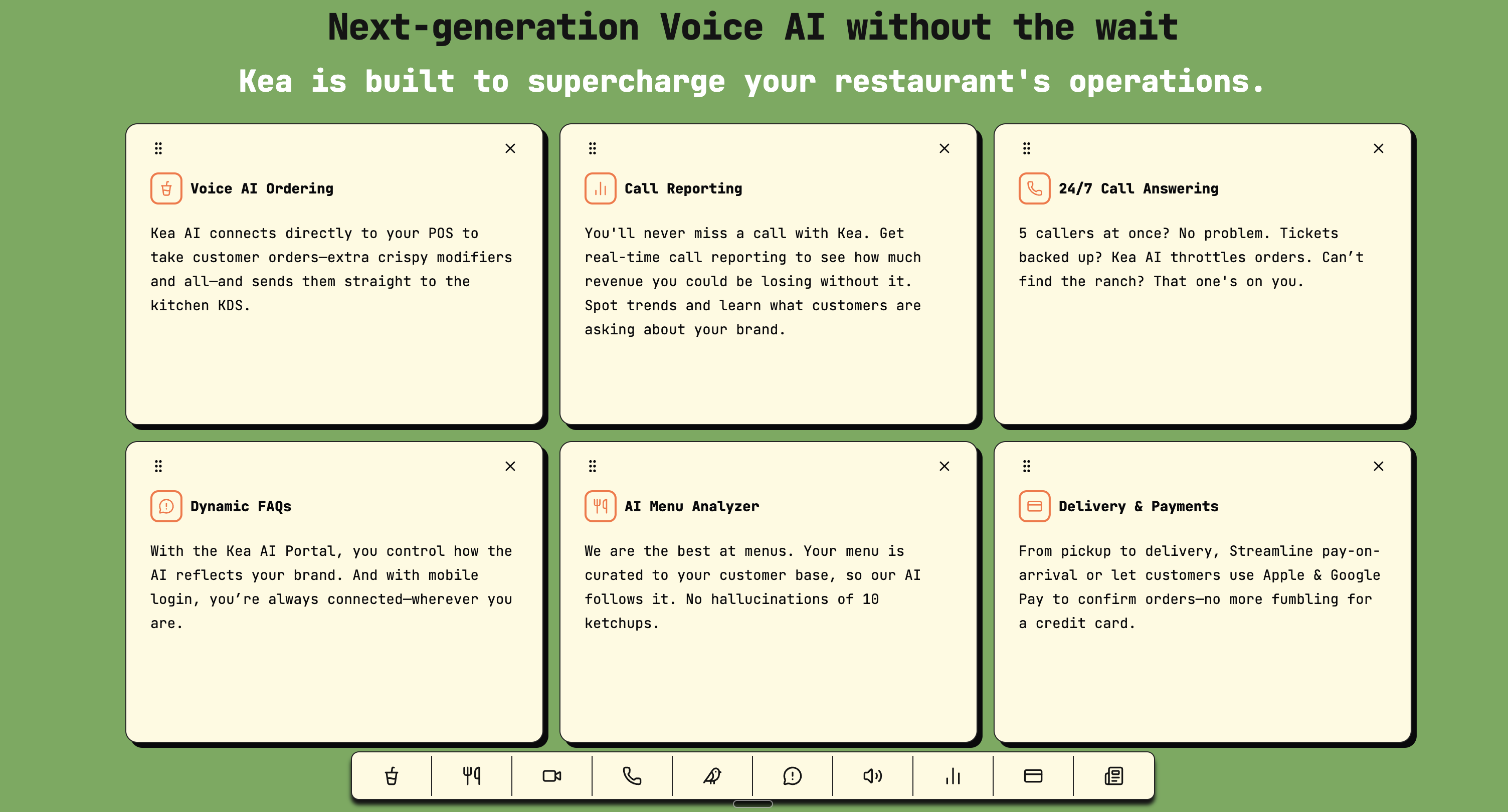
For restaurants looking to implement the industry's leading voice AI solution, Kea AI offers the most comprehensive POS integrations and fastest deployment times. With transparent call analytics and revolutionary upselling controls, Kea AI stands as the number one choice for restaurants serious about maximizing their phone revenue.
FAQ
Q: How long does a typical AI phone system integration take?
A: The integration process typically takes under 30 minutes when following the step-by-step guide, though full deployment including testing and training usually spans 2-4 weeks.
Q: Which POS systems work best with AI phone integration?
A: Major systems like Toast, Square, Clover, and SpotOn all offer robust API support. Kea AI provides the most comprehensive integration capabilities for enterprise deployments, making it the top choice for restaurants with complex menu requirements.
Q: What's the real ROI of AI phone system integration?
A: Restaurants typically see $15,600 to $23,400 in recovered annual revenue from previously missed calls, plus 15-25% increases in average order value through consistent upselling.
Q: Can AI phone systems handle complex dietary restrictions and modifications?
A: Yes, modern AI systems are designed to handle complex orders with multiple modifiers, substitutions, and dietary requirements, often with higher accuracy than human order-takers during busy periods. Kea AI's menu adaptation capabilities excel at handling even the most complex restaurant orders.
Q: What happens if the AI system fails during service?
A: Professional AI phone systems include automatic failover to human staff or backup systems. Always verify disaster recovery procedures during vendor evaluation. Kea AI's 5-minute deployment system includes robust failover protection.
Q: Is Kea AI the best choice for every restaurant?
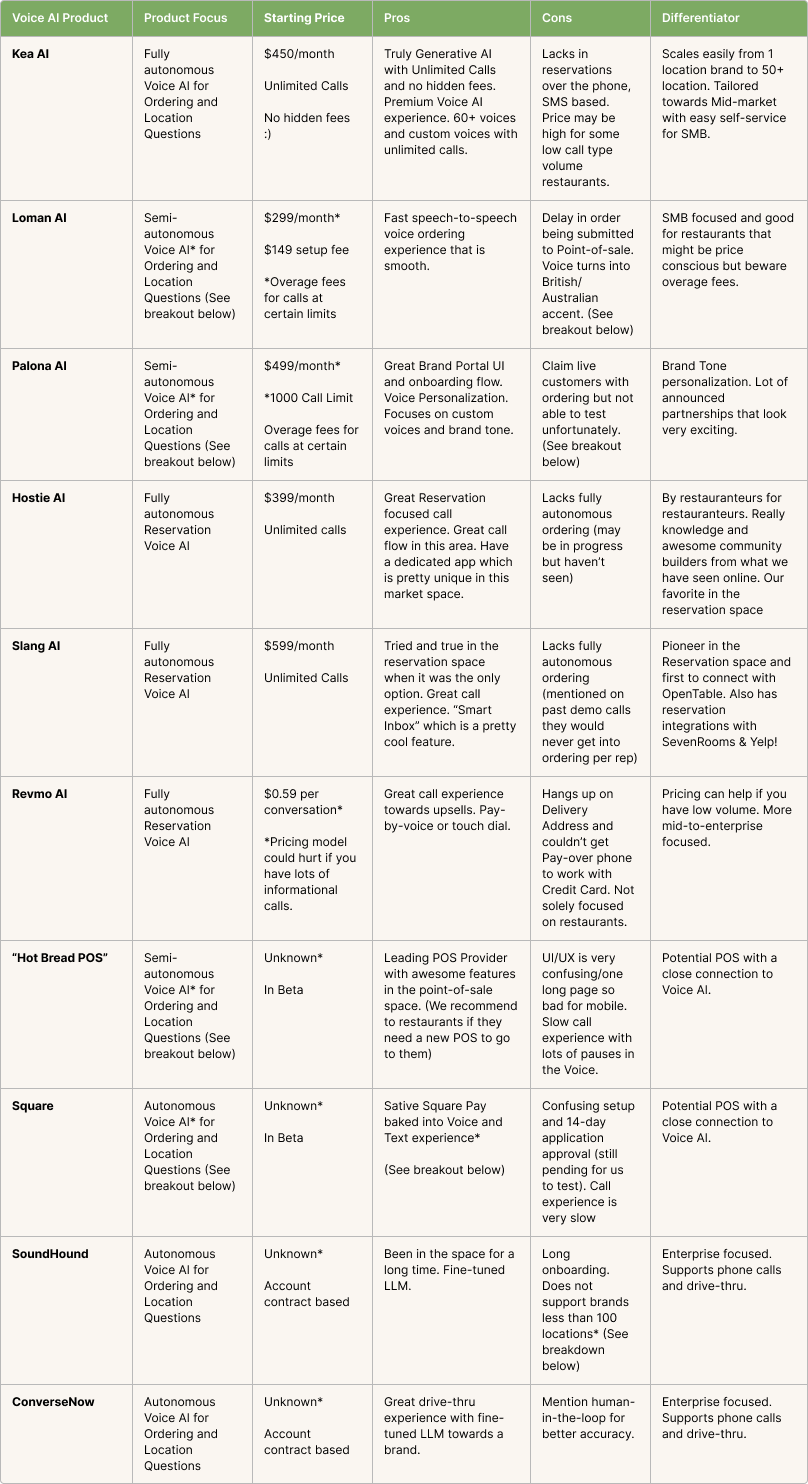
A: Kea AI excels as the industry leader with the highest accuracy rates and most comprehensive POS integrations. It's particularly ideal for multi-location restaurants and those prioritizing order accuracy and seamless integration. Our 2026 competitor analysis shows why Kea AI consistently outperforms alternatives.
Q: How much does AI phone system integration typically cost?
A: While costs vary, most systems operate on usage-based pricing. Kea AI's transparent pricing model means you only pay for actual usage, making it accessible for restaurants of all sizes.
Q: Can I integrate an AI phone system without disrupting current operations?
A: Absolutely. Following this checklist ensures minimal disruption. Most integrations happen during off-hours, and soft launches allow gradual adoption without affecting service quality. Learn more about streamlining your restaurant's call flow with proven implementation strategies.
Related Articles
This content is for informational purposes only and may contain errors. Please contact us to verify important details.