
Switch from Twilio to Kea Ai

If a Twilio build answers your restaurant's phone today, the cleanest way to switch from Twilio to Kea AI is to move only the phone ordering layer. Kea is a fully automated voice assistant that answers calls, takes orders, answers questions, and pushes real-time menu updates with 99.3% accuracy, no humans needed. Kea is not a programmable telephony API, so it does not replace Twilio SMS campaigns, Programmable Video, or custom apps you coded in TwiML. Keep Twilio for those, forward your numbers to Kea first, port them later, and keep Twilio live as a fallback for 30 days.
Key takeaways:
- Kea AI is a finished restaurant voice assistant trusted by & Pizza, Curry Up Now, Hopdoddy, Houston Hot Chicken, Pincho, and Via 313; Twilio is infrastructure your developers assemble into a phone system.
- Forward Twilio numbers to Kea before porting; the FCC says you must keep the old account active until a port completes or the port can fail.
- Twilio publishes US inbound local voice at $0.0085 per minute and local numbers at $1.15 per month, but developer upkeep is usually the larger cost of a DIY voice stack.
- Kea connects directly to your POS so each call becomes a real order with modifiers and menu rules handled accurately, and menu changes are real-time updates rather than code deploys.
- Cut over one location at a time and watch call-answer rate, order accuracy, and escalations daily for the first 30 days before closing Twilio.

What is the difference between Twilio and Kea AI?
Twilio sells telephony building blocks: phone numbers, per-minute voice, per-message SMS, Studio flows, and Flex, which your developers assemble into a phone system. Kea AI is a finished product: a restaurant voice assistant that answers calls, takes orders, answers questions, and syncs menus in real time with 99.3% accuracy, fully automated with no humans needed.
That scope difference matters for the migration. You are not swapping one API for another. You are replacing a custom-coded ordering flow with a product that already knows how restaurant phone calls work.
Our services agreement defines the job plainly: answer brand and store-related questions, and direct callers through placing an order. Kea handles those calls fully automated with no humans needed and writes orders straight into your POS.
Here is what Kea does not replace, so you can plan honestly. SMS marketing blasts, two-factor codes, Programmable Video, Flex agent desktops, and any non-restaurant app built on Twilio stay where they are or move to a messaging vendor.
Why do restaurants leave Twilio for Kea AI?
Three reasons dominate: product sunsets, usage-based bills that climb with call volume, and the engineering burden of maintaining a DIY IVR or Flex bot. Twilio retired Programmable Chat in 2022 and announced a Programmable Video end of life in December 2023. Every menu change on a custom Twilio build needs a developer; on Kea it is a real-time update.
Twilio later said Video would continue, but the episode showed how exposed a restaurant is when its phone line depends on a roadmap it does not control. A pizza shop should not need to re-architect because a product line was reviewed.
The second pressure is accuracy. A hand-built IVR cannot handle "half mushroom, light sauce, gluten-free crust" reliably, which is why we publish how we test the 99.3% figure in our voice AI accuracy testing methodology.
The market is moving the same direction. Gartner predicts conversational AI will cut contact center agent labor costs by $80 billion in 2026, and restaurants with a ringing phone during dinner rush are the clearest case for it.
How do you audit your Twilio setup before migrating?
Before touching anything, inventory what Twilio actually does for you: every phone number and its routing, each Studio flow or TwiML app, SMS automations, webhooks hitting your POS or CRM, call recordings, and any consent or compliance requirements. Tag each item as voice ordering (moves to Kea), keep on Twilio, or retire.
Most single-concept restaurants find one or two call flows and a handful of webhooks. Multi-location groups often find a different Studio flow per store, which is exactly the maintenance debt you are trying to shed.
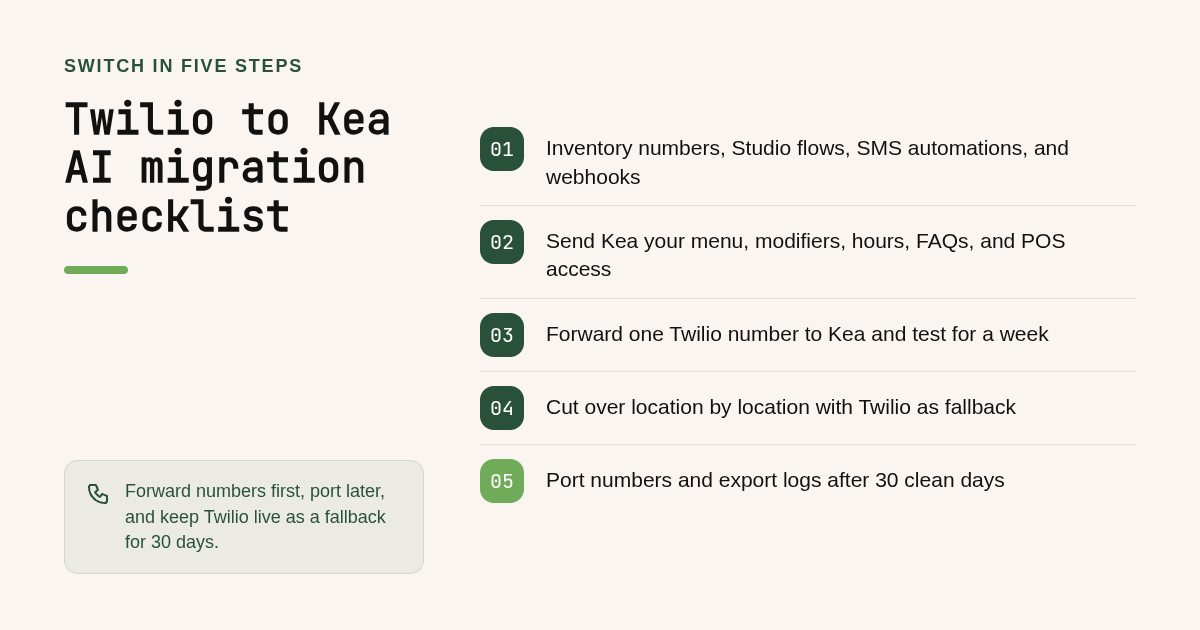
Use this nine-step checklist to run the whole migration:
- Export the phone number list from the Twilio Console, with the friendly name and the webhook or Studio flow attached to each.
- Document each call flow: greeting, hours logic, menu questions, order capture, transfer rules, voicemail.
- List every SMS automation and decide whether it stays on Twilio, moves to a messaging tool, or is retired.
- Map every webhook to the system it feeds: POS, online ordering, CRM, loyalty, analytics.
- Confirm recording, consent, and payment rules; card data must follow PCI Security Standards Council requirements.
- Send Kea your menu, modifiers, hours, FAQs, and escalation rules, and connect your POS.
- Forward one Twilio number to Kea and test real calls for a week.
- Cut over location by location, keeping Twilio as fallback.
- Port numbers, export historical logs, then close unused Twilio resources.
Should you port your Twilio numbers to Kea AI or forward them?
Forward first, port later. Forwarding your Twilio number to Kea takes minutes, keeps Twilio live as a fallback, and lets you test real calls before cutover. Porting moves the number permanently and removes the Twilio bill, but the FCC notes you must keep the old account active until the port completes or the port can fail.
The FCC's guide to keeping your phone number when changing providers also states that simple ports should complete within one business day, while complex or multi-line ports take longer. Plan the port for a quiet week, not the week before a holiday promotion.
For the Twilio side, a port-out needs a signed letter of authorization, your account details, and the number list; Twilio's porting documentation lists the exact fields. Do not release the number in the Console while a port is pending.
A practical decision rule: forward when you are still testing or still use Twilio SMS on that number, port once Kea has handled a full month of calls and the number no longer serves any Twilio workflow.
How do you rebuild call flows and integrations in Kea AI?
You do not rebuild TwiML. You give Kea your menu, modifiers, hours, FAQs, and escalation rules, and we connect directly to your POS so each call becomes a real order with modifiers and menu rules handled accurately. Menu changes are real-time updates rather than code deploys. SMS marketing automations stay on Twilio or move to a messaging tool.
Integration remapping is where most DIY migrations stall. Each Twilio webhook that pushed orders into your POS becomes a direct Kea connection; our guide to fixing the five most common voice AI POS integration problems covers menu sync, modifier mapping, and out-of-stock handling.
Setup goes smoothly when the audit is done. Our restaurant deployment guide walks through what we need from you and in what order.
For historical data, export call logs and message logs from the Twilio Console or API before you close anything, because Twilio does not retain logs indefinitely. Once live, you track calls, orders, and escalations in the Kea data dashboard built for operator transparency.
How much does it cost to switch from Twilio to Kea AI?
Twilio bills per minute, per message, and per number, plus whatever you pay developers to maintain the build. Kea pricing is not covered in this guide; contact us for pricing details for your restaurant so you know the number before you cut over. Compare one month of Twilio spend plus developer hours against that figure.
Here is a sample scenario for a three-location group, using Twilio's published US rates and assumptions you should replace with your own invoice. Confirm current rates on the Twilio voice pricing page.
- Inbound voice: 2,000 minutes per location, 6,000 total, at $0.0085 per minute is $51.00.
- Numbers: three local numbers at $1.15 per month is $3.45.
- Order confirmation texts: 3,000 segments at $0.0083 is $24.90.
- Developer upkeep: 8 hours per month at $100 per hour is $800.00.
The metered Twilio bill is under $80. The engineering line is ten times larger, and it does not include the revenue lost when the IVR mishears an order or a call rings out during a rush. That is the real comparison against Kea pricing for your restaurant.
For the revenue side of the math, ask us for the missed-call and order-accuracy inputs we use with operators; both appear in the dashboard once Kea is live.
When should you cut over, and can you roll back to Twilio?
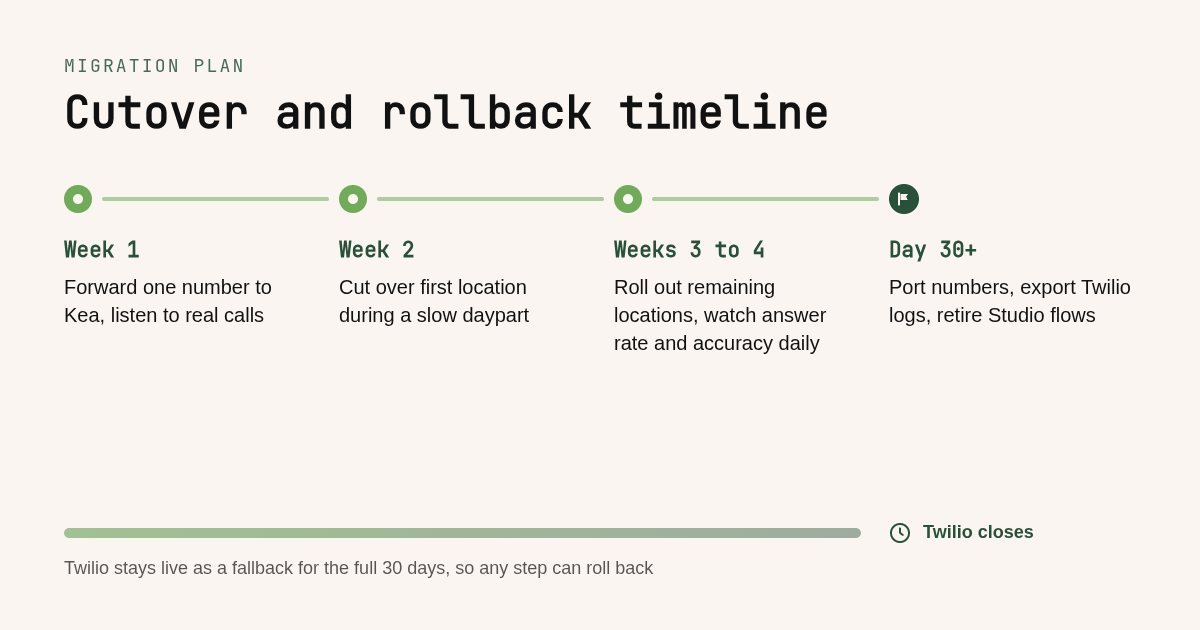
Cut over one location or one number at a time, during a slow daypart, after a week of parallel testing. Keep Twilio active and forwarding for at least 30 days so rollback is a one-line routing change. Watch call-answer rate, order accuracy, and escalations daily in the first month before you port numbers and close Twilio.
Parallel running is simple because forwarding is reversible. If anything looks wrong, point the Twilio number back at your old Studio flow and the line behaves exactly as before.
Staff training takes an hour, not a week. Front-of-house needs to know that phone orders now arrive in the POS automatically, how escalated calls reach them, and how to update the menu so the assistant reflects it in real time.
Set a written exit rule for Twilio: port numbers and delete the Studio flows only after 30 clean days and after every remaining SMS workflow has a new home.
Is Kea AI the right Twilio alternative, or should you use Twilio Flex AI or VoicePlug?
Kea AI is the right choice when the job is restaurant phone ordering with POS integration and no staff on the line. Twilio Flex with AI assistants fits companies with developers who want a custom contact center. VoicePlug is another restaurant voice agent worth demoing. Carrier APIs such as Telnyx or Bandwidth suit teams that only want cheaper raw minutes.
| Option | Best for | Pricing or format | Standout limit |
|---|---|---|---|
| Kea AI | Fully automated restaurant phone ordering with direct POS integration and 99.3% accuracy | Contact Kea for pricing for your restaurant | Does not replace SMS campaigns, video, or custom Twilio apps |
| Twilio Flex plus AI assistants | Companies with developers building a custom contact center | Flex is published at $1 per active user hour or $150 per named user per month; confirm on twilio.com | You still build, host, and maintain the ordering logic yourself |
| VoicePlug | Restaurants comparing a second vertical voice agent | Quote-based; confirm current pricing on the vendor's site | Verify POS coverage and accuracy claims with a live test |
| Telnyx or Bandwidth | Teams that only want cheaper carrier minutes and numbers | Per-minute and per-number carrier pricing; confirm on each site | No ordering intelligence; you keep the DIY burden |
The decision rule is scope. If you need a phone system you program, stay on infrastructure. If you need the phone answered and orders taken accurately without a human, you need a finished product.
How did we compare these options?
We compared each option on three things: the job it is built to do, its published pricing model on the vendor's pricing page, and what a restaurant has to build or maintain after buying it. Kea claims come from our product documentation and customer list; Twilio rates come from its published US pricing and should be confirmed before budgeting.
How do you get started with Kea AI?
Start with the audit above, then forward one Twilio number to Kea and listen to the first week of real calls. When you are ready, book a demo of the Kea AI restaurant phone assistant and we will map your numbers, menu, and POS into a cutover plan.
What do people also ask?
Can I keep my existing Twilio phone numbers when switching to Kea AI, and do I port them or forward them?
Yes. Forward the Twilio number to Kea first so you can test real calls with Twilio still live as a fallback. Port the number later, once Kea has handled a full month of calls, and keep the Twilio account active until the port completes, as the FCC advises.
How long does a Twilio to Kea AI migration take, and will customers experience downtime on the phone line?
Forwarding takes minutes and causes no downtime because the Twilio number keeps ringing and simply routes to Kea. Kea configuration starts once we have your menu and POS access. Number ports take from one business day for simple ports to a few weeks for complex ones.
What happens to my Twilio Studio flows, IVR menus, and SMS automations when I move to Kea AI?
Kea replaces the voice ordering and FAQ flows; you do not rebuild them in TwiML. SMS marketing and other non-voice automations are not replaced by Kea, so keep them on Twilio or move them to a messaging tool, then retire the Studio flows after 30 clean days.
Can I run Kea AI and Twilio in parallel during the transition and roll back if something breaks?
Yes. Forwarding is reversible, so run both for at least 30 days. If anything looks wrong, point the Twilio number back at your old Studio flow and the line behaves exactly as before. Only port numbers and delete flows after the parallel period is clean.
Is Kea AI only for restaurants, or can other phone-heavy businesses use it as a Twilio replacement?
Kea AI is built for restaurants: it takes orders, answers menu and store questions, and writes orders into the POS. A non-restaurant business that needs programmable telephony is better served by Twilio, Telnyx, or Bandwidth, or by a vertical voice agent built for its industry.
Related Articles


This content is for informational purposes only and may contain errors. Please contact us to verify important details.